How to export AI-made slides to PowerPoint or PDF, and what stays editable
Updated 2026-11-05
Click "Export" and choose one of three formats: PowerPoint (.pptx) with editable text and tables, PowerPoint picture version (.pptx) that looks exactly like the page but cannot be edited, or PDF. Exporting is free.
In the editable file, text is in text boxes, tables are native PowerPoint tables, and cards, color blocks and lines are shapes. Pictures, icons, charts, gradient backgrounds and shadows are exported as pictures. We counted this in a real file: our 12-slide launch plan has 125 text boxes, 2 native tables and 9 pictures.
Four steps
Open "Export"
In the editor, click "Export". A one-line summary appears first: how many figures have a source, how many are TBD, which slides have charts that will export as pictures, and whether any slide has not been generated.
Pick the format
"PowerPoint (.pptx)" for a file you will edit; "PowerPoint, picture version (.pptx)" for presenting or sharing when the layout must not shift; "PDF" for readers.
If the deck has figures with sources, you can tick "Add a sources page at the end": one or more pages listing every figure and where it came from (PDF and both PPTX formats).
Download
The file is checked before you get it: it must open, and its page count must match the slides you exported. If it does not, it is rebuilt once; if it still fails you get an explanation instead of a broken file.
Open it where you present
Check the fonts (see below) and any slide with a chart. If you change the file in PowerPoint, you can keep working on the slides in the editor only for decks made from your own uploaded .pptx ("Change this PPT"): there, "Upload your edited file" under "Versions" brings it back as a new version.
A real file, counted: our 12-slide launch plan
We opened the PPTX of our recorded "New product launch plan" (quick mode, 12 slides; the export is 137 KB, the PDF 583 KB) and counted what is in it. The slide size is 16:9 (13.33 x 7.5 in) and the PDF pages are 20 x 11.25 in.
| What | Count in the file |
|---|---|
| Text boxes with text | 125 |
| Native tables | 2 (slides 2 and 11) |
| Pictures | 9: four icons on slide 4, four on slide 10, and the donut chart on slide 9 |
| Other shapes (cards, color blocks, lines) | 65 |
Hojicha Oat Latte Launch Plan (slide 4 of 12)
Hojicha Rises While Matcha Matures
- Four cards, each with a small icon, a heading and two lines of text.
- Hojicha momentum; Flavor cues align; Matcha under strain; Mellow energy.
(A description of the slide as built; the picture on the right is the export.)
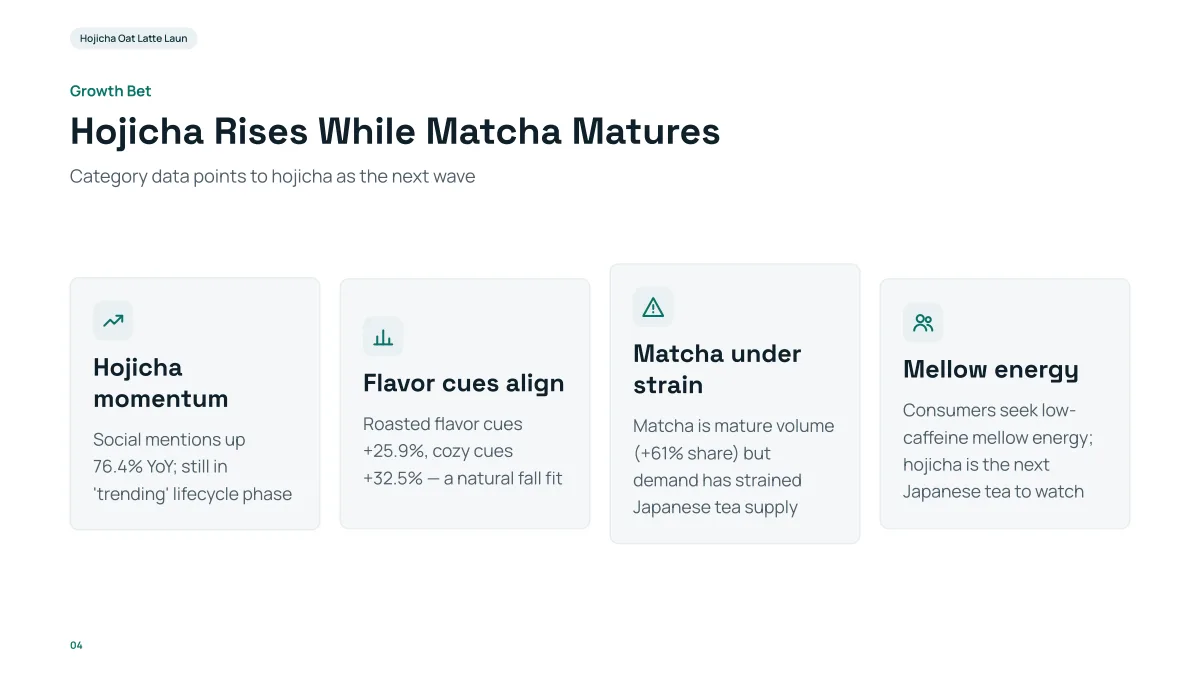
- In the PPTX, the four headings and descriptions are editable text boxes and the cards are shapes. You can retype them in PowerPoint.
- The four small icons are pictures: you can move or delete them but not edit their shapes.
- The title and the subtitle are text boxes too. Fonts are named, not embedded.
Which format should I choose?
| Format | Text | Tables | Charts, icons, photos | Best for |
|---|---|---|---|---|
| PowerPoint (.pptx) | Editable text boxes | Native tables | Pictures | Editing in PowerPoint or Keynote |
| PowerPoint, picture version (.pptx) | Cannot be edited | Part of the picture | Part of the picture | Presenting without font or layout shifts |
| Kept as is | Kept as is | Kept as is | Sending to people who only read it |
Your own file: if you started from an uploaded .pptx with "Change this PPT", the PPTX export is that file with the changes, and every slide, chart and text box stays editable.
What about fonts?
Font names are written into the file, not embedded. Latin fonts that your computer lacks are replaced with similar ones; Chinese and Japanese text uses system fonts such as PingFang SC (Chinese) or Hiragino Sans (Japanese). On a computer without them (many Windows PCs), PowerPoint substitutes, and line breaks can move.
To unify the fonts in PowerPoint: Home, Replace, Replace Fonts.
Arabic and Persian paragraphs are written right to left with Arial as the complex-script font.
Why was my export refused or incomplete?
- A slide that was not generated exports as a placeholder page that states why; the pre-export summary tells you.
- TBD markers export as plain text without the dashed frame.
- A file that fails the check twice is not offered; you get the reason and can retry later.
Questions
Can I export AI slides to PowerPoint?
Yes. Choose PowerPoint (.pptx) in the Export window. Text is in text boxes and tables are native tables, so you can edit them in PowerPoint or Keynote.
Are charts editable after export?
No. Charts export as pictures. To change a number, change it in the editor (ask the AI) and export again.
Can I export to PDF?
Yes: one slide per page, 16:9, with fonts, charts and effects kept as they are.
Does exporting cost credits?
No. Exporting is free in every format. AI edits and slide generation use credits.
Which format is the best for presenting?
PDF or the picture version of PowerPoint look identical everywhere. Use the editable PPTX when you will keep changing the text.
Check it on your own deck
Generate a deck, click Export, and open the file in PowerPoint.
Make a deck and export it