Gamma AI Slide vs gamma.app: what is the difference?
Updated 2026-11-05
Gamma AI Slide (gammaslide.com) and gamma.app are two different products. This site is not made by, affiliated with or endorsed by the makers of gamma.app. If you searched for "gamma slide" or "gamma slides", this page tells you which one you are on and helps you pick.
Gamma AI Slide makes presentations only: you describe a deck (or add a PDF, Word or PowerPoint file), review an outline, and get slides you can export to editable PowerPoint (.pptx) or PDF. You pay with credits bought once, not a subscription: writing the outline is free, a quick-mode slide is 1 credit, and new accounts get 20 free credits.
A note on the comparison below: on 2026-11-05 we tried to read gamma.app's pricing page and it refused automated access (HTTP 403 and a browser check). So we did not copy any gamma.app price, limit or feature from memory or from third-party sites. That column says "check gamma.app" instead; open their own pages for current figures.
How to choose in four steps
Decide what you need to make
If you only need slides, both kinds of tool can work. This site does presentations and nothing else, so anything beyond a deck (for example a website or a long document) is a reason to look at other tools, including gamma.app.
Compare how you pay
Here: credits bought once. A quick-mode slide is 1 credit, a deep-mode slide 3, an AI edit 1; outlines and exports are free. Packs run from $5.99 (40 credits plus 10 bonus) to $59.99 (750 plus 450 bonus), and credits never expire. See our Pricing page.
For gamma.app, read gamma.app/pricing yourself and note the billing period, what is included and what happens when credits run out.
Try one deck here at no cost
Sign in with Google, describe a deck on the home page, click "Next" and review the outline: that is free. The 20 free credits cover a 12-slide deck in quick mode (12 credits) plus a few AI edits.
Open the export in PowerPoint
Click "Export" and choose PowerPoint (.pptx). Text should be in text boxes and tables in native tables; charts and pictures are images. Open it in PowerPoint or Keynote and check it is what you need before paying for anything, here or elsewhere.
What one prompt produces here: a real 12-slide deck
This is our recorded "New product launch plan" run (October 19, 2026): one request for a made-up coffee brand, quick mode, 12 slides. The outline took 77 seconds (it first looks up the topic), and the 12 slides were built about 19 seconds after the outline was approved. The deck used 12 credits, plus 1 credit for one AI edit.
Slide 2 is the deck's agenda. It is a native table, so in the exported PowerPoint you can click into it and type.
Prompt (English, recorded October 19, 2026)
New product launch plan
Make a launch marketing plan for a new product. Tsukiao Coffee, a made-up coffee brand, is launching a hojicha oat latte this fall for office workers aged 25 to 35. The campaign runs 6 weeks with a $40,000 budget; the first-month targets are 20,000 cups sold and 5,000 new members. Channels: social media, in-store events and delivery apps. It's for the management team, 12 slides.
(Shortened: the recorded request also asked for a look at oat-milk coffee and hojicha trends without naming real brands.)
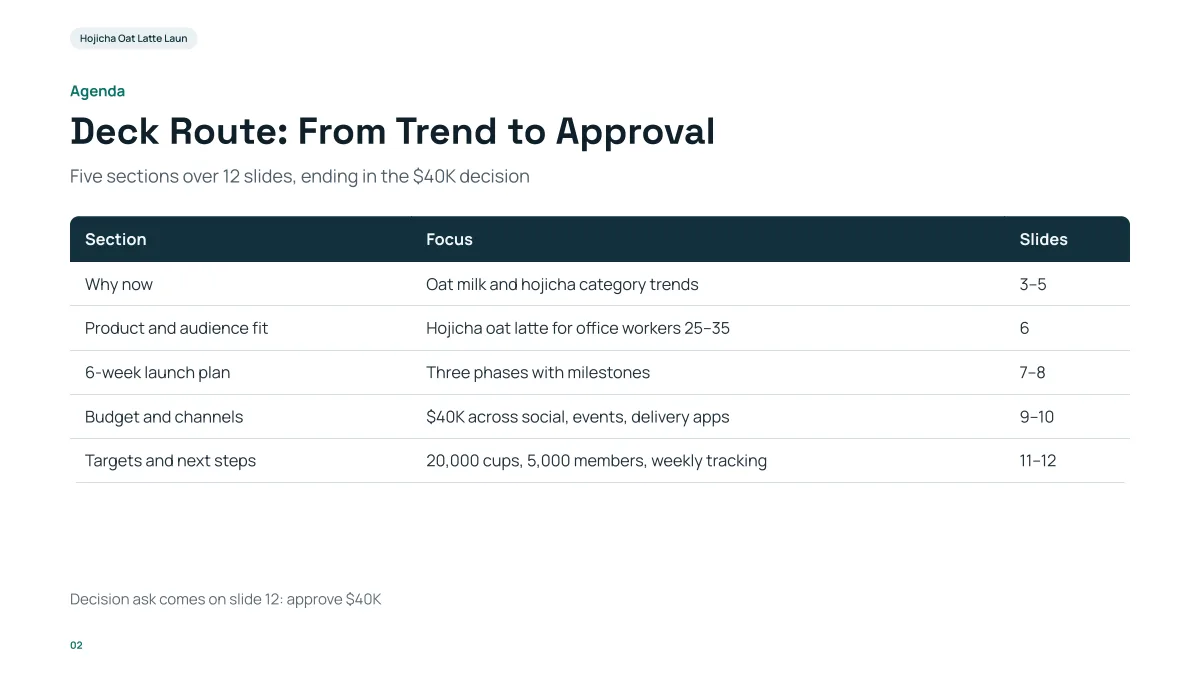
- The deck has a story: market evidence, product, plan, budget, then a decision slide. The agenda says where each part is.
- The figures in the table ($40K, 20,000 cups, 5,000 members) are the ones from the request.
- This slide is as generated: we did not edit it by hand.
Gamma AI Slide and gamma.app side by side
| | Gamma AI Slide (gammaslide.com) | gamma.app | |
|---|---|---|
| Relationship | Independent product, not affiliated | Independent of this site |
| What it makes | Presentations (decks) | Check gamma.app |
| How you pay | Credits bought once, no subscription, no expiry | Check gamma.app/pricing |
| Free to start | 20 credits at sign-up; outlines always free | Check gamma.app/pricing |
| Cost per slide | 1 credit quick, 3 credits deep; AI edit 1 credit | Check gamma.app/pricing |
| Interface languages | 7: English, Japanese, Simplified Chinese, Traditional Chinese, Arabic, Persian, Russian | Check gamma.app |
| Deck languages | The same 7, or auto (the language of your request) | Check gamma.app |
| Edit an uploaded .pptx in place | Yes, "Change this PPT" (up to 25 MB and 30 slides) | Check gamma.app |
| Files read as sources | PDF (with a text layer), Word .docx, Excel, PowerPoint, text, images | Check gamma.app |
| Export | Editable PPTX, picture PPTX, PDF | Check gamma.app |
| Slides per deck | Up to 30 | Check gamma.app |
Our column is from our own product and code, checked 2026-11-05. The gamma.app column is empty on purpose: see the note at the top.
When is Gamma AI Slide the better fit?
- You want to pay per deck instead of a monthly plan, and keep unused credits.
- You write decks in Japanese, Chinese, Arabic, Persian or Russian, and want the text laid out and exported for that language (Arabic and Persian right to left).
- You have an existing PowerPoint and want the AI to fix or translate it in place and give you the same file back.
- You want to see and edit the outline, and see where each figure came from, before anything is built.
When should you look at gamma.app instead?
- You need something other than a presentation. We make presentations only.
- You already have a gamma.app workspace and your team shares decks there. Accounts are separate: nothing you made on gamma.app is on this site, and the other way round.
- You need something that is not in our column of the table above. Check their pages for it.
Questions
Is Gamma AI Slide the same as gamma.app?
No. They are separate products with separate accounts, pricing and sites. Gamma AI Slide is at gammaslide.com. We are not affiliated with gamma.app.
Can I sign in here with my gamma.app account?
No. Sign-in here is with Google, and the account only exists on gammaslide.com.
Is Gamma AI Slide free?
Writing an outline and exporting are free, and new accounts get 20 free credits to build slides. After that you buy credit packs once; there is no subscription.
Can I export to PowerPoint?
Yes. Export gives an editable .pptx (text in text boxes, tables as native tables, charts and pictures as images), a picture-only .pptx, or a PDF.
Is my file used to train AI?
We do not use your files to train AI models. The text of your file is sent to AI providers to write the slides. See the Privacy Policy for details.
See for yourself
Write an outline for free, then decide. Your first 20 credits are on us.
Start with an outline