How to make a pitch deck with AI: the 12 slides and how to build them
Updated 2026-11-05
A pitch deck is usually 10 to 12 slides that end in a clear ask: cover, problem, solution, product, market, business model, traction, go-to-market, competition, team, financials and use of funds, then the ask. In Gamma AI Slide you pick the scenario "Investor pitch" and the audience "Investors", give your real numbers, review the outline, and generate; a 12-slide deck in quick mode is 12 credits.
The AI does not know your company's numbers and is told not to invent them. Put your figures in the request or in an attached file (a Word memo or an Excel sheet). Where a figure is missing you will see "TBD" on the card and the slide, which is your cue to fill it in.
Four steps
Write the request with your facts
Name the company and what it does, the stage, the amount you are raising, and the numbers you have: customers, revenue, growth, team size. Add "12 slides" so the length is set. You can add a Word memo, a PDF or an Excel sheet with "Add files".
Template, not a recorded run: "Pitch deck for [company], [one-line description]. Raising [amount] at [stage]. Traction: [numbers]. Team: [names and roles]. 12 slides, ending with the ask and use of funds. Write TBD where I gave no figure."
Set the scenario and audience
Click "Next" and choose a mode. On the outline screen, open "More" and set "Scenario" to "Investor pitch" and "Audience" to "Investors". For "Tone", "Persuasive" fits an ask; "Rigorous" suits a technical audience.
Behind those labels, the scenario is told to build a story that ends in a clear ask, and the audience to lead with market, traction, business model and the ask. Change them and regenerate the outline to apply.
Check the outline against the 12-slide structure
Compare the cards with the table below. Reorder, delete or rewrite cards; this step is free. Look for the "TBD" markers and fill them by editing the card or adding a file.
Generate, edit, export
Click "Generate presentation". Change a slide with one sentence ("Turn the revenue table on slide 7 into a bar chart"; 1 credit). Export to PowerPoint (.pptx) with editable text and tables, or PDF.
A real example of a deck that ends in an ask (a launch plan, not a pitch)
We have not recorded an investor pitch. The closest recording is our "New product launch plan" (October 19, 2026, quick mode, 12 slides, 12 credits plus 1 for an edit), written for a management team. It shows what the last slide of such a deck looks like: the decision and the numbers that support it, on one slide.
Prompt (English, recorded October 19, 2026)
New product launch plan
- It is for the management team, 12 slides.
- The campaign runs 6 weeks with a $40,000 budget; the first-month targets are 20,000 cups sold and 5,000 new members.
(Extract from the request. It did not say what the last slide should contain.)
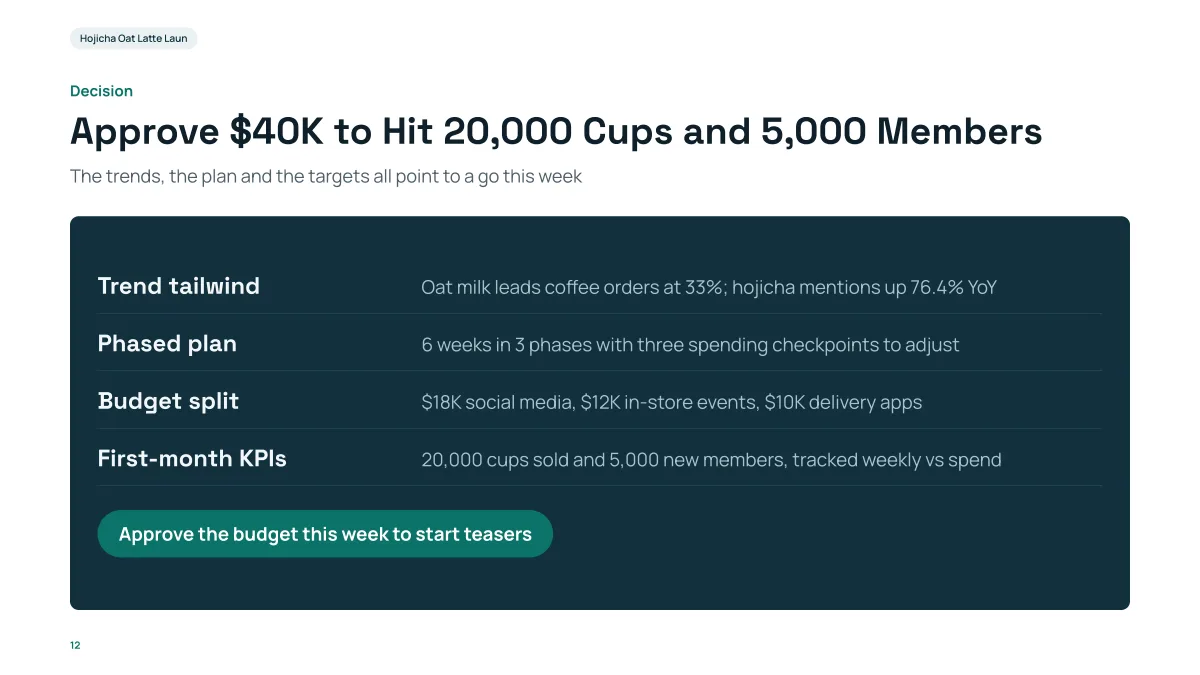
- The title is the ask, with the two targets in it: $40K, 20,000 cups, 5,000 members.
- The four rows repeat the case in one line each: the trend, the plan, the budget split ($18K, $12K, $10K) and the KPIs.
- For a pitch you would put the amount raised, the use of funds and the milestone it buys on this slide.
What goes on each slide of a pitch deck?
| # | Slide | What to put on it | Numbers to bring |
|---|---|---|---|
| 1 | Cover | Company name, one line on what it does | None |
| 2 | Problem | Who has the problem and what it costs them | Size or cost of the problem |
| 3 | Solution | What you built, in one sentence and one picture | None |
| 4 | Product | How it works, with a screenshot or three steps | Usage figures if you have them |
| 5 | Market | Who buys and how many | Market size and how you got it |
| 6 | Business model | How you make money | Price, margin |
| 7 | Traction | Proof that it works | Customers, revenue, growth rate |
| 8 | Go-to-market | How customers find you | Cost to win a customer |
| 9 | Competition | The alternatives and why you win | None |
| 10 | Team | Who is building it and why them | Years, past roles |
| 11 | Financials and use of funds | Where the money goes | Amount, split, runway |
| 12 | The ask | What you want from the investor | Amount and milestone |
This is a common structure, not a rule; many decks drop competition or merge product and solution to reach 10 slides.
Quick mode or deep mode for a pitch?
- Quick mode (1 credit per slide): builds slides from a library of layouts; consistent, and you can switch the theme in one click afterwards. Fits most pitch decks.
- Deep mode (3 credits per slide): the AI designs each slide and checks it from a screenshot. Freer layouts for dense slides, slower, and no one-click theme switch.
What the AI will not do for you
- It does not know your traction or your financials. Give them, or expect "TBD".
- It does not decide how much to raise or at what valuation.
- Charts are drawn from numbers you provide; check each one against your own sheet before you send the deck.
Questions
How many slides should a pitch deck have?
Most are 10 to 12. This page uses 12; a deck can have up to 30 slides here, but investors rarely want more than 12 for a first read.
Can AI write my financial projections?
It can lay out numbers you give it, as slides, tables and charts. It does not know your business, so it is told not to invent figures; missing ones are marked "TBD".
Can I export the pitch deck to PowerPoint or PDF?
Yes. The PowerPoint export keeps text in editable text boxes and tables as native tables; charts and pictures are images. PDF is also available.
Can I send my notes as a file?
Yes: Word, PDF with selectable text, Excel, text files or an existing PowerPoint, up to 25 MB each.
How much does it cost?
Writing the outline is free. Quick mode costs 1 credit per slide, deep mode 3, each AI edit 1, and exporting is free. New accounts get 20 free credits; credit packs are one-time purchases (for example $5.99 for 40 credits plus 10 bonus) with no subscription, and credits never expire. See the Pricing page.
Draft your pitch outline
Write the request with your numbers and read the outline first. It is free.
Start a pitch deck