How to make a sales proposal presentation with AI
Updated 2026-11-05
Add the client's brief (PDF or Word) and your price sheet (Excel), write what you are proposing, and set the scenario "Proposal", the audience "Clients" and the tone "Persuasive". The AI writes an outline (the problem, the plan, why it works, what it needs) for you to check and then builds the slides. A 10-slide quick-mode deck is 10 credits.
The numbers on the slides are meant to be yours: the AI is told to use only figures from your files and request, and to write "TBD" otherwise. Price and scope tables export as native PowerPoint tables, so you can adjust a line in PowerPoint before you send the deck.
Four steps
Add the client brief and your numbers
Click "Add files": the brief (PDF with selectable text or .docx), your price sheet (.xlsx) and past case notes if you have them. Write: "Proposal for [client]: we propose [solution] to cut [problem]. 10 slides: their problem, our plan, timeline, price, next steps. Use only the numbers in the attached files."
Set the scenario, audience and tone
On the outline screen open "More": "Scenario" = "Proposal" (the problem, the plan, why it works, what it needs), "Audience" = "Clients" (their problem and the value to them, without your internal jargon), "Tone" = "Persuasive" (lead with the benefit and back every claim).
Regenerate the outline after changing them.
Read the outline as the client would
Does slide 2 describe their problem in their words? Does every claim have a number behind it? Reorder, delete or rewrite cards; free. Fill every "TBD" you can.
Generate, adjust the price table, export
Click "Generate presentation", then export PowerPoint (.pptx). Change a figure by clicking it in the editor (free), or ask in one sentence ("Add a column for monthly cost to the pricing table"; 1 credit).
A real example: a metrics table that stays a table
We have no recorded sales proposal. This is slide 11 of our recorded "New product launch plan" (October 19, 2026, quick mode): a table of targets, weekly pace and how each is tracked. A proposal's pricing, scope and timeline slides are built from the same kind of table, and in the exported PPTX this one is a native PowerPoint table (our file has two).
Prompt (English, recorded October 19, 2026)
New product launch plan
- The first-month targets are 20,000 cups sold and 5,000 new members.
- The campaign runs 6 weeks with a $40,000 budget.
(Extract. The weekly pace and the cost per cup and per member on the slide were worked out by the AI.)
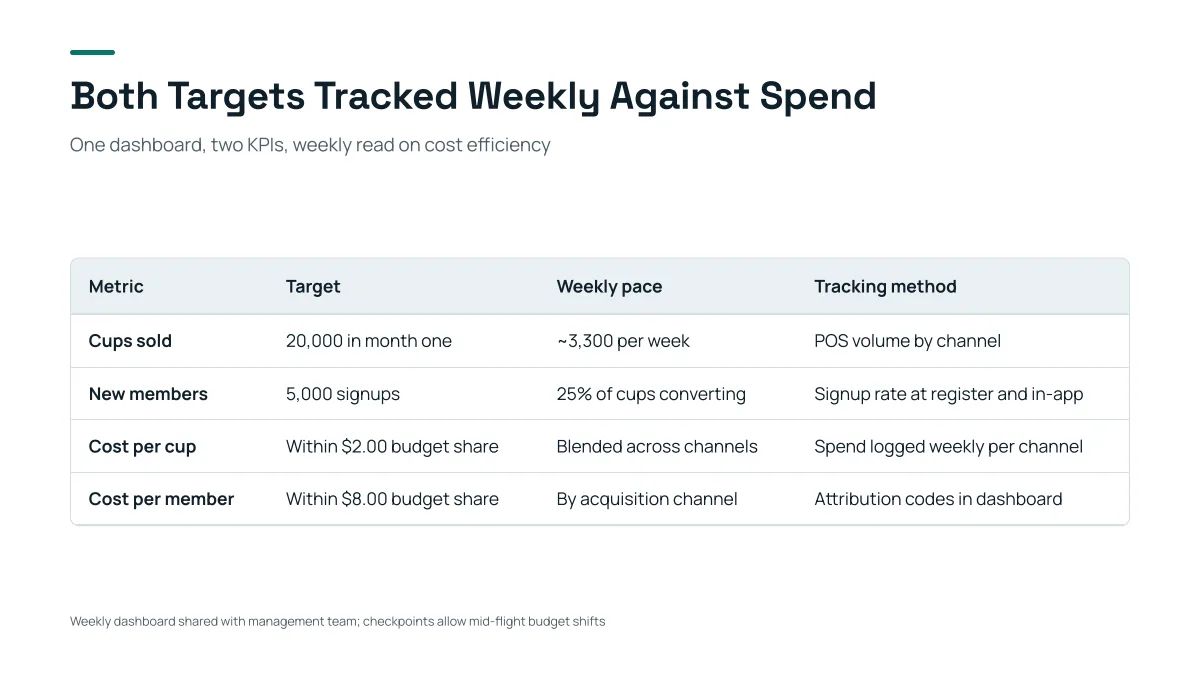
- Targets of 20,000 cups and 5,000 members come from the request. "About 3,300 per week" is the AI's own division of 20,000 by 6 weeks.
- The cost-per-cup and cost-per-member rows ($2.00 and $8.00) are the AI's own working, not from the request: this is the kind of figure to check before it goes to a client.
- In the PPTX this is a table you can edit cell by cell.
A sales proposal in 10 slides
| # | Slide | Content |
|---|---|---|
| 1 | Cover | Client name, proposal title, date |
| 2 | Your situation | The client's problem in their words, from the brief |
| 3 | What it costs you today | The cost of the problem, with their numbers |
| 4 | Our proposal | The solution in one sentence and three parts |
| 5 | How it works | Steps or a diagram |
| 6 | Proof | A similar case with a number, from your own notes |
| 7 | Timeline | Phases and dates |
| 8 | Investment | Price table with scope |
| 9 | Risks and how we handle them | Two or three, plainly |
| 10 | Next steps | The decision and the date |
A common structure to adapt, not a recorded result.
Prompt templates for sales decks
- New client proposal: as in step 1.
- Renewal: "A 6-slide renewal deck for [client]: what we delivered this year with the numbers in the attached report, what changes next year, the price."
- Product demo follow-up: "A 5-slide follow-up after today's demo: the three needs they named, how we meet each, pricing, next step."
What to check before you send it
- Every figure against your price sheet and the client brief. The AI can only match a figure to your files, not judge them.
- Anything marked "TBD" is filled or removed.
- The client's name and spelling: the AI uses what you typed.
Questions
Can AI make a sales proposal presentation?
Yes. Add the brief and your numbers, choose the Proposal scenario and the Clients audience, review the outline, and generate; you export editable PowerPoint.
Will it invent prices or case studies?
It is told to use only figures from your files and request and to write "TBD" otherwise. It can add worked figures such as a weekly pace; check them.
Can I add my logo and brand colors?
Choose a template or theme in the home flow and adjust colors and text in the editor. We have not recorded a logo workflow, so test it on a sample deck first.
Can the client open the file?
Export PowerPoint or PDF and send it as a file.
How much does it cost?
Writing the outline is free. Quick mode costs 1 credit per slide, deep mode 3, each AI edit 1, and exporting is free. New accounts get 20 free credits; credit packs are one-time purchases (for example $5.99 for 40 credits plus 10 bonus) with no subscription, and credits never expire. See the Pricing page.
Draft your next proposal
Add the brief and read the outline first. It is free.
Start a proposal deck