How to turn a PDF into a presentation with AI, and which PDFs it cannot read
Updated 2026-11-05
Add the PDF on the home page, say who the presentation is for and how many slides you want (up to 30), and the AI reads the text and writes an outline for you to check. The slides come after you approve it. This works for PDFs that have selectable text: a PDF that is only scanned page images cannot be read yet.
Limits: 25 MB per file, up to 24 files and 64 MB in one request. Writing the outline is free; a quick-mode slide costs 1 credit. This is not a page-by-page converter: the AI writes a new, shorter presentation from the content. For a longer walk-through with a Word file, see the guide linked below.
Four steps
Check that your PDF has selectable text
Open the PDF and try to select a sentence with the mouse. If you can, it has a text layer and will work. If the whole page highlights as one picture, it is a scan: run it through an OCR tool first and add the result (a PDF with text, or a Word file).
Add the file and say what the slides are for
Click "Add files" and pick the PDF. In the box, write the audience, the length and the order, for example: "A 10-slide summary of the attached report for the leadership team: findings first, then three recommendations."
Choose the deck language under "Language" (it can differ from the PDF's), click "Next", then pick "Quick mode" or "Deep mode".
Review the outline cards
The AI writes one card per slide with a title, the key points and a layout. Edit the text, drag cards to reorder, delete or add cards, or use "Rewrite this card with AI" on one card. None of this costs credits.
For a long PDF, the structure comes from the PDF's bookmarks, and each slide uses only the passages that belong to it. A figure that is not in your PDF is not invented: the card says it is missing and the slide gets a "TBD".
Generate, then export
Click "Generate presentation". Export as PowerPoint (.pptx) with editable text and tables, or as PDF. Before the download you see how many figures have a source in your PDF.
A real example: one paragraph of a draft becomes the evidence slide
We have no recording that starts from a PDF. This one starts from a Word file; from "Add files" onward the steps are the same, because the text is read the same way. It is our "Course design overview" run (October 19, 2026, deep mode, 10 slides, 31 credits including one AI edit).
One sentence in section 1 of the draft became a whole slide with its two numbers pulled out.
data-literacy-101-course-draft.docx
1. Why this course
- We piloted it on campus last fall: 21 of 24 participants completed every exercise, and in the end-of-course survey the favorite session was session 5 (pivot tables).
(One sentence of a longer paragraph. Both numbers appear nowhere else in the file.)
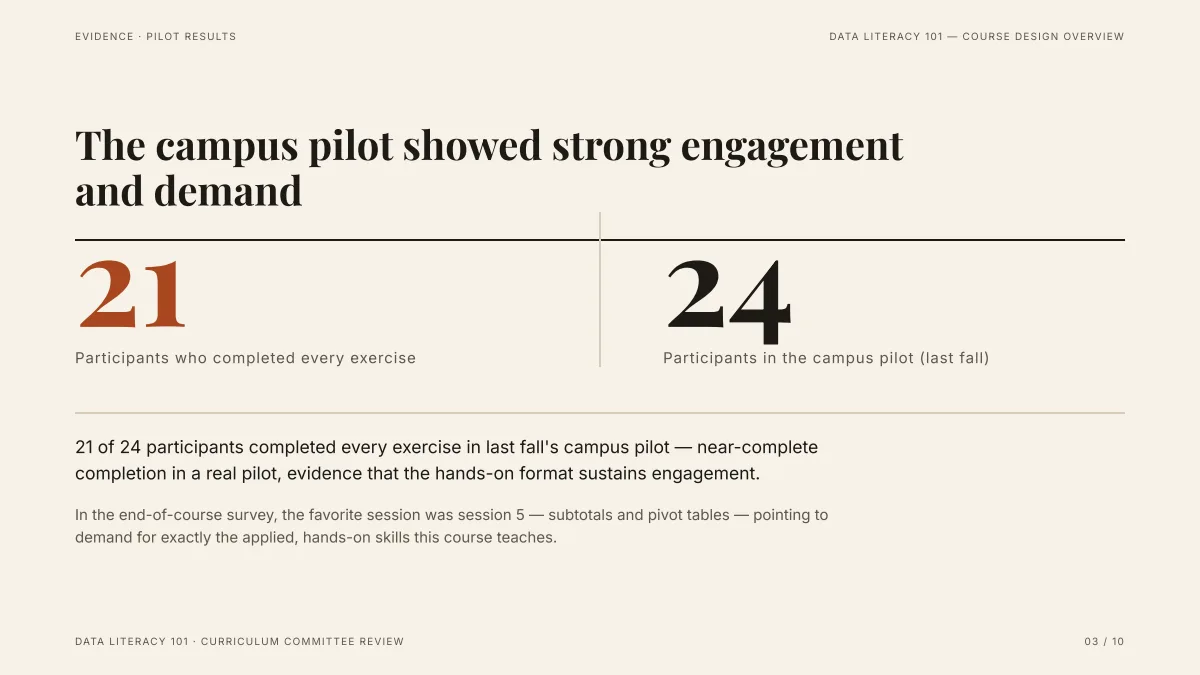
- 21 and 24 are exactly the numbers in the source, shown as the two big figures.
- The survey sentence (session 5, pivot tables) is on the slide as supporting text.
- The request said "don't add outside facts or figures", and nothing outside the draft was added to this slide.
Which PDFs work?
| Your PDF | Works? | What to do |
|---|---|---|
| Papers, reports, articles with selectable text | Yes | Add it as is |
| Long documents with bookmarks | Yes | The outline follows the bookmarks |
| Scans: every page is one picture | No, not read | OCR it first, then add the text PDF or a .docx |
| Figures and photos inside the PDF | Not read | Save the picture as PNG or JPG and add it separately |
| Over 25 MB, or over 24 files | No | Split the file or leave out the appendix |
PDF converter or AI: which do you need?
| You want | A page-by-page converter | AI from the PDF |
|---|---|---|
| The same pages and layout as slides | Yes | No |
| A shorter deck written for a new audience | No | Yes |
| A different order than the document | No | Yes, you set it in the outline |
| Slides from a paper for a 15-minute talk | Poor fit | Yes |
If you need the original layout kept exactly, use a converter. If you need a presentation, use the AI.
Request templates by kind of PDF
These are templates to adapt, not recorded runs:
- Research paper: "A 12-slide talk for a 15-minute seminar from the attached paper: background, question, method, results, limits, conclusion. Keep the paper's numbers; write TBD where the paper has none."
- Annual or market report: "A 10-slide summary for executives from the attached report: three findings with their numbers, then what we should do. No figures that are not in the report."
- Manual or policy: "An 8-slide training deck for new staff from the attached policy: what it covers, five rules to remember, who to ask. Plain words."
Questions
Can AI make a presentation from a PDF?
Yes, if the PDF has selectable text. The AI reads it, writes an outline you can edit, and builds up to 30 slides that you export as PowerPoint or PDF.
Does it read scanned PDFs?
Not yet. A PDF whose pages are only pictures has no text to read. Use an OCR tool first and add the result.
Will the pictures in my PDF appear on the slides?
No. Pictures and figures inside PDFs are not read. Save any picture you want as PNG or JPG and add it as a separate file.
What is the file size limit?
25 MB per file, 24 files and 64 MB in total per request. A deck can have up to 30 slides.
How much does it cost?
Writing the outline is free. Quick mode costs 1 credit per slide, deep mode 3, each AI edit 1, and exporting is free. New accounts get 20 free credits; credit packs are one-time purchases (for example $5.99 for 40 credits plus 10 bonus) with no subscription, and credits never expire. See the Pricing page.
Try it with your PDF
Add the file and read the outline first. That step is free.
Add a PDF and start