How to translate a PowerPoint into another language with AI
Updated 2026-11-05
Add your .pptx, choose "Change this PPT" and write one sentence such as "Translate the whole deck into Japanese". The AI translates every text box and table cell on its own, keeps your slide masters, fonts, colors, pictures and charts, and you export your own file. One request costs 1 credit, however many slides it covers (up to 30 slides and 25 MB).
Text inside pictures and the data of charts are not translated. We have not yet recorded a translation run, so the example below shows the mechanism on a recorded edit, not a translated result.
Four steps
Add the file and choose "Change this PPT"
Click "Add files" on the home page and pick your .pptx. When asked how to use it, choose "Change this PPT" (the other choice, "Use as material", builds a new deck).
Ask for the translation, with the scope
Examples: "Translate the whole deck into English." / "Translate slides 3 to 5 into Spanish." / "Translate into Japanese; keep product names in English."
Above the box, "Edit" sets the reach: "This slide", "Picked slides" or "Whole deck".
Compare every slide
Open "Versions" and click "Compare with the one before": each changed slide is shown side by side with the changed words marked. "Undo this slide" restores one slide; "Restore this version" the whole deck.
Fix what needs a human, then export
The reply names any slide where translated text still does not fit its box. Click the text to edit it (free), or use "Edit in browser". Export "PowerPoint (.pptx)": it is your original file with the translation.
The mechanism on a real recorded edit (a polish, not a translation)
Our recorded run "Polishing an existing PPTX" (October 19, 2026) used the same mode on an 8-slide file and two requests, 2 credits in all. It is a rewrite, not a translation, but it shows what a translation keeps: the layout, the fonts, the text boxes and the numbers.
Product Team Q3 Project Update.pptx
Membership System Revamp
- The membership revamp went live on Sep 22, which is about a week later then we planned.
- After the revamp the sign-up conversion rate for new members went up from 3.1% to 4.0%, we think the close rate improvement is pretty big.
(Two of the four bullets, word for word, typos included.)
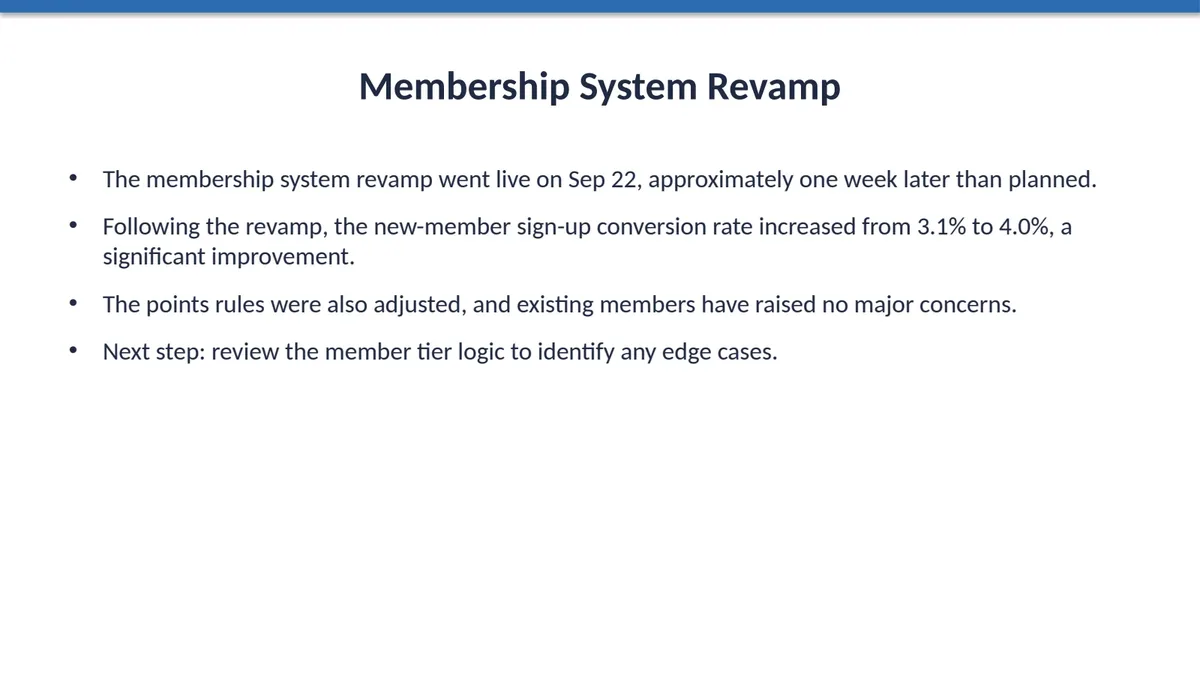
- Same title, same four bullets, same font and box positions; only the words changed.
- Sep 22, 3.1% and 4.0% are unchanged. A translation also leaves numbers and names alone.
- In the export it is still the same editable text box.
What is translated, and what is not?
| Part of the file | Translated? |
|---|---|
| Titles, subtitles, labels, captions, footers in text boxes | Yes, each on its own |
| Table cells | Yes, each cell |
| Numbers, formulas, names | Left as they are |
| Text that is part of a picture | No |
| Chart data and labels inside a chart | No: the AI can read a chart's data but cannot change it |
| Slide layout, masters, colors, pictures | Kept |
What if the translation is longer than the original?
German or Russian text is often longer than English. When new text would not fit, its box is first widened into free space, then the text wraps and the box grows, and only then is the text set smaller (down to 60% of its size, never below 8 pt). Boxes side by side keep the same size. The reply names any slide that still does not fit.
Arabic and Persian (right to left)
When a paragraph changes script, its direction follows its first letter: a translation into Arabic or Persian is set right to left and right-aligned, and one out of them left to right. We test this with automated checks. A paragraph that takes its left alignment from the file's own layout may stay left-aligned in PowerPoint; fix it with the alignment button.
Questions
Can AI translate a PowerPoint and keep the formatting?
Yes, with "Change this PPT": the AI changes the words in your file and leaves the design and layout. The export is your own .pptx.
Does it translate charts and text in images?
No. Chart data and text inside pictures stay as they are. Retype them or ask for a chart to be made again on a deck made here.
Which languages can it translate into?
We have checked the layout rules for Arabic and Persian and use the product in seven languages (English, Japanese, Simplified and Traditional Chinese, Arabic, Persian, Russian). Other languages are up to the AI model and we have not tested them.
Does translating cost one credit per slide?
No: each request to the AI is 1 credit, and it is returned if nothing could be changed. A whole-deck translation is one request.
Is my file used to train AI?
We do not use your files to train AI models. The text of your file is sent to AI providers to write the slides. See the Privacy Policy for details.
Translate your own deck
Add a .pptx, choose "Change this PPT" and ask for the language you need.
Add a PowerPoint and start