How do you make slides for a conference talk with AI?
Updated 2026-11-05
Write or attach your talk outline, choose the scenario "Talk" and a low text level (Minimal is about 50 words per slide), review the outline, then generate. Export a PowerPoint (.pptx) to keep editing and a PDF as a backup for the conference computer.
The main rule for a talk: one claim per slide, and the slide carries what the audience should see while you say the rest. The table below shows how a script becomes slides, and the export file sizes were measured on our recorded decks.
Five steps
Write the talk as claims
List what you will say as short statements, one per idea: "Churn dropped in March because of X". Each statement will become one slide title.
Describe the talk and set the options
On the home page, write the topic, the audience, the length and the slide count (see the guide on how many slides to use). Choose the scenario "Talk", and under "Text per slide" choose Minimal or Concise.
Review the outline against your script
Each outline card should match one claim. Reorder the cards to the order you speak, delete extra ones, and click "Generate presentation".
Edit what the audience will read
Ask the AI to shorten a slide ("Shorten slide 4 to three points") or fix a word yourself. Keep your spoken script in your own document: the slides carry the text the audience reads.
Export two copies
Export PowerPoint (.pptx) and PDF. Open both on a different computer if you can, and bring the PDF on a USB stick or in the cloud.
From script to slides, and what the files weigh
The table is an invented 20-minute talk (our illustration, not a recording) to show how script lines map to slides:
| What you say | Slide title (one claim) | On the slide |
|---|---|---|
| "Last year our deploys took four hours." | Deploys took four hours | One big number |
| "We found three causes." | Three causes slowed us down | Three short labels |
| "The biggest was the test suite." | The test suite was the bottleneck | A chart, or one sentence |
| "Here is what we changed." | What we changed | A three-step list |
| "Now it takes twenty minutes." | Deploys now take twenty minutes | One big number |
| "Three things to take home." | Take-aways | Three short lines |
Export sizes we measured on recorded decks (files in the product's demo replays, checked 2026-11-05): the 12-slide launch plan is 137 KB as PPTX and 583 KB as PDF; the 10-slide course design is 53 KB as PPTX and 499 KB as PDF. These decks have no photos, so a deck with images will be larger.
The screenshot shows one slide from the course design recording where a time budget is the subject: a bar shows 20 minutes of explanation, 60 minutes of practice and 10 minutes of wrap-up. It is a real slide; the course is made up.
Prompt template (English)
Conference talk, 20 minutes
Make a 20-minute conference talk for developers about how we cut deploy time from four hours to twenty minutes. Use these claims as slide titles, one claim per slide, about 12 slides. Keep the text on each slide short.
(A template, not a recording. Choose the scenario "Talk" and the audience in the options.)
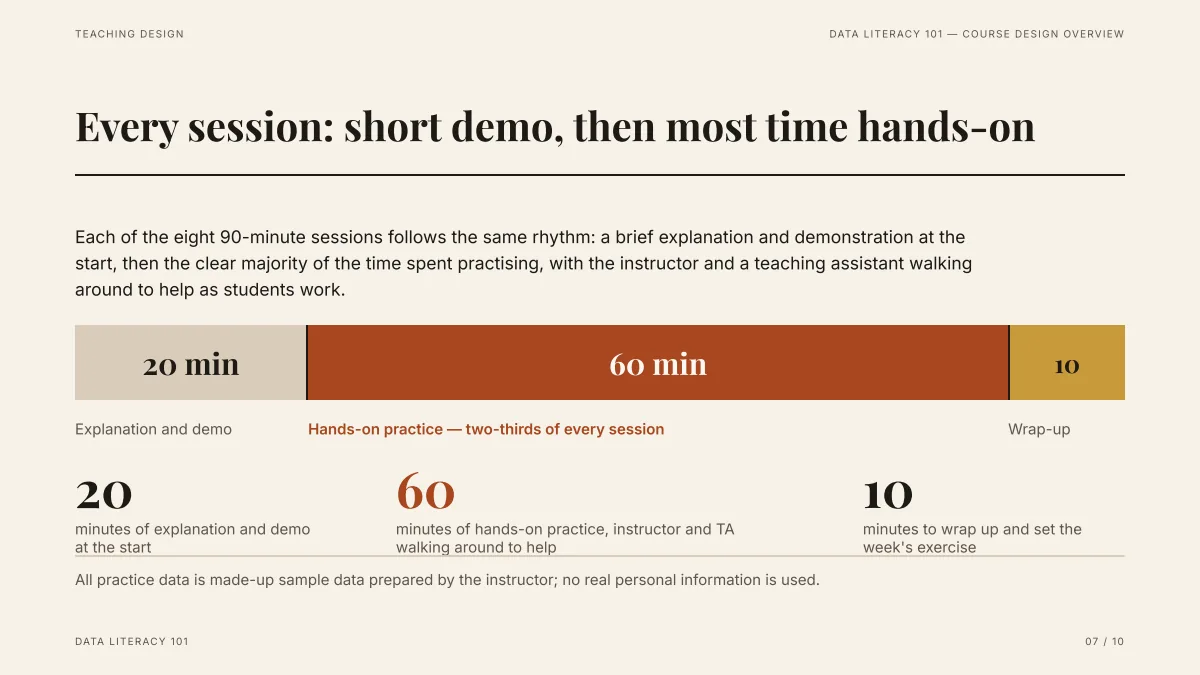
- A claim as the title, one visual below it: the pattern to copy for a talk.
- The numbers (20, 60, 10) come from the Word draft that was attached, not from the AI.
- The same slide exports as editable text in PPTX, and as an exact picture in PDF.
Which export should I take to the venue?
| Format | Why take it |
|---|---|
| PowerPoint (.pptx) | Editable text: fix a typo in the green room |
| PowerPoint, picture version (.pptx) | Looks exactly like the page, cannot be edited |
| Same look everywhere, opens on any computer |
Fonts are named in the PPTX, not embedded: on a computer without them PowerPoint substitutes and line breaks can move. If you cannot test on the venue computer, take the PDF or the picture version.
How much text should a talk slide have?
As little as will do. Use "Minimal" (about 50 words) or "Concise" (about 100) in "Text per slide"; both leave the explaining to you. Put the script in your own notes, since the slides are made for the audience to read.
Can the AI write my talk?
It can draft an outline and slides from a topic, and it looks the topic up when no file is attached. A talk is your voice, though: give it your claims, your numbers and your stories, and check every figure it proposes.
Questions
Can AI make slides for a conference talk?
Yes. Describe the talk, choose the scenario "Talk", review the outline and generate. Export PowerPoint (.pptx) or PDF. Give the AI your own claims and numbers, and read the result before you present.
How big are the exported files?
We measured our recorded decks: a 12-slide launch plan is 137 KB as PPTX and 583 KB as PDF, and a 10-slide course design is 53 KB and 499 KB. Those decks have no photos, so decks with images will be bigger.
Which format is the safest at a conference?
PDF, or the picture version of PowerPoint: they look the same on every computer. Use the editable PPTX when you still need to change text.
Are speaker notes included?
We do not promise speaker notes. The slides carry the text the audience reads, so keep your script in your own document.
How much does it cost?
Writing the outline is free. Quick mode costs 1 credit per slide, deep mode 3, each AI edit 1, and exporting is free. New accounts get 20 free credits; credit packs are one-time purchases (for example $5.99 for 40 credits plus 10 bonus) with no subscription, and credits never expire. See the Pricing page.
Start from your claims
Write one claim per slide, choose "Talk", and check the outline against your script.
Make my talk slides