How to write a prompt for an AI presentation, with 6 templates
Updated 2026-11-05
A good presentation prompt names six things: what the deck is for, who will read it, how many slides, the order of sections, the facts and numbers you already have, and what to leave out. The prompt below, from our recorded 12-slide run, has all six, and it produced a deck whose slides use the numbers it gave.
The prompt is the start, not the end: you then review an outline for free and can change any slide with one sentence. The tone, audience and scenario settings under "More" on the outline screen add to your prompt, so you need not repeat them.
The six parts of a prompt
Purpose: what is the deck for?
One phrase: "a launch marketing plan", "a lesson on fractions", "a quarterly report". It sets the structure.
Audience: who reads it?
"For the management team", "for first-year students". It decides how much detail and jargon.
Length and order
"12 slides" is honoured (up to 30). Name the order: "problem, plan, budget, then the ask".
Facts and numbers
Give dates, amounts and targets. Figures you leave out are looked up or marked "TBD"; with your numbers, the AI uses yours.
Exclusions
"Don't name real brands", "no outside figures", "no jargon". Rules like these were in our recorded prompt.
Language
Write the prompt in the language you want the deck in, or pick "Language" next to the box.
A real prompt, taken apart
This is the prompt of our recorded "New product launch plan" (October 19, 2026, quick mode). It contains: purpose (a launch marketing plan), audience (the management team), length (12 slides), facts (brand, product, target group, 6 weeks, $40,000, 20,000 cups, 5,000 members, three channels) and an exclusion (no real brands). It does not give the order of sections, so the AI chose one.
The first edit that followed was one sentence: "Turn the budget breakdown on slide 9 into a donut chart, and say which item is the largest in the title." 12 credits for the deck, 1 for the edit.
Prompt (English, recorded October 19, 2026)
New product launch plan
Make a launch marketing plan for a new product. Tsukiao Coffee, a made-up coffee brand, is launching a hojicha oat latte this fall for office workers aged 25 to 35. The campaign runs 6 weeks with a $40,000 budget; the first-month targets are 20,000 cups sold and 5,000 new members. Channels: social media, in-store events and delivery apps. Look at how oat-milk coffee and hojicha drinks have done over the past two years, but don't name real brands or companies. It's for the management team, 12 slides.
(The whole prompt.)
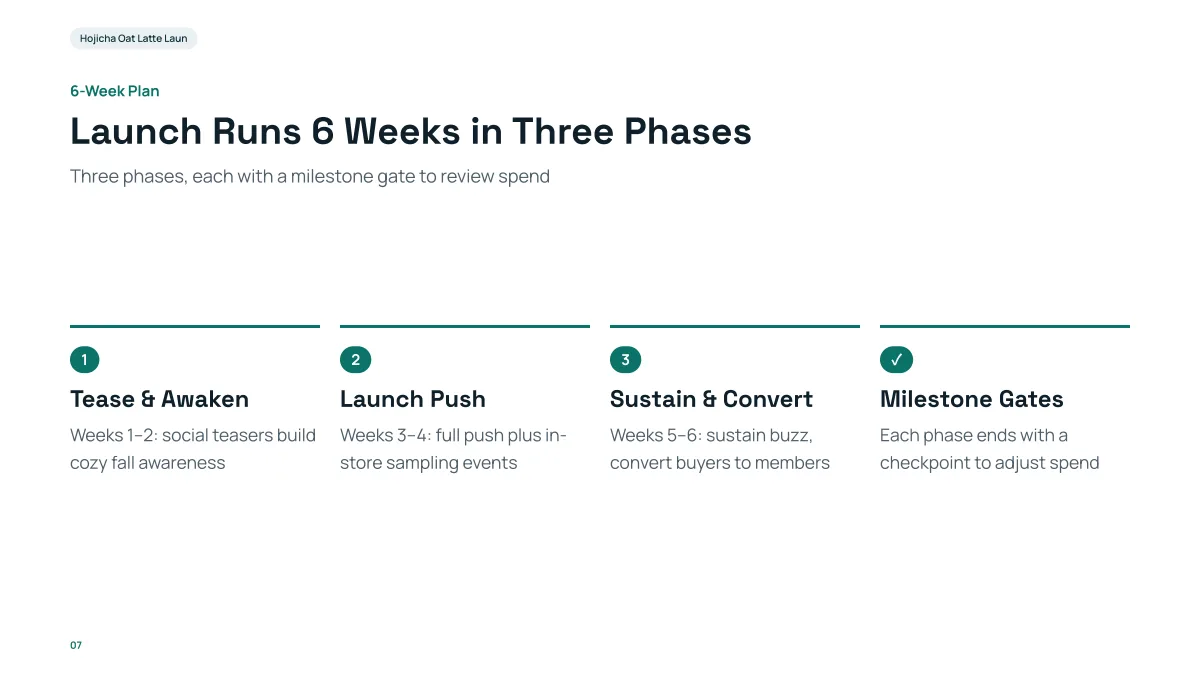
- The "6 weeks" in the prompt became three two-week phases; the prompt did not ask for phases, so that is the AI's own structure.
- The prompt's facts ($40K, 20,000 cups, 5,000 members) appear on the later slides.
- The "don't name real brands" rule was followed on this slide.
Six prompt templates to copy
Templates to adapt (not recorded runs):
| For | Prompt |
|---|---|
| Work report | A 10-slide quarterly report for the team: results with the numbers below, three problems, next quarter's plan. [numbers] |
| Investor pitch | A 12-slide pitch deck for [company], [what it does]. Raising [amount]. Traction: [numbers]. End with the ask. Write TBD where I gave no figure. |
| Lesson | A 12-slide lesson for [grade] on [topic]: goals, explanation, two worked examples, recap. |
| Client proposal | A 10-slide proposal for [client]: their problem, our plan, timeline, price, next steps. Use only the attached numbers. |
| Product launch | A 9-slide launch deck for [product]: what is new, why it matters, how to get it, pricing. |
| Talk | A 10-slide talk on [idea]: one big idea told through three stories and three takeaways. |
Common prompt mistakes
- No audience: "a presentation about solar power" gives an average deck for nobody.
- No length: the AI decides (usually 6 to 12 slides).
- No numbers: the AI looks things up or marks "TBD"; you then check them.
- Everything in one sentence: put the facts in a list inside the prompt.
Prompts for editing a slide afterwards
One sentence, naming the slide: "Turn the budget breakdown on slide 9 into a donut chart" (recorded); "Make the course goals on slide 5 more specific: start each one with 'By the end of the course, students can'" (recorded); "Summarize slide 6 into three bullet points" (recorded). Each is 1 credit.
Questions
What is a good prompt for an AI presentation?
One that names the purpose, audience, number of slides, section order, your facts and what to avoid. See the six parts above.
Do I need to write a long prompt?
No. A sentence or two works, but a short paragraph with your facts gives a better first draft. You can fix the outline for free before slides are built.
Can I ask for a specific number of slides?
Yes: say "12 slides" or choose the number next to the box. The maximum is 30.
Should I write the prompt in English?
Write it in the language you want the deck in, or pick that "Language" next to the box.
How much does it cost?
Writing the outline is free. Quick mode costs 1 credit per slide, deep mode 3, each AI edit 1, and exporting is free. New accounts get 20 free credits; credit packs are one-time purchases (for example $5.99 for 40 credits plus 10 bonus) with no subscription, and credits never expire. See the Pricing page.
Try your prompt
Write it, read the outline, then decide. The outline is free.
Write a prompt