How can a student make a school project presentation with AI?
Updated 2026-11-05
Write your own notes or draft first, attach it, and tell the AI to stick to it: it writes an outline you can edit, then builds the slides, and you can export an editable PowerPoint (.pptx) or a PDF. Writing the outline is free and a 10-slide deck in quick mode costs 10 credits; new accounts get 20 free.
Before you start, find out whether your teacher or school allows AI for this assignment. This page covers that, a 10-slide class report outline you can copy, and a real recorded example of a deck built only from a document the user supplied.
Five steps for a class presentation
Check the rules for your assignment
Ask your teacher, or read the assignment sheet: is AI allowed, for what (outline, wording, pictures) and does it need to be mentioned? Schools differ, and this site cannot tell you your school's rule.
Write your notes first
Put your findings, your sources and your own conclusions in a short document (Word, text or PDF). The slides will only be as good, and as much yours, as what you give.
Attach the notes and tell the AI to stay inside them
Attach the file on the home page and add a request such as: "Using the attached notes, make a class presentation. Stick to the notes; don't add outside facts or figures. 10 slides." Choose the audience "Students" and the language, then click "Next".
Edit the outline
Read each outline card against your notes. Delete anything that is not yours, fix wrong claims, and reorder the cards so the story is clear. Then click "Generate presentation".
Check, practice and export
Open the sources list and the fact check in the editor, ask for a sources page at the end if your teacher wants references, and practice out loud. Export as PowerPoint (.pptx) to hand in or PDF to share.
A real example built only from a supplied document, and a class report outline
We have no recording of a student report. The closest recording is a course proposal made from a Word draft ("data-literacy-101-course-draft.docx"), recorded on October 20, 2026. The request was: "Using the attached course draft, make a course design overview for the curriculum committee to review. Stick to the draft; don't add outside facts or figures. 10 slides, with the support needed and the budget on the last slide." The structure carries over to a class report, but the content is a course proposal, not a student project.
What happened: deep mode, 10 slides, outline in 16 seconds and all slides after 71 seconds; 31 credits (10 slides at 3, plus one edit). The draft did not give a budget, so the last slide shows "TBD" and says it is not specified in the draft, instead of inventing a figure.
Here is a 10-slide outline you can use for a class report. It is our suggestion, not a recording:
| Slide | What goes on it |
|---|---|
| 1 | Title, your name, class, date |
| 2 | The question you set out to answer |
| 3 | Background: what the audience needs to know |
| 4 | How you found out (method or sources) |
| 5 | Finding 1, with one number or picture |
| 6 | Finding 2 |
| 7 | Finding 3 |
| 8 | What the findings mean (your own conclusion) |
| 9 | Limits: what you could not check |
| 10 | Summary and sources |
data-literacy-101-course-draft.docx (made-up sample)
Data Literacy 101: course design draft
- Goal: by the end of the course, students can clean data, answer questions and present one finding.
- Four weeks, eight sessions of 90 minutes.
- Budget: not specified in the draft.
(Our summary of the draft's content as it appears on slides 5, 6 and 10; the draft itself is longer.)
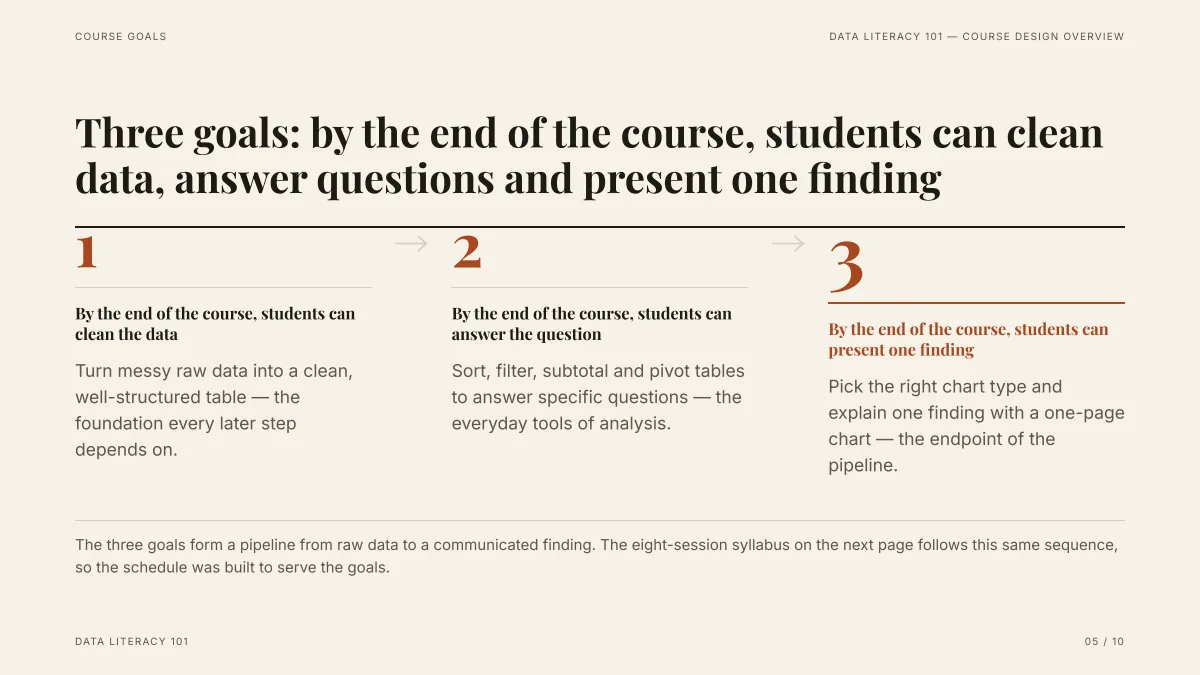
- The three goals come from the draft. The wording "By the end of the course, students can" is from the one edit asked for in the recording.
- The AI added no outside facts, because the request said to stick to the draft.
- Slide 10 shows "TBD" for the budget: a missing number is marked, not made up.
Is it allowed to use AI for a school presentation?
That depends on your teacher and your school. Many ask students to say when AI was used; some do not allow it for certain tasks. We cannot tell you your school's rule, so ask before you start and follow it.
A sensible way to stay honest is to do the thinking yourself (the question, the findings, the conclusion) and use AI for layout and phrasing. Keep your notes: they show which ideas are yours.
What should I check before I present?
- Every number: the AI can propose figures you did not give it. In the editor you can see where each figure came from.
- Every claim: if it is not in your notes or a source you have read, remove it.
- Sources: when you export, tick "Add a sources page at the end" if the deck has figures with sources.
- Your own words: you must be able to explain each slide without reading it.
How many slides should a class presentation have?
Plan about one to two minutes per slide, so a 5-minute talk is 3 to 5 slides and a 10-minute talk 5 to 10. That is a rule of thumb, not a standard. See the table by talk length in our guide on how many slides to use.
Questions
Can students use AI to make a presentation?
Technically yes: you describe the project, review an outline and get slides. Whether you may depends on your teacher and school, so check the assignment rules first and say that AI was used if they ask for it.
How do I stop the AI from adding facts I did not give it?
Attach your own notes and write "Stick to the notes; don't add outside facts or figures" in the request. In our recorded example this was the request, and the budget the draft did not state was shown as TBD instead of a made-up number. Still read every slide.
Is it free for students?
Writing the outline is free and every new account gets 20 free credits, enough for a 10-slide deck in quick mode (10 credits). See the Pricing page for credit packs.
Can I edit the slides in PowerPoint afterwards?
Yes. Export as PowerPoint (.pptx): text is in text boxes and tables are native tables. Charts and pictures export as pictures.
How much does it cost?
Writing the outline is free. Quick mode costs 1 credit per slide, deep mode 3, each AI edit 1, and exporting is free. New accounts get 20 free credits; credit packs are one-time purchases (for example $5.99 for 40 credits plus 10 bonus) with no subscription, and credits never expire. See the Pricing page.
Start from your own notes
Attach your notes, write one line telling the AI to stay inside them, and check the outline.
Make my class presentation