How do you make a project proposal presentation with AI?
Updated 2026-11-06
Write the problem, the goal, the plan, the budget and the decision you need in a paragraph or a document, tell the AI to stick to it, and review the outline before any slide is made. A proposal usually takes 10 to 12 slides; the product accepts 1 to 30, and it exports editable PowerPoint (.pptx).
The point of a proposal deck is the last slide, the decision. Below are a 10-slide structure that builds toward it, a real decision slide from a recorded run, and what the product does when your material has no budget: it writes "TBD" where a figure is missing.
Five steps
Write the facts and the decision you need
Problem, goal, scope, timeline, team, budget, and the single decision you want ("approve $40K by Friday"). If you already have a project brief, attach it (PDF, Word, text or Excel) and write "stick to the file; don't add outside figures".
Choose the scenario "Proposal" and the audience
Under "More" set the scenario to "Proposal", and the audience to "Executives" or "Clients". Put the slide count in the request.
Check the outline against your brief
The last card should be the decision. Look for any card that states a number your brief does not contain; where the brief has none, the card should say TBD or name an assumption. Edit, reorder, delete.
Generate and fact-check
Click "Generate presentation". In the editor, use the "Fact-check" action and the sources drawer to see where each figure came from.
Fill the gaps and export
Replace every TBD with a real figure by clicking the text, or ask the AI to do it with the number in your message. Then export PowerPoint (.pptx) or PDF.
A 10-slide proposal structure and a real decision slide
The table is our suggested order (not a product template): adapt it to your project.
| Slide | Title idea | What to put on it |
|---|---|---|
| 1 | Proposal title and the ask | What you want approved, in one line |
| 2 | The problem | Who is hurt, with one number |
| 3 | The evidence | A pilot, a customer quote or data you hold |
| 4 | Goal and success measures | Two or three measures with targets |
| 5 | Scope | In scope and out of scope |
| 6 | Approach and timeline | Phases with dates |
| 7 | Team and roles | Owners, not just names |
| 8 | Budget | Cost by item, the total, and what is still TBD |
| 9 | Risks | The top three and what you do about each |
| 10 | Decision | The ask again, with who decides and by when |
The screenshot is the last slide of our recorded launch-plan deck (a made-up coffee brand, October 19, 2026): the whole case in four rows, then the ask. It is a marketing plan, but the closing slide of a proposal works the same way.
Prompt template (English)
Project proposal, 10 slides
Using the attached project brief, make a project proposal for the steering committee. Stick to the brief; don't add outside facts or figures, and mark any missing figure as TBD. 10 slides: problem, evidence, goal and success measures, scope, approach and timeline, team, budget, risks, and the decision we need on the last slide.
(A template, not a recording. Choose the scenario "Proposal" and attach your brief.)
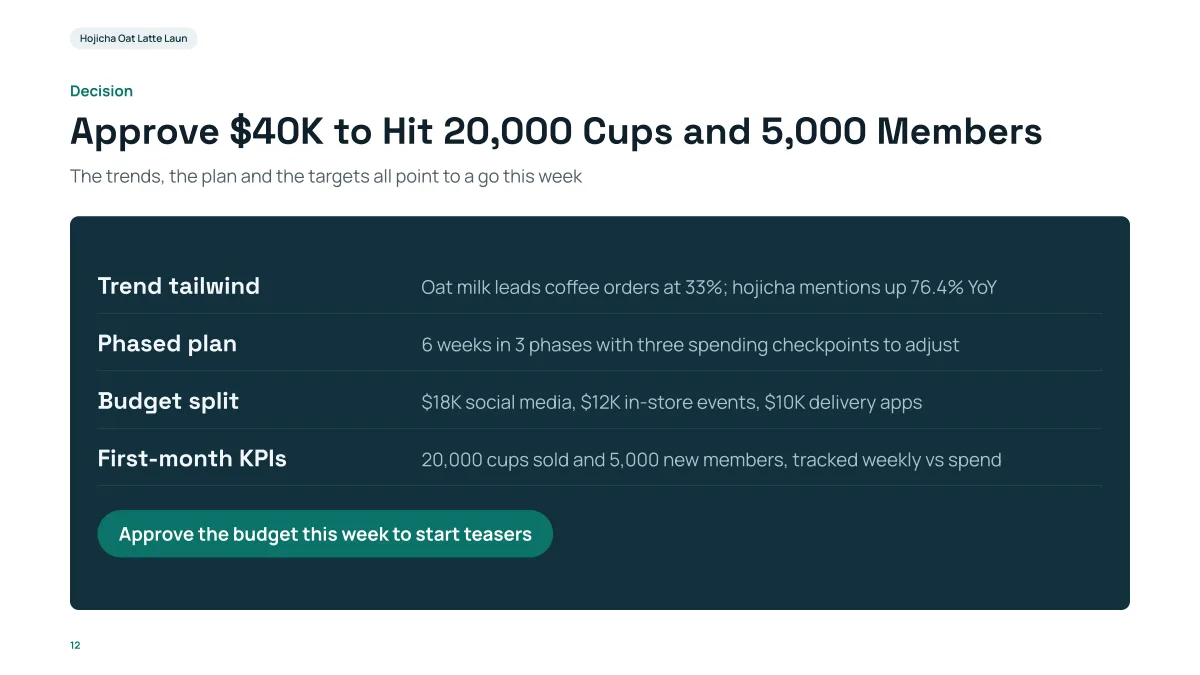
- The title is the decision with its numbers; the four rows are the case, each one line; the last line is the ask with a deadline.
- The $40,000, 20,000 and 5,000 were typed in the request. The 33% and 76.4% in the first row came from the research step (sources listed), not from us.
- The deadline "this week" was the AI's own wording: check dates and deadlines on this slide first.
What happens when my proposal has no budget?
The product writes TBD instead of making a number up. In our recorded "Course design overview" run the draft gave no budget and the request said "don't add outside facts or figures". The last slide ended with a table row reading "Budget: Not specified in the draft; to be confirmed with the committee" and the value TBD. The sources drawer counted the gaps: 2 gaps across the 10 slides (slides 8 and 10), with 43 of 43 other figures traced to the draft.
Two cautions from the same deck. On slide 8 the placeholder landed in a big-number spot, where it read "TBD of the grade sits in the weekly exercises (40%) and the final group report (50%)" instead of a figure; and on the last slide the intro sentence ran under the table header. Both are visible in the editor, so scan every slide that has a TBD.
How long should a project proposal presentation be?
Ten slides cover the structure above for a steering committee. A longer deck is usually a detail you can put in an appendix: ask for 14 or 15 slides and mark the last ones "Appendix". The count in your request is used as written, and the cover counts.
How do I stop the AI from adding figures I did not give?
Say it in the request ("stick to the brief; don't add outside figures; mark missing figures TBD"), and attach your brief so the AI reads it instead of searching the web. After generating, open the sources drawer and the "Fact-check" action: they list every figure with its source or mark it as a gap, an assumption or unchecked.
What should I change after exporting to PowerPoint?
- Replace each TBD and check the totals add up (the budget appears on more than one slide).
- Add owners and dates to the plan slide.
- Add your logo and your own notes for the meeting; speaker notes are not in the export (see the guide on notes).
Questions
Can AI make a project proposal presentation?
Yes. Give it the problem, the plan, the budget and the decision you need, or attach a project brief. It drafts an outline and then the slides, with a decision slide at the end. Check every figure and every deadline before you send it.
What if my proposal has no budget yet?
Ask it to stick to your brief and mark missing figures as TBD. In our recorded run, the missing budget came out as TBD with a note that it was to be confirmed, not as an invented number.
How many slides does a proposal need?
About 10 to 12. The product accepts 1 to 30 slides including the cover.
Can I edit the proposal in PowerPoint?
Yes. The PPTX export keeps text as editable text, and PDF export is there too. Exporting is free.
How much does it cost?
Writing the outline is free. Quick mode costs 1 credit per slide, deep mode 3, each AI edit 1, and exporting is free. New accounts get 20 free credits; credit packs are one-time purchases (for example $5.99 for 40 credits plus 10 bonus) with no subscription, and credits never expire. See the Pricing page.
Start from your brief
Attach your project brief, ask the AI to stick to it, and see which figures are marked TBD before any slide is made.
Make my proposal deck