How do you make a training presentation with AI?
Updated 2026-11-06
Describe the training in a paragraph (who it is for, how long it runs, what people should be able to do afterwards), choose the scenario "Internal training", and check the outline before any slide is made. A one-hour session usually needs 15 to 25 slides; the product accepts 1 to 30, and you export an editable PowerPoint (.pptx) or PDF.
Below: a slide structure for a training or onboarding session, how much text to put on each slide with the measured word counts of a recorded deck, and how to add quiz slides. There is no quiz tool: a quiz is an ordinary slide the AI writes, and we say below what that means.
Five steps
Write who, how long, and what people can do afterwards
For example: "Onboarding for new support agents, 45 minutes, they should be able to log a ticket and escalate one by the end." Attach your handbook or policy file (PDF, Word, text) and say "stick to the file": the outline then follows your material, not the web.
Choose "Internal training" and the audience
Under "More" set the scenario to "Internal training" and the audience, for example "Teammates". Add the slide count to the request.
Set the text per slide for how the deck will be used
Presented live: Minimal or Concise (about 50 or 100 words). Sent as a handout that people read alone: Detailed or Extensive (about 150 or 210). The setting is "Text per slide" on the screen before you click "Generate presentation".
Review the outline, then add quiz cards
In the outline you can add a card by hand or ask the AI to rewrite one. Add a "Check yourself" card after each module (see the quiz question below).
Generate, edit, export
Ask for changes in plain words (1 credit each), then export. Your own notes for the trainer go into PowerPoint after export; see the guide on speaker notes.
A training deck structure, and one real audience slide
The structure below is our suggestion for a 45-minute onboarding session (not a product template and not a recording). Each row is one outline card.
| Slide | Title idea | What to put on it |
|---|---|---|
| 1 | Course title | Who it is for, date, trainer |
| 2 | What you will be able to do | Three outcomes, each starting with a verb |
| 3 | Agenda and timing | Modules with minutes |
| 4 to 6 | Module 1 | The idea, one example, one picture or table |
| 7 | Check yourself: module 1 | Two or three questions |
| 8 to 10 | Module 2 | As above |
| 11 | Check yourself: module 2 | Two or three questions, answers on slide 12 |
| 12 | Answers | Short answers with the reason |
| 13 | Practice task | What to do in the next 10 minutes |
| 14 | Summary | Three things to remember |
| 15 | Where to get help | Names, channels, documents |
The screenshot is from our recorded "Course design overview" deck (a made-up four-week course, October 20, 2026). It is a course overview for a committee, not a training session, but its slide 4 is the slide a training deck also needs: who the training is for, group size, what people must know first. It is also a Detailed-text slide, about 160 words including the header and footer; for a live session you would choose Concise.
Prompt template (English)
Onboarding training, 15 slides
Make an onboarding training for new customer-support agents, 45 minutes, 15 slides. By the end they can log a ticket and escalate one. Use the attached handbook and stick to it; don't add outside facts or figures. Two modules, with a "Check yourself" slide after each, answers on the slide after the second one, and a practice task at the end.
(A template, not a recording. Choose the scenario "Internal training" and attach your handbook.)
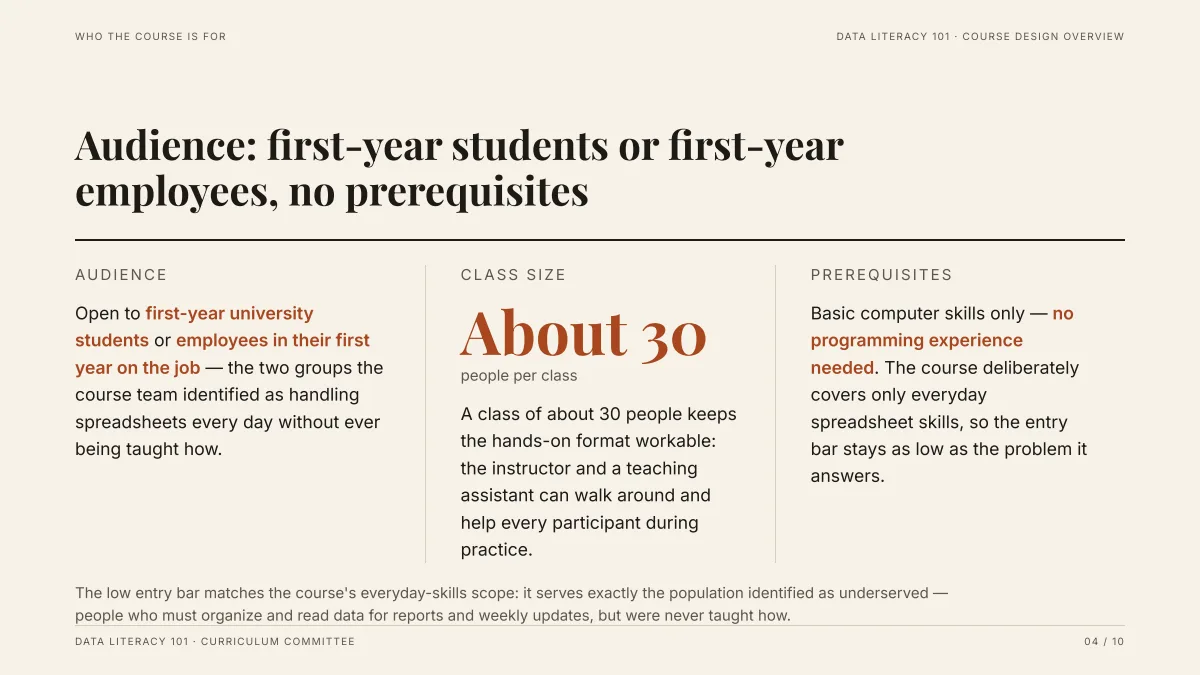
- Three facts, three columns: audience, group size, prerequisites. The facts are from the attached Word draft, not from the AI.
- Counted from the PDF, this Detailed deck has 97 to 201 words per slide (about 154 in the middle, headers and footers included). The Concise launch-plan deck has 24 to 88 (about 75).
- Dense slides read well as a handout and badly on a projector: pick the text level before you generate.
How many slides and how many words per slide for a training session?
A common rule of thumb is one to two minutes per slide, which gives 15 to 30 slides for an hour; it is an experience-based guideline, not a standard. Training slides that people practise on take longer, so stay near the low end. The guide on how many slides to use has a table.
| Text per slide setting | About words per slide | Use it for |
|---|---|---|
| Minimal | 50 | Live session on a projector |
| Concise | 100 | Live session with some reading |
| Detailed | 150 | Handout and self-study decks |
| Extensive | 210 | Documents that stand alone |
How do I add a quiz to a training presentation?
Ask for it in the request ("a Check yourself slide after each module, with three questions, answers on a later slide") and keep or edit the cards in the outline. The AI writes a quiz slide like any other slide, as text; there are no clickable answers or scoring, and we have not recorded a run with quiz slides, so read the questions before you use them.
For tracked, scored quizzes put the questions into your learning system and keep the slides for explaining. Putting the answers on a separate later slide lets people think before they see them.
Can I base the training on our own handbook?
Yes: attach the PDF, Word, text or Excel file and write "stick to the file". The AI reads it instead of searching the web, and the editor can show which paragraph or page each figure came from. Anything your file does not say may be left as "TBD" instead of invented; fill those in before the training.
What should I check before the session?
- Open the exported PowerPoint on the computer you will present from.
- Read every quiz question and answer yourself.
- Check policy statements, dates and numbers against the source document.
- Add trainer notes in PowerPoint if you need them; they are not in the export.
Questions
Can AI make an employee training presentation?
Yes. Describe the training and who it is for, optionally attach your handbook, choose the scenario "Internal training", review the outline, and generate. It exports to editable PowerPoint. Read the content against your own policies before you train anyone with it.
How many slides should a training presentation have?
The product accepts 1 to 30 slides including the cover. A one-hour session is typically 15 to 25 slides by the one-to-two-minutes-per-slide rule of thumb.
Can it make quiz slides?
It writes them as ordinary text slides if you ask. There are no interactive or scored quizzes, and the slides are not a replacement for a learning management system.
Can I use my own onboarding document as the source?
Yes. Attach it as a PDF, Word, Excel, text or PowerPoint file (up to 25 MB each) and ask the AI to stick to it.
How much does it cost?
Writing the outline is free. Quick mode costs 1 credit per slide, deep mode 3, each AI edit 1, and exporting is free. New accounts get 20 free credits; credit packs are one-time purchases (for example $5.99 for 40 credits plus 10 bonus) with no subscription, and credits never expire. See the Pricing page.
Start from your training outline
Describe who the training is for and how long it is, attach your handbook, and review the outline before any slide is made.
Make my training slides