How does Markdown become a presentation with AI?
Updated 2026-11-06
Paste your Markdown into the box on the home page (up to 20,000 characters) or attach a .md file, say how many slides you want, and check the outline the AI drafts before any slide is made. Then export an editable PowerPoint (.pptx) or a PDF.
This is not a fixed converter: the AI reads your headings and text as material and decides which become slides, so one heading is not always one slide. Below is a real trace of 12 headed parts that became 10 slides, and what the code does with each Markdown element.
Five steps from a .md file to slides
Write one heading per idea, with short lines under it
Use "#" for the title and "##" for each part. Put the facts you want on the slide (numbers, names, dates) under the heading as plain lines or "-" lists. The headings need a space after the "#" signs: "## Budget" counts, "##Budget" does not.
Paste it, or attach it
Paste into the box on the home page (limit 20,000 characters), or click the attach button and add a .md or .txt file (up to 25 MB). Attached files are also read for sources: a figure on a slide can be traced back to a numbered paragraph of your file.
Add one sentence that says what the deck is for and how long it is
For example: "Turn this into a 10-slide update for the management team. Stick to the notes; don't add outside figures." A count such as "10 slides" is read and used; the cover counts. Without a count the AI picks, usually 6 to 12 slides.
Click "Next", choose a mode, and read the outline
"Quick mode" is 1 credit per slide, "Deep mode" 3. The outline shows one card per slide: edit, reorder, add or delete cards. Nothing is charged until you click "Generate presentation".
Generate, fix, export
Ask the AI to change a slide in plain words (1 credit per request) or click the text to fix it yourself. "Export" gives PowerPoint (.pptx), a picture-only PPTX, or PDF; there is no Markdown export.
A real trace: 12 headed parts, 10 slides
This is our recorded "Course design overview" run (October 20, 2026; the course is made up). The input was a Word draft, not a .md file, but it has the same structure as a Markdown file: one title heading (like "#") and eleven numbered section headings (like "##"), with paragraphs and two tables under them. Word headings and Markdown headings are read into the same list of headings by the same code.
The request was: "Using the attached course draft, make a course design overview for the curriculum committee to review. Stick to the draft; don't add outside facts or figures. 10 slides, with the support needed and the budget on the last slide." Deep mode, Detailed text, no images. The outline came 16 seconds after the request and the 10 slides about 71 seconds after it; deep mode at 3 credits per slide is 30 credits.
| Part of the draft (heading) | Where it went |
|---|---|
| Title and byline | Slide 1: the ask, "Approve Data Literacy 101 ..." |
| 1. Why this course | Slide 2 (the problem) and slide 3 (the pilot numbers): one section became two slides |
| 2. Who it is for | Slide 4: audience, class size, prerequisites |
| 3. Course goals | Slide 5: three goals |
| 4. Schedule (with an 8-row table) | Slide 6: the table regrouped into three blocks of sessions |
| 5. How each session runs | Slide 7: 20 + 60 + 10 minutes |
| 6. Assignments and 7. Grading | Slide 8: two sections merged into one slide |
| 8. How the final report is graded (5-row table) | No slide of its own: only the 30% and 20% split from section 7 appears |
| 9. What the pilot showed, and what changed | Slide 9: four changes |
| 10. Teaching resources and 11. Support needed | Slide 10: merged, with the budget marked TBD because the draft gave none |
So the count you ask for decides the number of slides, and the AI splits, merges or drops parts to fit it. If you want one slide per heading, say so and give that number.
data-literacy-101-course-draft (headings only)
Heading structure
# Data Literacy 101: Making Sense of Data with Spreadsheets (Course Design Draft)
## 1. Why this course
## 2. Who it is for
## 3. Course goals
## 4. Schedule
## 5. How each session runs
## 6. Assignments
## 7. Grading
## 8. How the final report is graded
## 9. What the pilot showed, and what changed
## 10. Teaching resources
## 11. Support needed
(Headings only. Under them the real file has a byline, paragraphs and two tables. The recorded input was .docx, not .md.)
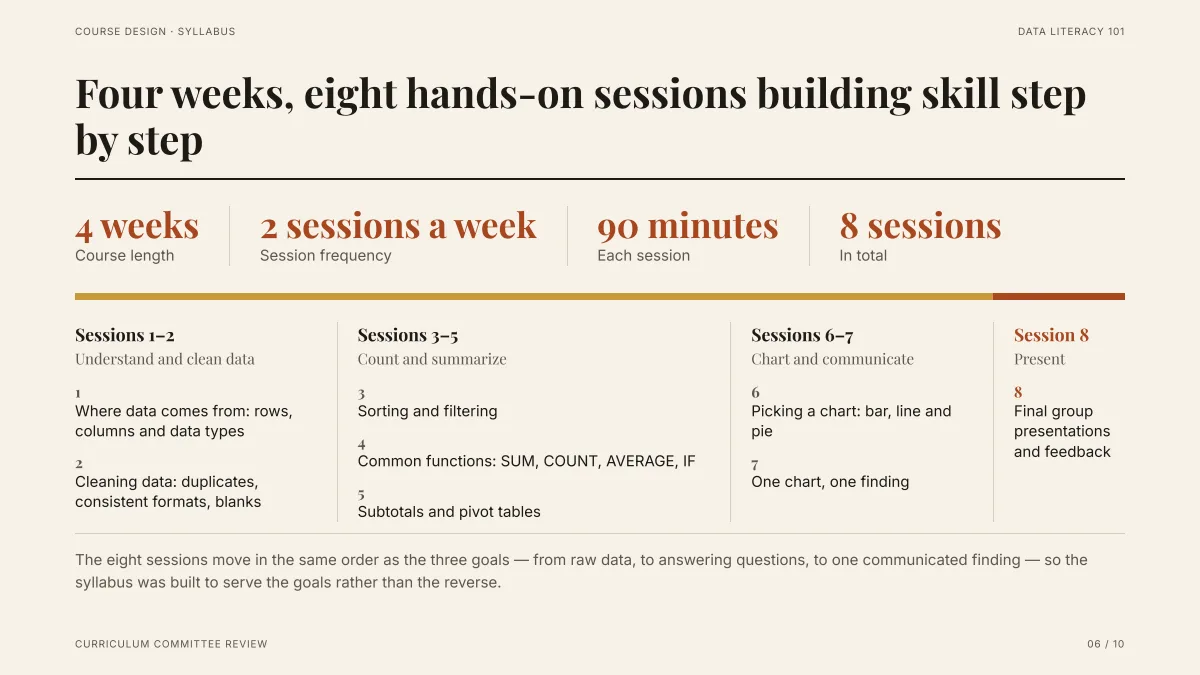
- The draft had an 8-row table. The slide groups its rows into three phases plus the final session: the grouping was the AI's choice, the session titles are the draft's own.
- The four headline figures (4 weeks, 2 a week, 90 minutes, 8 sessions) come from one sentence of the draft.
- Every number on the slide can be traced to a numbered paragraph or table cell of the attached file in the editor's sources drawer.
Which parts of Markdown does the product actually read?
This is what the code does with an attached .md or .txt file. Pasted text goes to the AI as written, and only attached files get the paragraph numbering and heading list below.
| In your Markdown | What happens |
|---|---|
| "# " to "###### " followed by text | Read as a heading of the file, six levels. Used in the file's outline (see the length question below) |
| A block of lines between blank lines | One numbered paragraph: the sources drawer says "Paragraph 12" for a figure found there |
| "-" or numbered list lines | Plain text. The AI rewrites them into 2 to 5 short bullets per slide, each at most about 20 words |
| A pipe table | Read as text, not as a table. For a table that is checked cell by cell, attach an Excel, CSV or Word table instead |
| Bold, links, images ("![]()") | No special handling: the text is read, pictures are not fetched. Attach pictures as image files |
| "#3" or "No. 3" | Not counted as a figure when sources are checked |
We recorded no run that starts from a .md file, so the table comes from reading the code, not from a recording. How "###" lines land on slides we have not observed.
How long can the Markdown be?
Pasted into the box: 20,000 characters. As an attached file: up to 25 MB, but the outline step reads about 24,000 characters of attached files in total (all files together). A longer file gives the AI its list of headings first and then its opening, so keep the part you care about near the top or split the file.
The product says in the outline page's sources panel when a file was too long to read whole.
How do I get one slide per heading?
Count your "##" headings, add the cover (and a closing slide if you want one), and put that number in the request: "12 slides, one per ## heading, in the same order". The number is used as written. If you give no number the AI chooses, and the product allows 1 to 30 slides.
Check the outline cards before generating: each card should carry the heading of the part it comes from.
How is this different from Markdown slide converters?
Converters that work mechanically follow a fixed rule, for example one slide per heading or per "---" line, and keep your text as written. Here the AI rewrites the text into short slide lines, picks a layout for each slide (list, cards, table, chart, timeline and so on) and may merge or split parts. You gain finished layouts; you give up exact control, so read the outline.
Questions
Can AI turn a Markdown file into a presentation?
Yes. Paste Markdown into the home page box (up to 20,000 characters) or attach a .md file, give a slide count, and the AI drafts an outline you can edit and then builds the slides. In our recorded Word-to-slides run, 12 headed parts became 10 slides in about 71 seconds; Markdown headings go through the same heading reader.
Does each Markdown heading become one slide?
Not always. In our recorded run one section became two slides, two pairs of sections were merged into one slide each, and one table appeared on no slide. Ask for a slide count and check the outline.
Can I export back to Markdown?
No. Export gives PowerPoint (.pptx) with editable text, a picture-only PPTX, or PDF.
How many slides can it make?
From 1 to 30, and the cover counts. A count in your request such as "10 slides" is used as written.
How much does it cost?
Writing the outline is free. Quick mode costs 1 credit per slide, deep mode 3, each AI edit 1, and exporting is free. New accounts get 20 free credits; credit packs are one-time purchases (for example $5.99 for 40 credits plus 10 bonus) with no subscription, and credits never expire. See the Pricing page.
Try it with your own Markdown
Paste your outline, add the slide count, and see which heading lands on which slide before any slide is made.
Turn my Markdown into slides