How does text to presentation AI work? One real paragraph, traced to its slides
Updated 2026-11-05
Text to presentation AI reads what you write, drafts one outline card per slide, and builds the slides after you approve the cards. In our recorded run, one paragraph of about 100 words became a 12-slide deck: the outline arrived 77 seconds after the text was sent, and the slides were done 19 seconds after the outline was approved.
Below, the same paragraph is split into its parts, and each part is matched to the slides it produced. That shows what the AI takes from your text and what it adds on its own.
Five steps from text to slides
Put the text in the box on the home page
Type or paste a request, or attach a file (PDF, Word .docx, Excel, PowerPoint, text, images, each up to 25 MB). Say what the presentation is for, who will see it and how many slides you want. A count such as "12 slides" in the text is read and used.
Click "Next" and choose a mode
"Quick mode" (marked "Recommended") builds slides from a library of layouts at 1 credit per slide. "Deep mode" has the AI design each slide, at 3 credits per slide. You can also pick a template and the language of the deck.
Review the outline
With no file attached, the AI first looks the topic up and shows how many sources it found. Then the outline appears card by card. Edit, reorder, add or delete cards; nothing is charged up to this point.
Click "Generate presentation"
The slides appear one by one as they finish. Set "Text per slide" (Minimal, Concise, Detailed or Extensive) before you click.
Ask for changes, then export
Ask the AI to change a slide in plain words (1 credit per request), or click the text to fix a word yourself. "Export" gives you an editable PowerPoint (.pptx) or a PDF.
The paragraph, traced to the slides
This is our recorded "New product launch plan" run (October 19, 2026; the brand is made up). Nothing was typed except the paragraph below. It used quick mode, the Slate template and Concise text, and no images.
Run time: outline after 77 seconds, all 12 slides 97 seconds after sending the text. Credits: 12 slides at 1 credit each, plus 1 credit for one follow-up edit, 13 in total.
| Part of the text you wrote | Where it ended up in the deck |
|---|---|
| "launch marketing plan", "for the management team" | Slide 1 (cover) and slide 12, a decision slide: "Approve $40K to Hit 20,000 Cups and 5,000 Members" |
| "12 slides" | 12 outline cards, including a slide 2 agenda that the AI added |
| "look at how oat-milk coffee and hojicha drinks have done" | Slides 3 to 6: market numbers found by the research step, not typed by us |
| "campaign runs 6 weeks" | Slides 7 and 8: three phases and three checkpoints |
| "$40,000 budget", "social media, in-store events and delivery apps" | Slides 9 and 10: budget by channel and the job of each channel |
| "20,000 cups", "5,000 new members" | Slides 11 and 12: a weekly tracking table and the closing ask |
Prompt (English)
Launch marketing plan, 12 slides
Make a launch marketing plan for a new product. Tsukiao Coffee, a made-up coffee brand, is launching a hojicha oat latte this fall for office workers aged 25 to 35. The campaign runs 6 weeks with a $40,000 budget; the first-month targets are 20,000 cups sold and 5,000 new members. Channels: social media, in-store events and delivery apps. Look at how oat-milk coffee and hojicha drinks have done over the past two years, but don't name real brands or companies. It's for the management team, 12 slides.
(The whole text. No file was attached.)
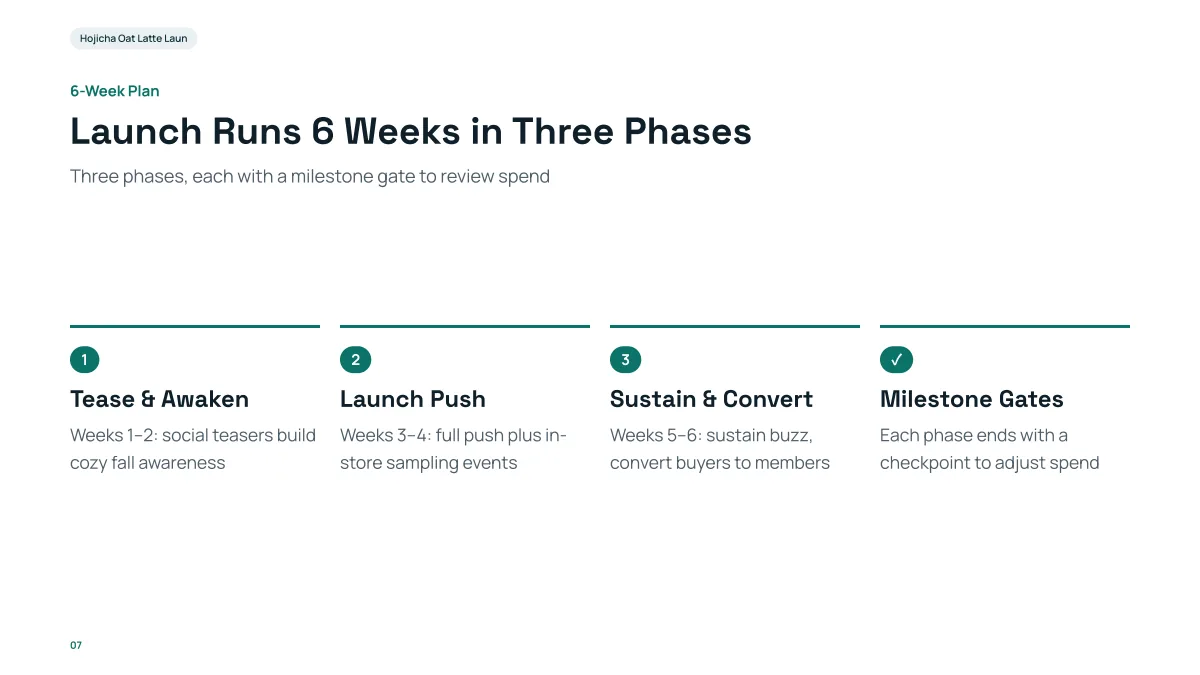
- The text said only "6 weeks". The split into three phases of two weeks is the AI's proposal. Check this kind of detail before you present.
- The budget split on slide 9 ($18K, $12K, $10K) was also not in the text; it adds up to the $40K you typed.
- Every number that was typed ($40K, 20,000, 5,000, 6 weeks) appears unchanged.
How much text should I give it?
Two or three sentences work, a paragraph works better, and a longer document works best when it is attached as a file. The more facts you give (dates, budget, targets, names), the fewer the AI has to propose. In the example, the numbers you type come back unchanged, and the numbers you leave out may be proposed.
If your text is long (a report, an article, meeting notes), attach it as a file instead of pasting: the outline then follows your material instead of the web. See the guides on PDF to presentation and Word to PowerPoint for how headings and pages become slides.
What does the AI add that I did not write?
- Structure: an agenda slide when the deck is long (in our run, slide 2) and a closing slide with the ask.
- Research: when no file is attached it looks the topic up and lists its sources; figures from there appear on the slides.
- Proposals: splits and phases that you did not give. These are suggestions, not facts.
You can see and change all of this in the outline before any slide is made.
What does it cost to turn text into slides?
| Step | Cost |
|---|---|
| Writing the outline | Free |
| Quick-mode slide | 1 credit per slide |
| Deep-mode slide | 3 credits per slide |
| One AI edit | 1 credit |
| Export (PPTX or PDF) | Free |
Our 12-slide run: 12 + 1 = 13 credits. A new account has 20 free credits.
Questions
Can AI turn any text into a presentation?
Yes, as far as the text has something to say. You type or paste a request, or attach a file; the AI writes an outline and then the slides. In our recorded example, one paragraph became 12 slides in 97 seconds. You should still read the outline and the slides, because the AI can propose numbers you did not give.
Do I get to see the outline before the slides are made?
Yes. The outline comes first, one card per slide. You can edit, reorder, add or delete cards, or ask the AI to rewrite one card. Slides are made only when you click "Generate presentation".
Is the text I type kept as written?
Numbers and facts you type are carried onto the slides unchanged in our example ($40K, 20,000 cups, 5,000 members, 6 weeks). The wording is rewritten into short slide text, and the AI may add figures from its research or its own proposals, which you can check in the editor.
Can I export the slides?
Yes: PowerPoint (.pptx) with editable text, a picture-only PPTX, or PDF. Exporting is free.
How much does it cost?
Writing the outline is free. Quick mode costs 1 credit per slide, deep mode 3, each AI edit 1, and exporting is free. New accounts get 20 free credits; credit packs are one-time purchases (for example $5.99 for 40 credits plus 10 bonus) with no subscription, and credits never expire. See the Pricing page.
Try it with your own text
Write or paste a paragraph, check the outline, and see which part of your text lands on which slide.
Turn my text into slides