How do I turn an outline into a presentation with AI?
Updated 2026-11-06
Paste your outline into the box on the home page (or attach it as a .md, .txt or Word file), say how many slides you want, and check the outline cards the AI drafts from it before any slide is made. Then generate, and export an editable PowerPoint (.pptx) or a PDF.
The outline reads best when each heading is a one-line takeaway and each has two to five short lines under it, with your numbers written out. Below: what the product does with each part of an outline (taken from its outline prompt), a sample outline, one real outline card next to the slide it became, and how to keep your own wording.
Five steps from an outline to slides
Write one heading per slide, as a sentence that makes a point
Write "Tickets rose 12% and response time held" rather than "Tickets". The AI is told to state the takeaway in each slide title whenever your content supports one, so a sentence heading survives close to as written, and a one-word label gets rewritten.
Put two to five short lines under each heading
Facts first: numbers, names, dates. Each card holds 2 to 5 points of at most about 20 words each. A longer paragraph under a heading is shortened to fit.
Paste it, and add one line about the count and your wording
For example: "Turn the outline below into a 7-slide update for the support leadership team: cover first, my five sections in order, then a closing slide. Use my wording and figures; don't add outside facts." A count such as "7 slides" is read, and the cover counts.
Pasted text can be up to 20,000 characters. Over about 8,000 characters, attach the outline as a file instead (see the length question below).
Click "Next", choose a mode, and edit the cards
"Quick mode" is 1 credit per slide, "Deep mode" 3. Each card has a title, points and a suggested layout. Edit any text, drag cards to reorder, add or delete cards, or use "Rewrite this card with AI" on one card. In quick mode, picking a layout on a card locks it in. Nothing is charged until you click "Generate presentation".
Generate, change what you need, export
Ask the AI to change a slide in plain words (1 credit per request) or click the text to edit it yourself. "Export" gives PowerPoint (.pptx), a picture-only PPTX, or PDF. "Download outline" on the outline page saves your cards as a Markdown file.
A sample outline, and a real outline card next to its slide
We have not recorded a run that starts from a typed outline, so the sample below is a made-up example, and what to expect from it comes from reading the product's code, not from a recording. With "7 slides" in the request, the outline step is told to write exactly 7 cards, and it retries once if the count is wrong, so expect a cover, your five sections and a closing slide. Check that each card carries your heading and your figures.
The picture is a real case of the next step. It is slide 9 of our recorded "Course design overview" run (October 20, 2026; deep mode, a made-up course). The outline card for it came 16 seconds after the request, and the 10 slides about 71 seconds after it. The card had a title and four points, and the slide shows all four.
| Real outline card 9 (what you edit) | The slide it became |
|---|---|
| Title: "Pilot feedback drove four concrete design changes" | Same title, kept as written |
| Layout suggested by the AI: plain bullets | A two-column table: "What the pilot showed" and "What changed in draft 2". In deep mode the AI designs each slide, so the suggestion can change |
| Four points, one per change (functions split, practice data, 8-minute presentations, handout summary) | Four numbered rows, one per point, in the same order |
Pasted into the box (our example, not a recording)
Support Quarterly Review: Q3
# Support Quarterly Review: Q3
## 1. Tickets rose 12% and response time held
- 4,200 tickets this quarter, 3,750 last quarter
- Median first response: 2 hours, same as last quarter
## 2. Help-center articles now answer one ticket in five
- 840 tickets avoided by a help article (20% of 4,200)
- Top 3 articles: reset password, change plan, export data
## 3. Billing questions are the biggest backlog
- 31% of open tickets are billing; average age 3 days
## 4. We propose a billing macro and a weekly triage
- A saved reply for the 5 most common billing questions
- A weekly 30-minute triage with finance
## 5. Next quarter targets
- First response under 90 minutes; billing backlog halved
(Made-up team and figures. Request line: "Turn this outline into a 7-slide update for the support leadership team: cover first, my five sections in order, then a closing slide. Use my wording and figures; don't add outside facts.")
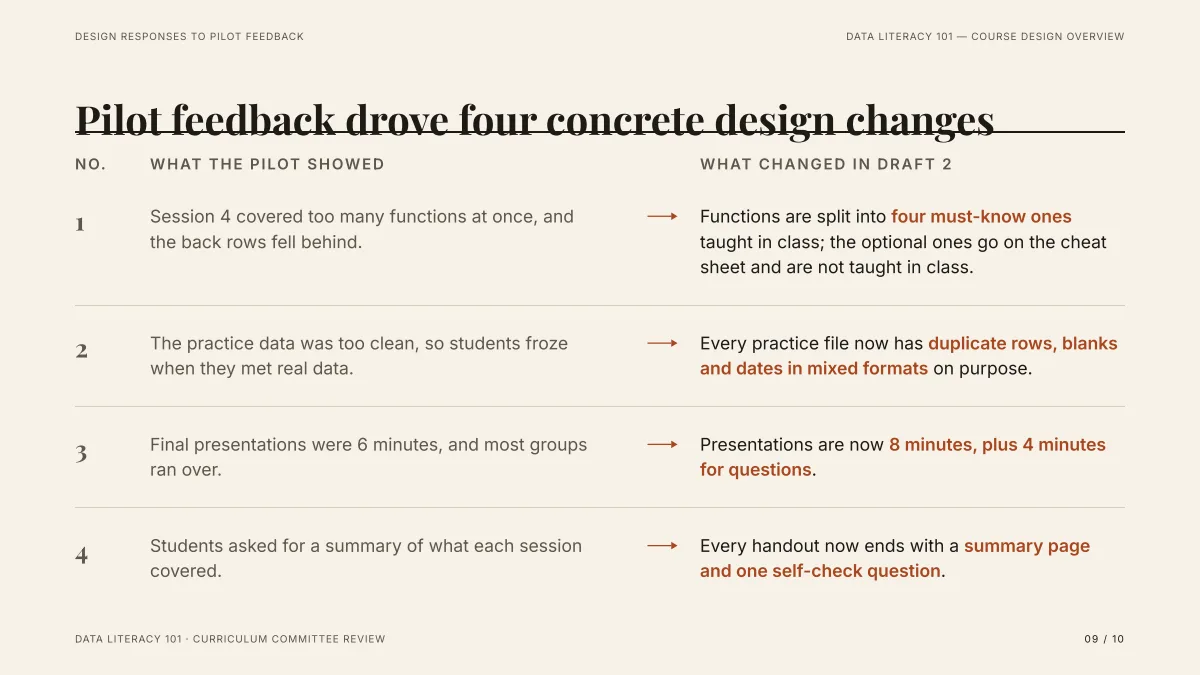
- All four points of the card are on the slide, in order, and the title is unchanged: that is what a card with a clear takeaway title and four concrete points gives you.
- The left column ("What the pilot showed") was written by the AI from the course draft, not from the card. The card is the plan for the slide, not the only thing on it.
- The layout was the AI's choice. To fix the layout of a slide, pick it on the card in quick mode.
How does the product read each part of an outline?
The product has no fixed converter for outlines. A model reads your text as material and writes one card per slide, following these rules from its outline prompt (read from the code on 2026-11-06):
| What you write | What the outline step does with it |
|---|---|
| The title line | Becomes the cover title (at most about 12 words). The cover's points are one subtitle line, plus facts you gave such as team, date or occasion |
| A heading per slide | Becomes the slide title, written as a short sentence of at most about 13 words that states the takeaway when your content supports one |
| Lines under a heading | Become 2 to 5 points, each at most about 20 words, with no numbering, no ending punctuation and no Markdown |
| Numbers, names, dates | Kept. The AI is told to use facts only from your request, your files or its research, and never to invent statistics. A planning assumption should be marked as one in the point |
| A slide count ("7 slides") | Used as written, cover included: the outline is told to have exactly that many cards, up to 30 |
| No count | The AI decides, usually 6 to 12 including the cover |
| A long outline (over 10 slides) | An agenda card may be added: the AI is told to skip the agenda unless the deck runs past 10 pages |
Every card also carries a suggested layout from a fixed list (cover, agenda, statement, bullets, cards, process, timeline, hierarchy, compare, stats, chart, table, funnel, closing and a few more).
Can I keep my outline exactly as written?
Not by instruction alone. The AI rewrites headings into takeaway sentences and points into short lines, and may merge, split or add a card. You control the result in the outline: every card is editable text, and what you change there is what the slides are made from. Figures you type into a card count as yours.
To keep your wording, say so in the request ("use my wording; one slide per ## heading, in this order"), then compare the cards with your outline before you generate. In our recorded Word-to-slides run, 12 headed parts became 10 slides because 10 was asked for, with some parts merged: see the Markdown guide.
How long can my outline be?
You can paste up to 20,000 characters and attach files of up to 25 MB each (up to 24 files, 64 MB in all). Two limits are worth knowing, both read from the code and not tested by us on a long outline:
- Pasted text: the outline step is given the first 8,000 characters of your request. For a longer outline, attach it as a .md or .txt file.
- Attached files: the outline step reads about 24,000 characters of attached files in all. A longer file gives the AI its list of headings first and then its opening, and the outline page says when a file was too long to read whole.
A deck has at most 30 slides; asking for more gets a message that the outline has 30.
Can I save the outline and use it again?
Yes. "Download outline" on the outline page saves a Markdown file: a "#" line with the deck title, then one "## 1. Slide title" line per card with its points as "-" lines. Edit it in any text editor and attach it to a new request. The suggested layouts are not saved in the file.
Which guide fits my starting point?
| You have | Read |
|---|---|
| A paragraph or a few sentences | Text to presentation |
| A .md file with headings and lists | Markdown to presentation |
| A Word document | Word to PowerPoint |
| A PDF or a paper | PDF to presentation |
| An outline you wrote, slide by slide | This page |
Questions
Can AI turn an outline into a presentation?
Yes. Paste the outline into the home page box or attach it as a file, give a slide count, and the AI writes one editable card per slide. You review the cards, then generate. In our recorded run, an outline card with a title and four points became a slide with a four-row table, in about 71 seconds for the whole 10-slide deck.
How should I format the outline?
Plain text works. A title line, one heading per slide written as a sentence, and two to five short lines under each, for example with "#", "##" and "-". There is no special syntax that the product requires; the outline is read as text.
Will it keep my headings?
Mostly, if they are already takeaway sentences of about 13 words or fewer. Short topic labels such as "Budget" are rewritten into a sentence, and the AI may merge or split sections to match the slide count. Check the cards before generating; they are fully editable.
How many slides will my outline make?
The number you ask for, from 1 to 30, cover included. Without a number the AI picks, usually 6 to 12. You can also add or delete cards on the outline page; the slide count follows the cards.
How much does it cost?
Writing the outline is free. Quick mode costs 1 credit per slide, deep mode 3, each AI edit 1, and exporting is free. New accounts get 20 free credits; credit packs are one-time purchases (for example $5.99 for 40 credits plus 10 bonus) with no subscription, and credits never expire. See the Pricing page.
Paste your outline and check the cards
Write the slide count in your request and see which of your headings lands on which card before any slide is made.
Turn my outline into slides