How do I make a board deck with AI?
Updated 2026-11-09
A board deck is usually built backwards from the decisions you need: the first slides say what the board is asked to decide, the middle slides give just enough results, risks and options to decide it, and the last slide words the ask. Ten to fifteen slides for a 60 to 90 minute meeting is common, with detail kept in an appendix or a pre-read. Your board chair or company secretary sets the real format.
To build one with Gamma AI Slide, attach your board notes, financials and KPI file (Word, Excel or PDF), write the meeting length and the slides you want, check the outline cards, and generate. You get an editable PowerPoint (.pptx). Writing the outline is free; a quick-mode slide is 1 credit, so a 12-slide deck is 12 credits.
What we have and have not done: we have no recorded board meeting, and the picture below is the cover of a different real recording (a course proposal “for approval” by a committee). The structure and timings are common practice, not a rule from any law or governance code. The product steps and limits come from the interface and the code, read 2026-11-09.
Six steps from board notes to board deck
List the decisions and the facts behind them
Write, in one file, the decisions you want (“approve the 2028 plan”, “authorise the new office lease”), then the facts each one rests on: results against plan, the figures, the options you rejected and why, and the risks. Word works best; put the key numbers in tables or clearly labelled lines.
Keep your finance and KPI tables in Excel if that is where they live. A sheet with more than 2,000 rows is read summed by month or category, and the sources panel says so; for a board pack, attach the summary sheet, not the ledger.
Check what may be attached
Board materials are often confidential. The text of your files is sent to AI providers to write the outline and slides (we do not train models on it; the Privacy Policy has the details). Check your company’s rules on confidential and price-sensitive material before you attach anything, and leave out what you may not share.
Write the request and attach the files
On the home page, click “Add files” (each file up to 25 MB), add your notes and tables, and paste the request below with your meeting length and slide order. Click “Next”. Choose “Quick mode” (1 credit per slide) for a library layout you can restyle in one click, or deep mode (3 credits per slide) if you want the AI to design each slide.
Set scenario, audience and detail
Under “More”, set the audience to “Executives” and the scenario to “Work report” (a results update) or “Proposal” (a decision paper). Tone “Professional” or “Rigorous” suits a board. “Text per slide” at “Concise” keeps each slide readable on a shared screen; “Detailed” (about 150 words a slide) reads like a pre-read page and is too dense to present.
Check the outline against the structure table
The outline has one card per slide. Compare it with the table on this page: decisions first, one slide per decision or topic, a risks slide, a closing slide that words the ask. Pick a layout on a card to lock it in: “Table” for financials against plan, “Key figures” for the headline numbers, “Comparison” for two options.
A card that states a figure your files do not contain says “Not in your materials: … It will be written as TBD”. Fill the gap in your file, or accept the TBD. Nothing is charged until you click “Generate presentation”.
Generate, check every number, export
Click “Generate presentation”. Open the export panel: it shows “x / y figures have a source” and lists figures with none; “Add a sources page at the end” appends them as a page. Check each figure against the source yourself; the checker shows where a number came from, not whether it is right for the period. Then export PowerPoint (.pptx) or PDF. Exporting costs no credits, but it needs Level 2 (any credit pack, bought once) or one new person invited per deck. The exported PowerPoint has no speaker notes.
A 12-slide board deck for a 60-minute meeting, and a real “for approval” cover
This is our suggested structure (common practice, not a standard). The layout column is the library layout the outline would normally suggest; the AI may choose another, and you can lock your own.
| # | Slide | What goes on it | Layout | Minutes |
|---|---|---|---|---|
| 1 | Cover | Meeting, date, “for decision” or “for information” | Cover | 0 |
| 2 | Agenda | Each item with its purpose (decide, discuss, note) and its time | Table | 1 |
| 3 | Decisions requested today | The two or three resolutions, one line each | Summary / next steps | 3 |
| 4 | The period in four numbers | Revenue, margin, cash, the one KPI that matters | Key figures | 4 |
| 5 | Financials against plan | Actual, plan, variance, last year | Table | 8 |
| 6 | Operating metrics | Customers, delivery, people: trend, not a dump | Table or Bar chart | 5 |
| 7 | Strategy progress | The three or four priorities and their status | Steps | 6 |
| 8 | Key risks | Risk, likelihood, impact, owner, what you are doing | Table | 6 |
| 9 | Topic for discussion | The one question the board should spend time on | Points + takeaway | 10 |
| 10 | Options | Option A against Option B, with your recommendation | Comparison | 8 |
| 11 | Recommendation and decision | The wording of the ask, what happens after approval | Summary / next steps | 5 |
| 12 | Next quarter | Priorities, dates, what you will bring back to the board | Timeline | 4 |
Behind slide 12, keep appendix slides (detailed financial statements, committee reports, the full risk register) outside the timed count, or send them as a pre-read. The picture is slide 1 of 10 in our recorded course proposal (Data Literacy 101, 2026-10-20, deep mode), made from a Word draft for a curriculum committee. It is not a board deck, but its right-hand column (decision sought, basis of review, what follows) is the kind of opening a board slide 2 or 3 needs.
Prompt (English)
Board deck, 12 slides, 60 minutes
Using the attached board notes and the finance and KPI sheet, make a 12-slide board presentation for a 60-minute meeting. Audience: the board of directors. Open with the two decisions we are asking for, then the quarter in four numbers, financials against plan, operating metrics, progress on the three strategic priorities, key risks, one topic for discussion, two options with a recommendation, the wording of the decision, and next quarter. Use only the facts and figures in the attached files; write TBD where a figure is missing. Keep text short and make each slide title a conclusion.
(Replace the numbers and name your two decisions and your discussion topic, so the cards match your meeting.)
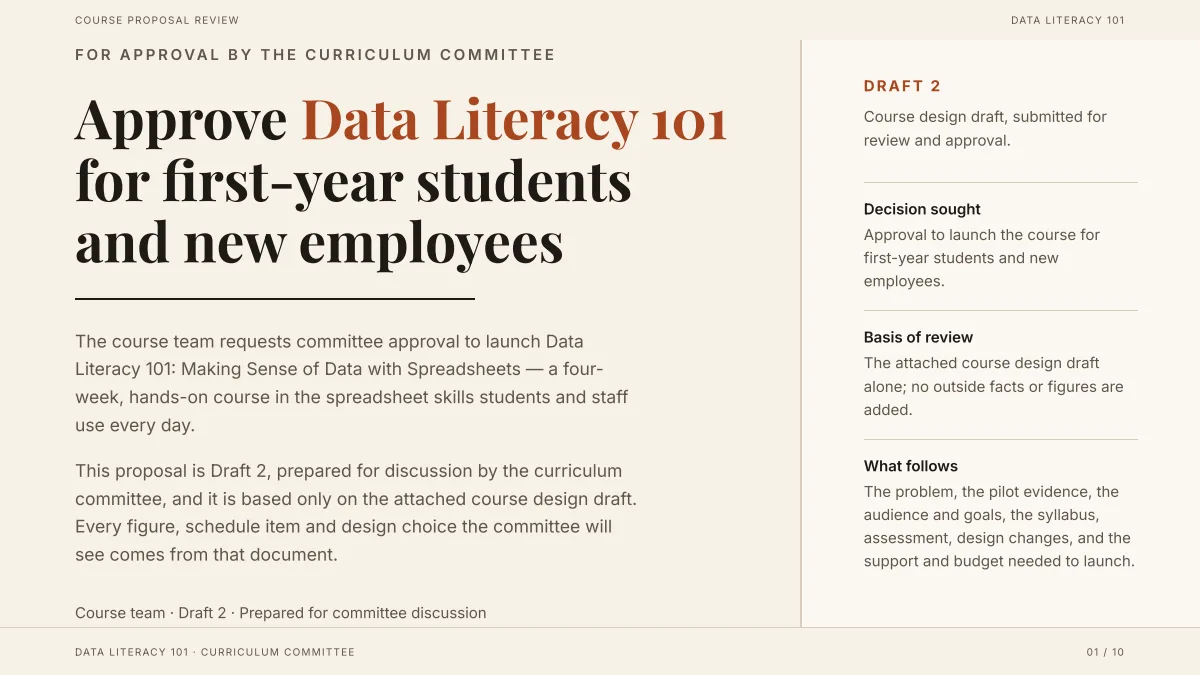
- The title is the decision, not a topic. A board slide 3 (“Decisions requested today”) should read the same way.
- The side column states what the review is based on and what follows: “the attached draft alone, no outside facts added”. For a board, that is where you say which period and which files the figures come from.
- It was made from a Word draft in deep mode (3 credits a slide, 10 slides = 30 credits in the recording). The topic is a course, so none of its words or figures carry over.
How many slides should a board presentation have?
Count about three to five minutes per content slide, because a board discusses rather than listens, and leave at least a third of the meeting for discussion. This is a rule of thumb, not a standard; the product accepts 1 to 30 slides and the cover counts.
| Meeting length | Slides to present | Appendix slides |
|---|---|---|
| 30 minutes | 6 to 8 | 4 to 8 |
| 60 minutes | 10 to 14 | 6 to 12 |
| 90 minutes | 14 to 20 | 8 to 15 |
The appendix column is our suggestion. A slide where the board must decide takes much longer than a slide that notes a result, so cut the “noting” slides first.
What is the difference between a board deck and a board pack?
In common practice the board pack is the document sent in advance (papers, financial statements, committee reports) and the board deck is the shorter set of slides used in the room. If your board reads a long pre-read, your deck can stay short and visual; if there is no pre-read, the deck must carry more. Ask your chair or company secretary which model your board uses.
Do not use “Extensive” text per slide to turn the deck into the pack. Attach the same files, keep the slides at “Concise”, and send the files or a PDF export as the pre-read.
How should I present bad news to the board?
Put it where the board will see it: a result that missed plan goes on the financials slide with the variance shown, not in the appendix, and the risk goes on the risks slide with an owner and an action. The AI drafts what your file says; it does not decide what to emphasise. Read the finished slides for softened wording (“slightly below”, “challenging”) and put the figure back.
- One slide titled with the miss, for example “Revenue is 6% below plan: two causes, one fix”.
- Variance as a number, and as a percentage, next to the plan.
- What you will do, who owns it, and when the board will see the result.
Can the AI word the board’s resolutions?
It can draft the plain-language ask on your closing slide from your notes. It cannot write formal resolutions, and you should not rely on it for them: the legal wording of a resolution, quorum or voting rule is for your company secretary or counsel. Put the formal text in the pack and keep the slide to the decision in one line.
How do I handle financial tables on a board slide?
A table slide takes 2 to 5 columns and up to 6 rows, and each cell is plain text of up to about 60 characters (aim for about 30). That fits “Actual, Plan, Variance, Last year” for six lines; it does not fit a full income statement. Show the six lines the board cares about, and put the full statement in the appendix or the pre-read.
In the exported PowerPoint the table is a native table you can edit, but the values are plain text: nothing recalculates. Check the totals in your spreadsheet before you attach it, and say the currency and the unit (thousands, millions) in the slide title or the table note.
Questions
How do I make a board deck with AI?
List the decisions you need and the facts behind them in a file, attach it with your finance and KPI sheet, write the meeting length and slide order, check the outline cards, generate, and export an editable PowerPoint. Then check every figure against your source.
What should a board meeting presentation include?
The decisions requested, the period’s headline numbers, financials against plan, operating metrics, progress on strategy, key risks, one topic for discussion, the options with a recommendation, and next quarter. Detailed statements go in an appendix.
How many slides should a board deck have?
About ten to fourteen for a 60-minute meeting, with at least a third of the time left for discussion, and extra detail in appendix slides or a pre-read. Your board’s own format comes first.
Is it safe to put board materials into an AI tool?
That depends on your company’s confidentiality rules, which you should check first. We do not use your files to train AI models, but the text of your files is sent to AI providers to write the outline and slides; the Privacy Policy has the details.
Will the AI make up numbers for the board?
If your files contain figures, a figure they lack is written as TBD instead of an invented number, and the export panel lists figures without a source. Figures typed only in the request do not switch that rule on, so check them yourself.
Does the PowerPoint include speaker notes?
No. The exported PPTX has text, shapes and tables you can edit, but no speaker notes; write your own in PowerPoint.
How much does it cost?
Writing the outline is free. Quick mode costs 1 credit per slide, deep mode 3, each AI edit 1. Exporting costs no credits, but it needs Level 2 (any credit pack, bought once) or one new person invited per deck. New accounts get 20 free credits; credit packs are one-time purchases with no subscription, and credits never expire. See the Pricing page for the packs.
Are my files used to train AI models?
No. We do not use your files to train AI models. The text of your files is sent to AI providers to write the outline and slides; the Privacy Policy has the details.
Start from your board notes
Attach the notes and the finance sheet, write the meeting length, and see the outline cards, and which figures are marked TBD, before any slide is made.
Make my board deck