How do you make a strategy presentation with AI?
Updated 2026-11-12
Put your strategy document or notes into the request, say who decides and how many slides you want, and check the outline cards before any slide is made. A strategy presentation works when it opens with the answer, then gives context, choices, a plan, the money, the risks and the decision you need. Twelve slides is a good length for a board; the product accepts 1 to 30 and exports editable PowerPoint (.pptx).
Below: the standard structure as a table, how to write each slide so it makes one point, the five steps in the product, and how a board version differs from a version for the whole company. The structure is our suggestion, not a product template, and we have no recorded strategy deck: the picture is a real slide from a made-up coffee launch plan that shows the pattern of a conclusion title over evidence.
Five steps from a strategy document to a strategy deck
Put the strategy in one document
Write down, in this order: where you stand now, what is changing, the choices you considered, the one you picked and why, the plan with dates, the money, the risks and the decision you need. A Word, PDF, Markdown, Excel or text file works (up to 25 MB each, up to 24 files). The AI uses only facts from your request, your files and its research, and never invents statistics, so a number that is not in your file comes out as "TBD" or is left out.
Write the request: who decides, how many slides, what you want from them
On the home page type the request (a template is below) and click "Add files" to attach the document. Put the slide count in the request; the cover counts.
Choose the audience and scenario under "More"
Audience "Executives" tells the AI to put conclusions and decisions first with little detail; "Teammates" tells it to assume shared context and give concrete next steps. Scenario "Proposal" asks for the problem, the plan, why it works and what it needs, which suits a strategy you want approved; "Work report" asks for results, problems and next steps, which suits a strategy review. Tone "Rigorous" or "Professional" keeps the wording measured. After you change them click "Regenerate outline".
Click "Next", choose a mode and check every card against the table
Quick mode is 1 credit per slide, deep mode 3. Each card is a title, two to five points and a suggested layout, all editable text. Check that every title is a sentence that states a conclusion, and that the cards follow the order in the table below. Add, delete and drag cards freely; nothing is charged until you click "Generate presentation".
Generate, check the figures, export
Open the sources drawer to see where each figure came from and use the "Fact-check" action, then compare the financial and target figures with your own file. Ask for changes in plain words (1 credit each). Export PowerPoint (.pptx) to finish in PowerPoint, or PDF to send. Exporting costs no credits, but it needs Level 2 (any credit pack, bought once) or one new person invited per deck.
The 12 slides of a strategy presentation, and a request to paste
The table is our suggested order for a 30-minute board or leadership review. The last column is the layout kind the outline step would usually suggest for that content; the AI may choose another. Slides 11 and 12 can move to an appendix if time is short.
| # | Slide (title it as a conclusion) | What goes on it | Layout kind |
|---|---|---|---|
| 1 | Title | Strategy name, period covered, the decision you need in the subtitle | Cover |
| 2 | Executive summary | The answer in three points: what we will do, why, what it costs | Bullets or cards |
| 3 | Where we stand | Two to four numbers on the current position | Stats |
| 4 | What is changing | The market or customer shift that forces a choice, with a source | Cards |
| 5 | The strategic choice | Where we will compete and how we will win, in one sentence | Statement |
| 6 | Options we rejected | Two or three alternatives and the reason each lost | Compare or table |
| 7 | The plan | Three or four phases with what is done by when | Process or timeline |
| 8 | Investment and return | What it costs, over what period, and what comes back | Table or chart |
| 9 | Risks | The three biggest risks, each with its response and an owner | Table |
| 10 | How we will know | Three to five measures with today value and target | Stats or table |
| 11 | Who owns it | Owners and the decision rhythm | Hierarchy or table |
| 12 | The decision | What you ask them to approve, by when, and the next step | Closing |
The picture is a real slide of the pattern used for slides 3 and 4: a title that states the conclusion, a line of context, and four short evidence cards with one number each. It comes from our recorded launch-plan deck (a made-up coffee brand, October 2026); the figures are market data for that made-up launch, not strategy figures.
Pasted into the box (English)
Strategy presentation, 12 slides
Make a 12-slide strategy presentation for [the board / the leadership team] from the attached strategy document. We need them to decide [the decision] by [date]. Order: title, executive summary, where we stand, what is changing, the strategic choice, options we rejected, the plan, investment and return, risks, how we will know, who owns it, the decision.
Write every slide title as a sentence that states the conclusion. Use only the facts and figures in the document; don't add outside statistics. Where the document has no figure, write "TBD".
(Replace the brackets. Choose the audience "Executives" and the scenario "Proposal" under "More".)
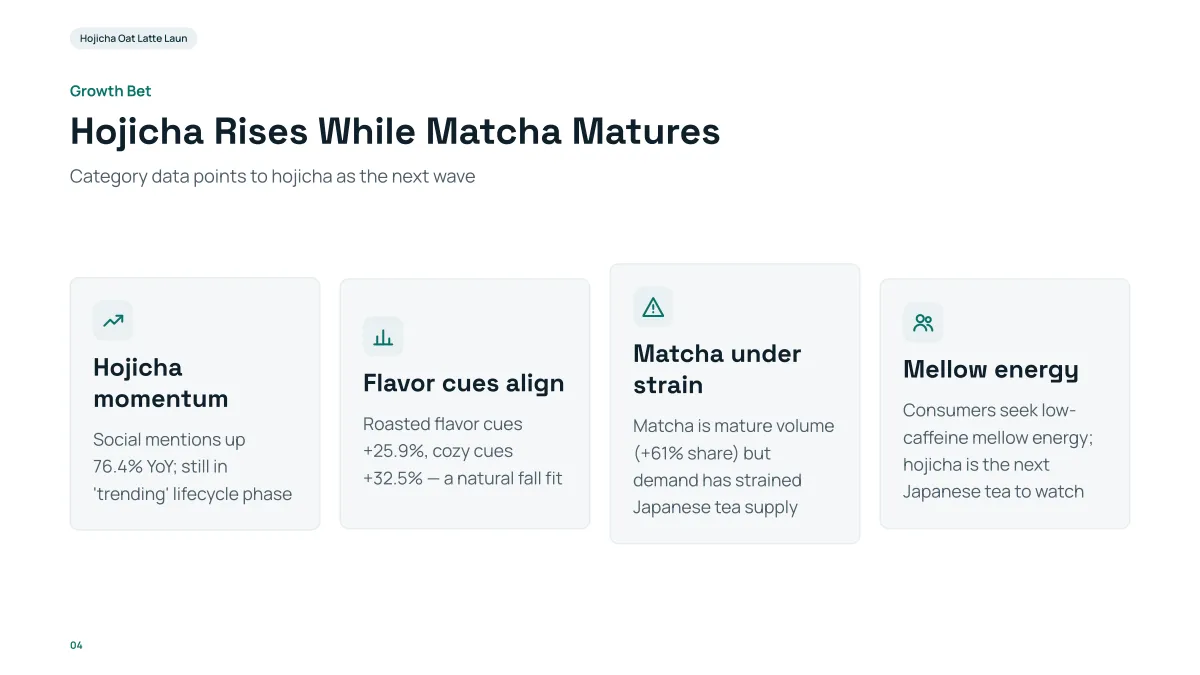
- The title is the conclusion and the four cards are the evidence, one idea each. A reader who sees only the titles still gets the argument.
- The content is a made-up coffee launch, written from facts we supplied. Your slide takes its facts from your document, never from this example.
- In our recording the 12 slides came about 71 seconds after the request, in deep mode.
- Replay this run step by step (no sign-in)
- Download the PPTX
- Download the PDF
- All-hands meeting slides: the same strategy for the whole company
- Business review presentation: results against plan
- SWOT analysis presentation: the position behind the strategy
- Outline to presentation: how the outline cards are read
- How many slides for your talk length
How do I write each slide so it makes one point?
Write the title as the sentence you want the reader to remember, and let the rest of the slide prove it. The outline step is told to state the takeaway in each slide title whenever your content supports one, with a title of at most about 13 words and two to five points of about 20 words each under it (read from the code, 2026-11-07). A topic label gives the AI nothing to hold on to.
| Topic label | One-conclusion title (made-up examples) |
|---|---|
| Market | The mid-size segment grew twice as fast as the rest and no rival serves it |
| Competition | Two rivals hold most of the segment and neither offers onboarding |
| Plan | Three phases take us from pilot to 40 sites by Q4 |
| Risks | Hiring is the one risk that can move the date, and it has an owner |
Test each slide by asking "so what?" of its title. If the answer is another slide's title, merge the two.
How is a board version different from an all-hands version?
The same strategy needs two decks, because the question each audience asks is different. In the product the difference is partly a setting: choose the audience "Executives" for the board and "Teammates" for the company.
| Board or leadership | Whole company | |
|---|---|---|
| Question they ask | Should we approve this and what is the risk? | What does this mean for my work? |
| Opens with | The decision you need | The one-sentence direction |
| Length | 10 to 15 slides plus an appendix | 6 to 10 slides |
| Detail | Options rejected, financials, risks with owners | Priorities, what changes for teams, what stays |
| Product setting | Audience "Executives", scenario "Proposal" | Audience "Teammates", scenario "Work report" or "Talk" |
| Text per slide | Concise or Detailed (it is often read) | Minimal or Concise (it is shown on a screen) |
Both columns are our suggestion. For the company version see the guide on all-hands meeting slides.
How many slides should a strategy presentation have?
Our rule of thumb is one to two minutes per slide, and a board will interrupt, so leave a third of the time for questions. It is an experience-based guideline, not a standard.
| Time | Slides | Keep |
|---|---|---|
| 15 minutes | 8 to 10 | Slides 1 to 3, 5, 7, 8, 12 of the table |
| 30 minutes | 12 | The whole table |
| 60 minutes | 15 to 20 | The whole table and a few detail slides on the plan and the money |
The product makes 1 to 30 slides, the cover included. Put the number in the request.
How do I make the slides from a long strategy document?
Attach it and the outline step reads it; you do not paste it. Two limits are worth knowing, both read from the code and not tested by us on a long document: the outline step reads about 24,000 characters of attached files in all, and a longer file gives the AI its headings first and then its opening. In quick mode each slide then draws the paragraphs it needs from the whole file. The outline page says when a file was too long to read whole.
Use heading styles in Word so the headings are found, and put the numbers you want on slides in a table or in plain sentences rather than in a chart picture, which is not read.
What should I check before presenting?
- Every figure against your source: targets, costs, dates and percentages.
- That each title still states a conclusion after your edits.
- That named competitors and market claims come from your document or a source you can cite.
- That there are no speaker notes in the export (the product does not write them); add yours in PowerPoint.
Can I use the situation, complication, options, recommendation, roadmap structure?
Yes. It is a common way to order a strategy argument, and it maps onto the 12 slides above. Use it when you want a shorter deck or a one-page logic to check your order before you write.
| Stage | Question it answers | Slides in a 12-slide deck | Slides in an 8-slide deck |
|---|---|---|---|
| Situation | Where do we stand? | 2 to 3 (title and summary, where we stand) | 1 to 2 |
| Complication | What is changing that forces a choice? | 1 to 2 (what is changing) | 1 |
| Options | What could we do and why did the others lose? | 2 (the choice, options rejected) | 1 |
| Recommendation | What do we do and what does it return? | 2 (investment and return, the decision) | 2 |
| Roadmap | Who does what by when, and how do we know? | 3 to 4 (plan, risks, measures, owners) | 2 to 3 |
The slide counts are our suggestion. State the answer on slide 2 whichever order you use, so that the reader knows the recommendation before the evidence.
What does each audience need: board, team or investors?
The same strategy changes in what it opens with, what it hides and how long it runs. These columns are our suggestion; the audience setting changes how the AI writes, not the structure, so state the structure in your request.
| Board | Team | Investors | |
|---|---|---|---|
| Their question | Should we approve this, and what is the risk? | What does this mean for my work? | Why will this create returns, and how much do you need? |
| Opens with | The decision you need | The direction in one sentence | The opportunity and the ask |
| Show more of | Options rejected, risks with owners, financials | Priorities, what changes, what stays | Market, traction, use of funds |
| Leave out | Team-level task lists | Financial detail and rejected options | Internal debates and process detail |
| Length | 10 to 15 slides plus appendix | 6 to 10 slides | 10 to 14 slides |
| Product setting | Audience Executives, scenario Proposal | Audience Teammates, scenario Work report or Talk | Audience Investors, scenario Investor pitch |
For the investor version see the pitch deck guide; do not paste company-internal numbers into an investor deck that your file does not support, because every figure should trace to your file.
Questions
Can AI make a strategy presentation?
Yes, as slides. Give it your strategy document, say who decides and how many slides you want, and it drafts one editable card per slide, then the deck, which you export as PowerPoint or PDF. The strategy itself has to come from you: it knows only what is in your request and files.
What is the standard structure of a strategy presentation?
Our suggestion is 12 slides: title, executive summary, where we stand, what is changing, the strategic choice, options we rejected, the plan, investment and return, risks, how we will know, who owns it, the decision. It is a structure we propose, not a measured best practice.
How do I make each slide one conclusion?
Write each title as a sentence that states the point, for example a result or a choice, and keep the evidence in the cards under it. The outline step is told to state the takeaway in the title when your content supports one.
Can I make a version for the board and one for the whole company?
Yes: make two decks from the same document. Choose the audience "Executives" for the board and "Teammates" for the company, and ask for fewer slides and less detail for the company version.
Will it make up market data or competitor facts?
It is told to use facts only from your request, your files and its research, and not to invent statistics. If you attach a file, a missing figure can show as "TBD". Read every figure against your source before you present.
How many slides does a strategy presentation need?
Twelve for a 30-minute board review, 8 to 10 for 15 minutes and 15 to 20 for an hour, counting the cover. These are our rules of thumb; the product makes 1 to 30 slides.
What is the situation, complication, options, recommendation, roadmap structure?
It is a common order for a strategy argument: where you stand, what forces a choice, the options and why one won, the recommendation with its return, and the roadmap. Put the answer on slide 2 so the reader knows it before the evidence.
How is a strategy deck for investors different from one for the board?
An investor deck opens with the opportunity and the ask, and shows market, traction and use of funds. A board deck opens with the decision and shows options rejected, risks and financials. Choose the audience Investors and scenario Investor pitch for the first one.
What should I leave out of a strategy presentation?
Task lists, process history and anything that does not change the decision. Move detail to an appendix. If a slide does not support one of the conclusion titles, merge it or cut it.
How much does it cost?
Writing the outline is free. Quick mode costs 1 credit per slide, deep mode 3, each AI edit 1. Exporting costs no credits, but it needs Level 2 (any credit pack, bought once) or one new person invited per deck. New accounts get 20 free credits; credit packs are one-time purchases (for example $5.99 for 40 credits plus 10 bonus) with no subscription, and credits never expire. See the Pricing page.
Start from your strategy document
Attach it, write who decides and how many slides, and read the titles of the cards before any slide is made.
Make my strategy deck