What goes in all-hands meeting slides, and how do you make them with AI?
Updated 2026-11-07
An all-hands deck needs eight sections: welcome and agenda, company results, wins and customer stories, priorities, announcements, people moments, questions, and a close. For a 45-minute meeting that is 10 to 12 slides. Paste last month's notes or your outline into the box on the home page, write the slide count, check the outline cards, generate, and export an editable PowerPoint (.pptx).
Below: the sections as a table with minutes and slides, how long the deck should be, how a quarterly meeting differs from a monthly one, and the steps in the product. The section table is our suggestion, not a product template, and we have no recorded all-hands deck: the picture is a real agenda slide from a made-up coffee launch plan, shown as the pattern for your agenda slide.
Five steps from meeting notes to all-hands slides
Collect one block of facts per section
For each section, ask its owner for the numbers and names: results against target, two or three wins, the announcements, the people to welcome or thank. Put them in one document or one outline (Word, Markdown, text, up to 25 MB), because the AI uses only your facts and never invents statistics.
Paste the outline or attach the notes, and write the count
Paste the outline into the box on the home page or attach the notes with "Add files", then add one line such as "A 45-minute all-hands, 11 slides, use only these facts". If you start from a typed outline, see the guide on outline to presentation for how each heading and line is read.
Choose audience, scenario and text level under "More"
Audience "Teammates" tells the AI to assume shared context and give concrete next steps. Scenario "Work report" asks for results, problems and next steps; "Talk" asks for one big idea carried through stories and takeaways, which suits a strategy or vision session. Tone "Friendly" or "Inspiring". Set "Text per slide" to Minimal or Concise (about 50 or 100 words) because the slides are shown on a screen to a room. Click "Regenerate outline" after you change them.
Click "Next" and add what the outline cannot know
Choose quick mode (1 credit per slide) or deep mode (3). Compare the cards with the table below. Add a card by hand for the question slide and for each person you want to name. Nothing is charged until you click "Generate presentation".
Generate, add photos, export
Ask for changes in plain words (1 credit each). The product does not make pictures: upload team and event photos with "Add files", choose "My uploads" under "Pictures", and place one with "Use my uploaded image" in the editor. Export PowerPoint (.pptx) or PDF. Exporting costs no credits, but it needs Level 2 (any credit pack, bought once) or one new person invited per deck.
The 8 sections of an all-hands deck, with minutes
The table is our suggested running order for a 45-minute all-hands. The slide counts add up to 11 with the cover; adjust the minutes to your meeting.
| # | Section | Minutes | Slides | What goes on it |
|---|---|---|---|---|
| 1 | Welcome and agenda | 3 | 2 | Cover, then an agenda with each block, its owner and its minutes |
| 2 | Company results | 8 | 2 | Three or four headline numbers against target, with the period |
| 3 | Wins and customer stories | 6 | 1 | Two or three wins, each with who made it happen |
| 4 | Priorities | 8 | 2 | The three priorities for the next period and what each means for teams |
| 5 | Announcements | 4 | 1 | Product, organization or policy news, one line each |
| 6 | People moments | 3 | 1 | New joiners, anniversaries, thanks |
| 7 | Questions | 10 | 1 | How to ask (live or in advance); the slide stays up |
| 8 | Close | 3 | 1 | The one thing to remember, and the date of the next meeting |
The picture is a real agenda slide from our recorded launch-plan deck (a made-up coffee brand, October 2026): three columns for the section, its focus and its slide numbers. It is the pattern for your slide 2. Its content is not an all-hands agenda.
Pasted into the box (English)
Q3 all-hands, 45 minutes
# Q3 all-hands
## 1. Agenda: five blocks, 45 minutes
- Results (8 min), priorities (8 min), announcements (4 min), questions (10 min)
## 2. Q3 revenue reached 104% of target
- Revenue: $4.2M against a $4.0M target
- Customer count: 310, up from 280
## 3. Three teams shipped the migration early
- Support, finance and data: finished two weeks ahead of plan
## 4. Next quarter we focus on onboarding speed
- Priority 1: new customers live in 10 days, from 17
- Priority 2: one help-center search for all products
## 5. Welcome to five new colleagues
- Names and teams to be added by People team
## 6. Questions
(Made-up company and figures. Request line: "Turn this outline into an 11-slide all-hands for the whole company. Use my wording and figures; don't add outside facts. Mark anything missing as TBD.")
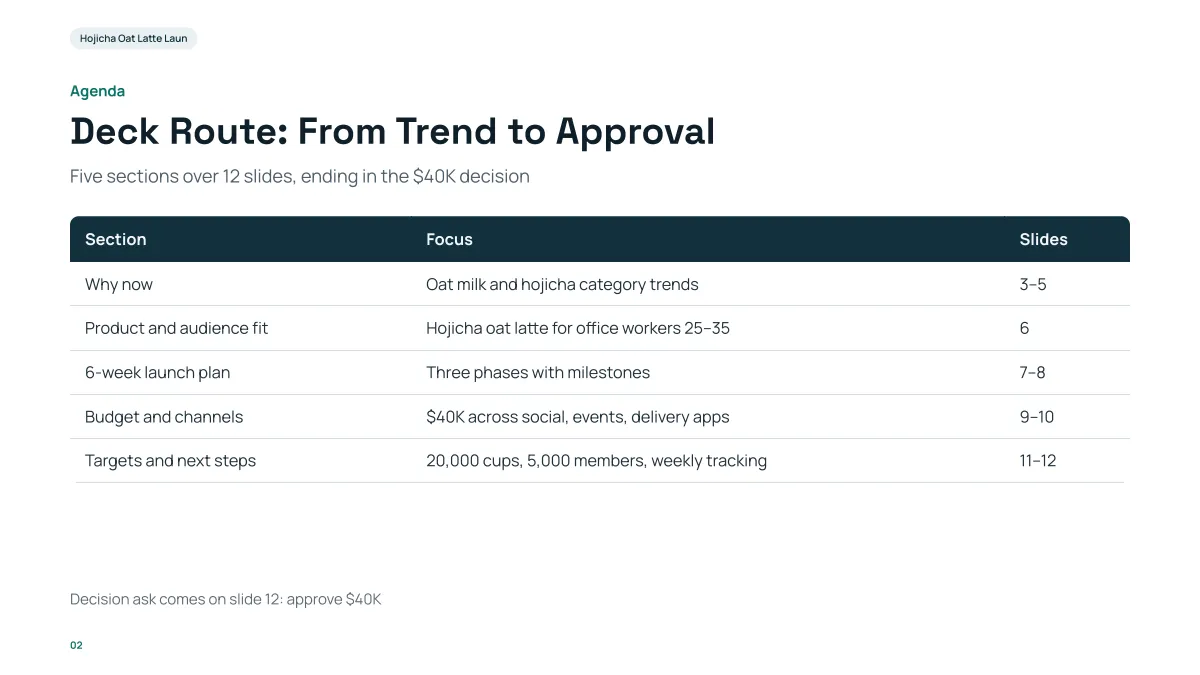
- An agenda as a small table: each block, what it covers, where it sits. For an all-hands, change the last column to the owner and the minutes.
- The content is a made-up coffee launch. Your agenda comes from your outline.
- In our recording, the outline cards came about 16 seconds after the request and the 12 slides about 71 seconds after it.
- Replay this run step by step (no sign-in)
- Download the PPTX
- Outline to presentation: how to write the outline
- Strategy presentation: the 12-slide structure for the board
- Status report presentation: six slides for a weekly or monthly update
- Webinar slides: slides by webinar length
- Speaker notes: what the export contains
How long should an all-hands meeting deck be?
Count one to two minutes per slide for the parts you present and nothing for the questions; leave a quarter of the meeting for questions. This is an experience-based rule of thumb, not a standard.
| Meeting length | Slides | Text per slide setting |
|---|---|---|
| 30 minutes | 6 to 8 | Minimal or Concise |
| 45 minutes | 10 to 12 | Minimal or Concise |
| 60 minutes | 12 to 15 | Concise |
The product makes 1 to 30 slides, the cover included. For a meeting that people may read afterwards, send the PDF and set the text level to Detailed.
How is a quarterly all-hands different from a monthly one?
| Monthly | Quarterly | |
|---|---|---|
| Purpose | Keep everyone current | Look back, reset direction |
| Length | 30 minutes, 6 to 8 slides | 45 to 60 minutes, 10 to 14 slides |
| Results | Last month against target, one chart | The quarter against target, the trend and the reasons |
| Priorities | What is next month | The next quarter's three priorities and what each means for teams |
| Extras | One wins slide, one announcement | Customer stories, organization changes, a leadership message |
| Reuse | Keep the same slide order every month so people know where to look | Reuse the monthly slides as the results section |
Both columns are our suggestion. For a monthly meeting, keep the previous deck as the source file: attach it with the new notes and say "same structure as the attached deck", which we have not tested, then compare the cards before you generate.
How do I turn meeting notes or an outline into slides?
Paste or attach them, as in the steps above. The outline step writes one card per slide: a heading becomes the slide title (a sentence that states the point when your content supports one), and the lines under it become two to five short points. Your numbers and names are kept. See the guide on outline to presentation for the details.
Notes written as a long narrative are shortened to fit; if a section matters, give it a heading and put its figures in short lines.
Can I add polls, live questions or a recording?
No. The product makes slides and exports them as PowerPoint or PDF; it has no poll, live-question or recording feature. Use your meeting tool for those and keep a "How to ask questions" slide in the deck.
Who should check the deck before the meeting?
- Each section's owner, for their own figures: compare each figure with the source.
- Whoever owns people moments, for names and spelling.
- Anyone who will present: open the exported PowerPoint on the computer you will use.
Speaker notes are not in the export; add yours in PowerPoint (see the speaker notes guide).
Questions
What should be in all-hands meeting slides?
Our suggestion is eight sections: welcome and agenda, company results, wins and customer stories, priorities, announcements, people moments, questions, and a close. That is about 11 slides for a 45-minute meeting. It is a structure we propose, not a measured best practice.
How many slides for an all-hands meeting?
About 6 to 8 for 30 minutes, 10 to 12 for 45 and 12 to 15 for 60, by the rule of thumb of one to two minutes per slide with a quarter of the time kept for questions. The product accepts 1 to 30.
Can AI make all-hands slides from meeting notes?
Yes. Paste or attach your notes or outline, say how many slides you want, and it drafts one editable card per slide for you to check, then the deck, which you export as PowerPoint or PDF. It uses only the facts you give it, so each section needs its numbers.
What is the difference between a monthly and a quarterly all-hands?
A monthly one keeps people current in 30 minutes and 6 to 8 slides; a quarterly one looks back at the quarter, resets direction and runs 45 to 60 minutes and 10 to 14 slides. This is our suggestion.
Can I add team photos?
Yes. The product does not generate pictures, but you can upload your own (PNG, JPG, WebP or GIF, up to 25 MB each) with "Add files", choose "My uploads" under "Pictures", and place one with "Use my uploaded image" in the editor.
How much does it cost?
Writing the outline is free. Quick mode costs 1 credit per slide, deep mode 3, each AI edit 1. Exporting costs no credits, but it needs Level 2 (any credit pack, bought once) or one new person invited per deck. New accounts get 20 free credits; credit packs are one-time purchases (for example $5.99 for 40 credits plus 10 bonus) with no subscription, and credits never expire. See the Pricing page.
Start from your meeting notes
Paste your outline, write the slide count, and check the cards before any slide is made.
Make my all-hands slides