How many slides does a webinar need, and how do I make them with AI?
Updated 2026-11-06
Subtract the time for questions, then plan one to two minutes per slide: a 30-minute webinar with 10 minutes of Q&A has 20 minutes of talk and needs 10 to 20 slides; a 45-minute one with 15 minutes of Q&A has 30 minutes of talk and needs 15 to 30. This is a rule of thumb, not a standard, and Gamma AI Slide makes up to 30 slides per deck.
Below: the table for three webinar lengths, a 45-minute run-of-show with slides per segment, a prompt to paste, and what the product does not do: it makes the slides only, with no live polls, chat or recording, and the exported PowerPoint carries no speaker notes.
Five steps from a webinar topic to slides
Work out your talk time and slide count
Take the length of the slot, subtract the Q&A, and use the table below. Count the housekeeping and title slides: they take seconds.
Write the request with the promise, audience and count
For example: "Make an 18-slide webinar on [topic] for [audience], a 30-minute talk followed by 15 minutes of Q&A. The attendees will leave knowing [one takeaway]." Attach your notes, a report or last time's deck if you have one, and say "stick to the file".
Choose the scenario, audience and text level
Under "More" choose the scenario "Talk" (the AI is told a talk carries one big idea through stories and takeaways) or "Internal training", and an audience. Set "Text per slide" to Minimal or Concise for a live webinar.
Read the outline against the run-of-show
Click "Next", choose a mode and compare the cards with the table below. Move the cards so the sections fit your minutes. Nothing is charged until you click "Generate presentation".
Generate, export, add notes and a PDF handout
Export PowerPoint (.pptx) to present from, add your notes in PowerPoint, and export the PDF as the handout you send after. Exporting is free.
Slides by webinar length, and a 45-minute run-of-show
The numbers apply the rule from our guide on how many slides to use (one to two minutes per slide) to the talk time. The Q&A times are our assumption, not a measurement, and we did not time any webinar for this page.
| Webinar length | Q&A | Talk time | Slides at 1 to 2 minutes each |
|---|---|---|---|
| 30 minutes | 10 | 20 minutes | 10 to 20 |
| 45 minutes | 15 | 30 minutes | 15 to 30 |
| 60 minutes | 15 | 45 minutes | 23 to 45, so at most 30 in one deck: use 30 and talk longer per slide, or make two decks |
The second table is our suggested run-of-show for the 45-minute webinar (30 minutes of talk, 15 of Q&A) in 18 slides, about 1.7 minutes per slide. It is a structure we propose, not a recording, and not a webinar template file: the product has no webinar template, so pick any template under "Look".
| Segment | Minutes | Slides | What goes on them |
|---|---|---|---|
| Welcome and housekeeping | 3 | 2 | Title slide, then speaker and how to ask questions (the tools of your webinar platform) |
| Agenda and the one takeaway | 1 | 1 | What attendees will leave with |
| Why this matters | 5 | 3 | The problem, one fact with its source, a short story |
| Main point 1 | 8 | 4 | The idea, how it works, an example, what to do |
| Main point 2, with the demo | 8 | 4 | Screenshots of the demo; the live demo happens outside the deck |
| Recap and call to action | 3 | 2 | Three takeaways, the one action you want |
| Resources and next steps | 2 | 1 | Link, offer, date of the next session |
| Q&A | 15 | 1 | A holding slide with your contact details |
Prompt (English)
Webinar, 18 slides
Make an 18-slide webinar presentation on [topic] for [audience]. It is a 30-minute talk followed by 15 minutes of Q&A. Attendees should leave knowing [one takeaway]. Use the attached notes and stick to them; don't add outside figures. Order: title, speaker and how to ask questions, agenda, why this matters (3 slides), main point 1 (4 slides), main point 2 with the demo as screenshots (4 slides), recap and call to action (2 slides), resources and next steps, and a final Q&A slide with my contact details. Short slide text, one idea per slide.
(Replace the brackets. Slide counts add up to 18: 2 + 1 + 3 + 4 + 4 + 2 + 1 + 1.)
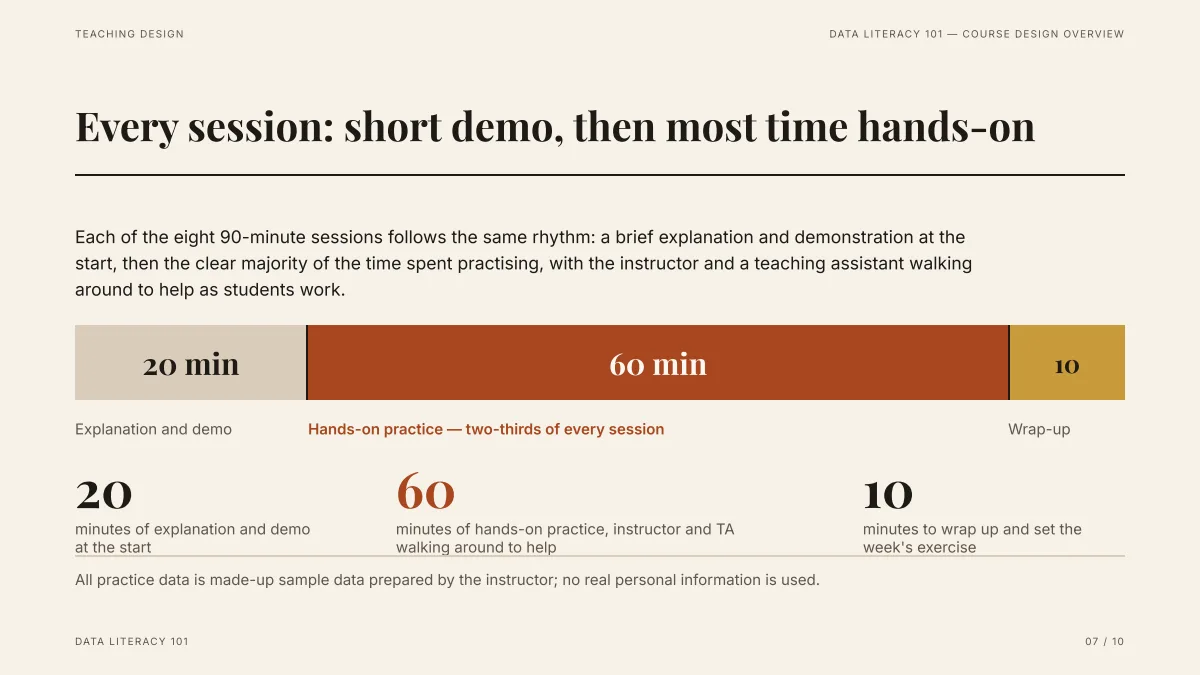
- One bar shows how the time is split: the same pattern fits a webinar (talk, demo, Q&A). The numbers here are the course's, from the draft we supplied.
- Put your own minutes in the request; do not rely on the AI to divide your time.
- The slide was made in deep mode from an attached document: 10 slides about 71 seconds after the request.
Does it add speaker notes for my webinar?
No. The exported PowerPoint (.pptx) has editable slide text and no speaker notes: we opened the PPTX files of our recorded examples and none has a notes part. Add your script under View, then Notes in PowerPoint, and see the speaker notes guide for a timing rule. If you use a script, keep the slides short: Minimal (about 50 words) or Concise (about 100).
Does it run the webinar, with polls, chat or a recording?
No. The product makes slides and exports them. Registration, live polls, chat, Q&A and recording belong to your webinar platform. A poll can be an ordinary slide with the question on it, and you start the poll in your platform.
Can I send the slides to attendees afterwards?
Yes. Export the PDF, which keeps the layout, and send it as the handout. For a handout without you present, ask for more text per slide: Detailed is about 150 words and Extensive about 210. Make a second version of the deck for that, since the live version should stay short.
Is there a webinar template?
No template is made for webinars. The structure table above does the job: put it in your request, pick the look you like under "Look", and check the cards before generating.
Questions
How many slides for a 45-minute webinar?
With 15 minutes of Q&A you talk for 30 minutes, which is 15 to 30 slides at one to two minutes per slide. A run-of-show of 18 slides is in the table above. It is a rule of thumb, not a standard.
Can AI make webinar slides?
Yes, the slides. Give it the topic, audience, talk time and slide count, attach your notes, and it drafts an outline you can edit and then the slides, as PowerPoint or PDF. In our recorded 10-slide example the whole deck took about 71 seconds. It does not run the webinar itself.
Does the export include speaker notes?
No. Add notes in PowerPoint under View, Notes. See the speaker notes guide.
What is the maximum number of slides?
Thirty per deck, and the cover counts. For a long webinar use 30 slides and talk longer per slide, or make two decks.
How much does it cost?
Writing the outline is free. Quick mode costs 1 credit per slide, deep mode 3, each AI edit 1, and exporting is free. New accounts get 20 free credits; credit packs are one-time purchases (for example $5.99 for 40 credits plus 10 bonus) with no subscription, and credits never expire. See the Pricing page.
Start with your talk time
Write your topic, talk minutes and slide count, and check the outline cards against the run-of-show before any slide is made.
Make my webinar slides