How do I make a SWOT analysis presentation with AI?
Updated 2026-11-12
A SWOT analysis presentation takes one slide for the four quadrants with 3 to 6 short items each, plus one closing slide that turns them into actions (a TOWS matrix). Add one slide per quadrant only if the audience needs the evidence.
Use one slide for the four quadrants, so the audience sees the whole picture at once, and add one slide per quadrant only if the audience needs the evidence. Then end with a slide of actions that follow from the SWOT. Three to six items per quadrant is plenty, and every item should be specific enough to check.
To build it with Gamma AI Slide, write the SWOT findings in a file (or paste them), attach it, ask for the slides you want, check the outline cards, and generate an editable PowerPoint. Writing the outline is free; a quick-mode slide is 1 credit, so a five-slide SWOT deck is 5 credits.
One limit up front: the product has no built-in 2×2 quadrant layout. It builds four cards side by side, a four-column table, or two comparison slides (internal and external), and this page shows which to choose. We have no recorded SWOT; the picture is a different real slide with four cards, and the example company is made up.
Six steps from report text to SWOT slides
Write the four lists in a file, with evidence
Use four headings: Strengths, Weaknesses (both inside the company), Opportunities, Threats (both outside). Under each, one line per item with the figure or fact behind it ("Repeat customers: 42% of orders" rather than "loyal customers"). Save it as Word, .txt or .md, or attach the report itself.
Put the figures in the file: when an attached file contains figures, the slide figures are limited to what the file says and a missing one is written as "TBD". Figures typed only in the request do not switch that rule on.
Write the request and attach the file
On the home page, click "Add files", attach the file, and paste the request below with your slide plan. Click "Next" and choose "Quick mode".
Set scenario, audience and slide count
Under "More", set the scenario to "Work report" for an internal review or "Proposal" if the SWOT supports a decision, and the audience to "Executives" or "Teammates". "Text per slide" at "Concise" suits quadrant slides. Put the number of slides in the request.
Pick the layout on each outline card
For the all-in-one slide choose "Table" (four columns) or "Cards" (four cards); for the internal-versus-external pair choose "Comparison". In quick mode a layout you pick is locked in, so pick on the cards that matter. A card that states a figure your file does not contain says "Not in your materials: … It will be written as TBD".
Generate and check the wording of each item
Click "Generate presentation". The AI shortens items to fit a slide: a card holds about 120 characters of text and a table cell about 60. Check that a shortened item still says the same thing, and that no item moved to the wrong quadrant (a Strength that is really an Opportunity is the usual slip).
Export
Click "Export" and choose PowerPoint (.pptx) or PDF. Exporting costs no credits, but it needs Level 2 (any credit pack, bought once) or one new person invited per deck. In the PPTX the table is a native PowerPoint table; in a table layout the cells are plain text, so colour the four columns in PowerPoint if you want the classic colour-coded look.
Three ways to lay out the four quadrants, and a worked example with a made-up company
Choose by how much each item must say. The first column names the product layout the arrangement uses.
| Arrangement | Slides | Product layout | Best for | Limit |
|---|---|---|---|---|
| Four cards side by side | 1 | Cards (2 to 4 cards) | A first look: 1 to 2 lines per quadrant | About 120 characters per card |
| Four columns, one per quadrant | 1 | Table (2 to 5 columns, up to 6 rows) | Many short items: up to 6 per quadrant | About 60 characters per cell; cells are plain text |
| Internal, then external | 2 | Comparison (2 to 5 points per side) | Strengths vs. Weaknesses, then Opportunities vs. Threats | Two sides per slide, not four |
| One slide per quadrant | 4 | Points + takeaway | Evidence and figures per quadrant | Longer deck |
A true 2×2 grid (four boxes in a square) is not one of the layouts. You can draw four boxes in PowerPoint after export, or ask the AI assistant in the editor for a 2×2 grid; we have not tested that request, so look at the result.
The worked example is a made-up company, "Northwind Bikes", with invented numbers: it is an example, not a recording and not real data. Its SWOT becomes five slides: 1 cover; 2 SWOT at a glance (Table, four columns); 3 Strengths and Weaknesses (Comparison); 4 Opportunities and Threats (Comparison); 5 Moves that follow (Steps: use a strength on an opportunity, fix a weakness that a threat exposes). The picture shows four cards side by side in a real recording: a different topic, but exactly what a four-card SWOT slide looks like.
northwind-swot-notes.docx (example)
Northwind Bikes: SWOT, 2027 planning
Strengths: 42% of orders are repeat customers; own repair shop in all 3 stores; 4.7 average rating on 1,900 reviews.
Weaknesses: 70% of sales come from two stores; online checkout takes 6 clicks; no electric bikes in the range.
Opportunities: city adds 40 km of bike lanes in 2027; two employers offer a bike-commute subsidy; e-bike rentals have no local provider.
Threats: a national chain opens 2 km from the main store; import tariffs may raise frame costs; spring weather swings seasonal sales.
(All names and numbers are invented for this example.)
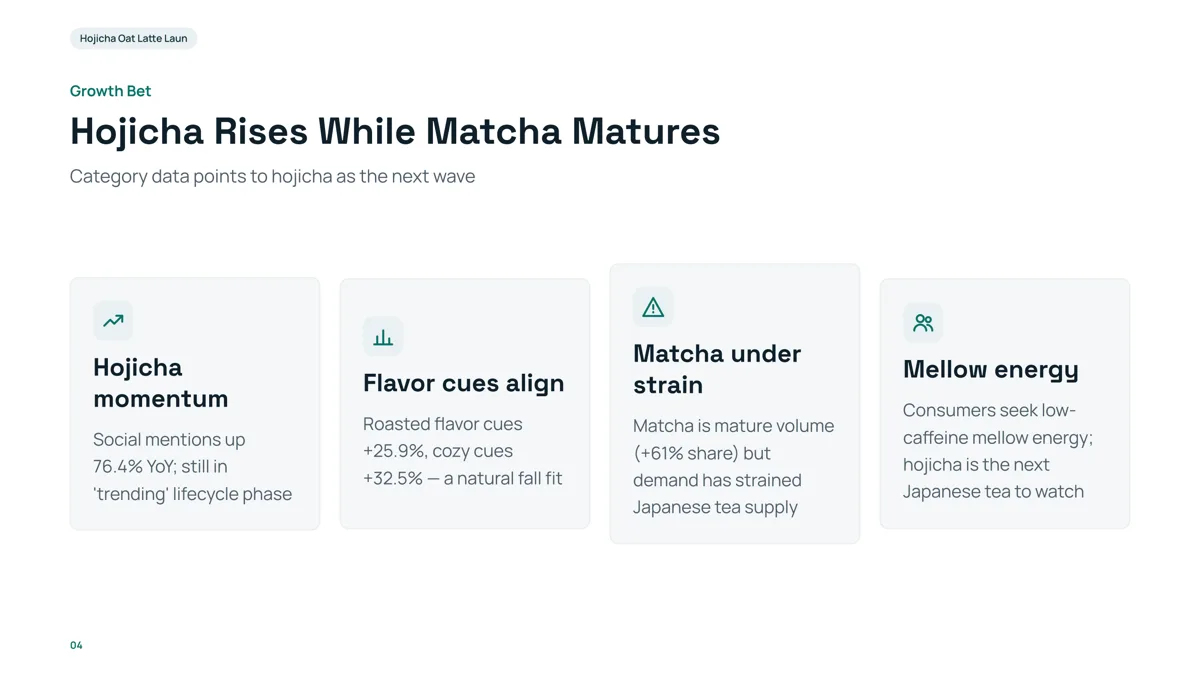
- Each card has a short heading and one or two lines: the same size as one SWOT quadrant. A SWOT in four cards is as dense as this, no more.
- The four cards are in a row, not a 2×2 square. If you want the classic square, see the table above.
- This slide is from a launch plan about coffee drinks; the heading and every figure on it are not ours to reuse for a SWOT.
- Replay this run step by step (no sign-in)
- Download the PPTX
- Business review decks: results, problems and next steps
- Competitive analysis presentation: comparison tables and sources
- Strategy presentation: where the SWOT fits in the deck
- Marketing plan presentation
- Investor pitch decks
- Outline to presentation: pick a layout on each card
- Make a presentation from text: the full walk-through
Should a SWOT be one slide or four?
One slide if the audience has to agree on the overall picture; four slides (one per letter) if each item needs figures; or two (internal, external) as the middle path. In every case add a closing slide with the actions, because a SWOT that stops at the lists has not answered "so what?".
How do I write items that belong in the right quadrant?
| Quadrant | Where it comes from | Test | Example item |
|---|---|---|---|
| Strength | Inside the company | Could a competitor copy it this month? If not, it is a strength | Own repair shop in all 3 stores |
| Weakness | Inside the company | Is it something you control and could fix? | Online checkout takes 6 clicks |
| Opportunity | Outside the company | Does it exist whether or not you act? | City adds 40 km of bike lanes |
| Threat | Outside the company | Could it hurt you without any mistake of yours? | A national chain opens 2 km away |
The examples are from our made-up company. Keep three to six items per quadrant, each with a figure or a fact; cut "good team" and "strong brand" unless you can back them.
How do I turn the SWOT into actions?
Pair the quadrants: use strengths on opportunities, fix weaknesses that a threat would expose, and use strengths to blunt threats. A closing slide with three to five of these moves is the part decision-makers remember. Ask for it in the request ("end with a slide of five actions that follow from the SWOT") and give the actions in your file if you already know them, so the AI is not left to invent them.
How does it differ from a business review?
A business review looks back at results; a SWOT looks at the position and points forward. If you also need results and numbers for the period, see the business review guide and use the SWOT as one slide in that deck.
How do I turn a SWOT into strategies with a TOWS matrix?
TOWS crosses the inside of the SWOT with the outside and gives four kinds of strategy. It is a common planning method, not something the product adds for you: write the pairs in your file and ask for the closing slide. The examples use the made-up Northwind Bikes.
| Pair | Question | Strategy kind | Example (made up) |
|---|---|---|---|
| Strength + Opportunity (SO) | Which strength can capture which opportunity? | Grow | Use the repair shops to offer commuter tune-ups to the two employers with a subsidy |
| Strength + Threat (ST) | Which strength blunts which threat? | Defend | Use the 4.7 rating and repair service against the new chain 2 km away |
| Weakness + Opportunity (WO) | Which weakness blocks which opportunity? | Improve | Cut checkout from 6 clicks to 3 before the lanes open |
| Weakness + Threat (WT) | Which weakness makes which threat worse? | Avoid or fix | Reduce reliance on two stores before tariffs raise frame costs |
Put the four strategies on one slide as a Table with two columns and two rows, or as four Cards; keep one strategy per cell and add an owner and a date in the file if you have them. Two strategies per pair is plenty.
How do I write each item so it can be checked?
Each item should name a thing, a number and, for outside factors, a source or a date. About 60 characters fits a table cell and about 120 a card, so aim for one short line. Cut an item you cannot back.
| Weak item | Checkable version (made up) | What changed |
|---|---|---|
| Loyal customers | 42% of orders are repeat customers | A number |
| Strong brand | 4.7 average rating on 1,900 reviews | A figure and a source |
| Poor website | Online checkout takes 6 clicks | A thing you can count |
| Growing market | City adds 40 km of bike lanes in 2027 | An event with a date |
| Competition | National chain opens 2 km from the main store | A named, located fact |
Common practice is 3 to 6 items per quadrant. If an item is true of every company in your industry, it is not a strength.
How many items per quadrant on one slide versus four slides?
| Format | Slides | Items per quadrant | Item length |
|---|---|---|---|
| All four on one slide | 1 | 3 to 4 | One line, about 60 to 120 characters |
| Internal, then external | 2 | 4 to 5 per side (two points joined) | A line with the figure |
| One slide per quadrant | 4 | 4 to 6 | A line plus a figure or a source |
These counts are our suggestion based on what a card or a table cell holds; the layout limits are in the table above.
Questions
Can AI make a SWOT analysis presentation?
Yes, for the slides: write the four lists in a file with the facts behind them, attach it, ask for the slide plan, check the outline cards, and generate an editable PowerPoint. The analysis itself, what really is a strength or a threat, is yours to decide.
Is a SWOT one slide or four?
Either. One slide shows the whole picture; four slides leave room for evidence; two slides (internal, external) are a middle path. End with a slide of actions in every case.
Does the product have a 2×2 SWOT layout?
No. It lays out four cards side by side, a table with four columns, or a comparison of two sides. For a 2×2 square, draw four boxes in PowerPoint after export, or try asking the AI assistant in the editor and check the result.
Can I generate a SWOT from a report?
Yes. Attach the report (Word, PDF with selectable text, or .md), and in the request say that the SWOT must use only what the report says. Add a short list of the four quadrants to the file for the best result.
Will the AI make up facts for the SWOT?
If your file contains figures, a figure it lacks is written as TBD instead of an invented number. The AI can still misplace an item or word it too strongly, so read every quadrant.
What is a TOWS matrix?
A TOWS matrix pairs the SWOT items to make strategies: strengths with opportunities (SO), strengths with threats (ST), weaknesses with opportunities (WO) and weaknesses with threats (WT). It answers “so what?” after the four lists. Write the pairs in your file and ask for a closing slide with them; the product does not generate a TOWS grid by itself.
How many items should each SWOT quadrant have?
Three to six is common. On a single slide keep three or four short items per quadrant, because a card holds about 120 characters and a table cell about 60. Use four slides when each item needs a figure.
How do I write SWOT items that can be verified?
Name a thing and a number: “42% of orders are repeat customers” instead of “loyal customers”. For outside factors add the event and its date. If an item has no fact behind it, cut it.
Where should the SWOT go in a deck?
After the situation or results and before the plan: it summarises the position and leads into the actions. In a strategy deck it is one slide of the structure; see the strategy presentation guide.
How much does it cost?
Writing the outline is free. Quick mode costs 1 credit per slide, deep mode 3, each AI edit 1. Exporting costs no credits, but it needs Level 2 (any credit pack, bought once) or one new person invited per deck. New accounts get 20 free credits; credit packs are one-time purchases with no subscription, and credits never expire. See the Pricing page for the packs.
Start from your SWOT notes
Attach the four lists, ask for the slides above, and see the outline cards before any slide is made.
Make my SWOT deck