How do I make retrospective slides with AI?
Updated 2026-11-09
A retrospective deck has five to seven slides: the goal and the facts, what went well, what did not, what you learned, and the actions with an owner and a date. Put your retro notes (Markdown, Word or text) in a file, attach it, write the slide order, check the outline, and generate; you get an editable PowerPoint (.pptx). Writing the outline is free, and a 6-slide deck is 6 credits in quick mode.
A retrospective is not a sprint review. The review shows stakeholders what you built; the retrospective is about how the team worked and what to change, usually with the team only, and often on a whiteboard. Slides are for the cases where you have to report it: a project retrospective for a sponsor, a lessons-learned deck at the end of a programme, or a remote team that wants one summary.
What we have and have not done: we have no recorded retrospective. The picture below is a real slide from a different recording (a course proposal, with the pilot’s findings next to the changes made). Example notes on this page are invented. The structures are common practice, not a standard. Product steps and limits come from the interface and the code, read 2026-11-09.
Five steps from retro notes to retrospective deck
Clean the notes into one file
Put the notes from the board in one Markdown or Word file, grouped under headings such as “Went well”, “Did not go well” and “Ideas”. Remove names from the negative items (see the blameless section below), and add the numbers you have: committed against done, bugs, cycle time.
Add last retrospective’s actions with their status, so the deck can show what you did about them.
Attach the file and write the slide order
On the home page, click “Add files” (each file up to 25 MB; Markdown, Word, text and Excel are read), and write the request from the template on this page. Click “Next”.
Set scenario, audience and tone
Under “More”, set the scenario to “Work report”, the audience to “Teammates” for the team or “Executives” for a sponsor, and the tone to “Friendly” or “Professional”. “Concise” text per slide keeps the slide a prompt for the conversation.
Check the outline: three columns, then actions
Pick “Cards” (2 to 4) for the three columns, “Table” for the actions (owner, date), and “Summary / next steps” for the close. Nothing is charged until you click “Generate presentation”. A card that states a figure not in your notes says “Not in your materials: … It will be written as TBD”.
Generate, check wording, export
Click “Generate presentation”, then read every slide for blame: change “Sam missed the deadline” to “the review was blocked for two days”. Export PowerPoint (.pptx) or PDF. Exporting costs no credits, but it needs Level 2 (any credit pack, bought once) or one new person invited per deck. The exported PowerPoint has no speaker notes.
Three common retrospective formats and what a 6-slide deck looks like
Pick one format and use it for the whole deck. These are common practices, not standards; each fits the Cards layout (2 to 4 cards).
| Format | Columns | Pick it when |
|---|---|---|
| What went well / What didn’t / Action items | Three | You want the simplest, most familiar one, or a sponsor will read it |
| Start / Stop / Continue | Three | The team needs concrete changes to behaviours, not feelings |
| 4Ls: Liked, Learned, Lacked, Longed for | Four | A project or a long period, where learning matters more than fixing |
A 6-slide deck in our suggested order: 1 title and goal; 2 the facts (committed against delivered, with Key figures); 3 what went well; 4 what did not, with the cause; 5 what we learned; 6 actions with owner and date. Add one slide for last time’s actions if you have them.
The picture is slide 9 of 10 in our recorded course proposal (Data Literacy 101, 2026-10-20, deep mode): four rows, each pairing what the pilot showed with what changed in the next draft. It is not a retrospective, but this problem-to-action shape is exactly what a retrospective’s last slide needs.
sprint-24-retro.md
Sprint 24 retro · notes
Went well: demo rehearsal on Tuesday caught two bugs. Pairing on the refund page cut review time. Did not go well: the staging environment was down for two days; three stories were added after planning. Ideas: freeze scope after day 2; a staging check in the Monday routine.
Request to paste with it: “Using the attached notes, make a 6-slide sprint retrospective for the team. Order: goal and facts; what went well; what did not go well and why; what we learned; actions with owner and date; summary. Use only the notes; write TBD where an owner or date is missing. Write problems about the process, not about people.”
(Made-up notes. A TBD in an action’s owner is the point: someone has to take it in the meeting.)
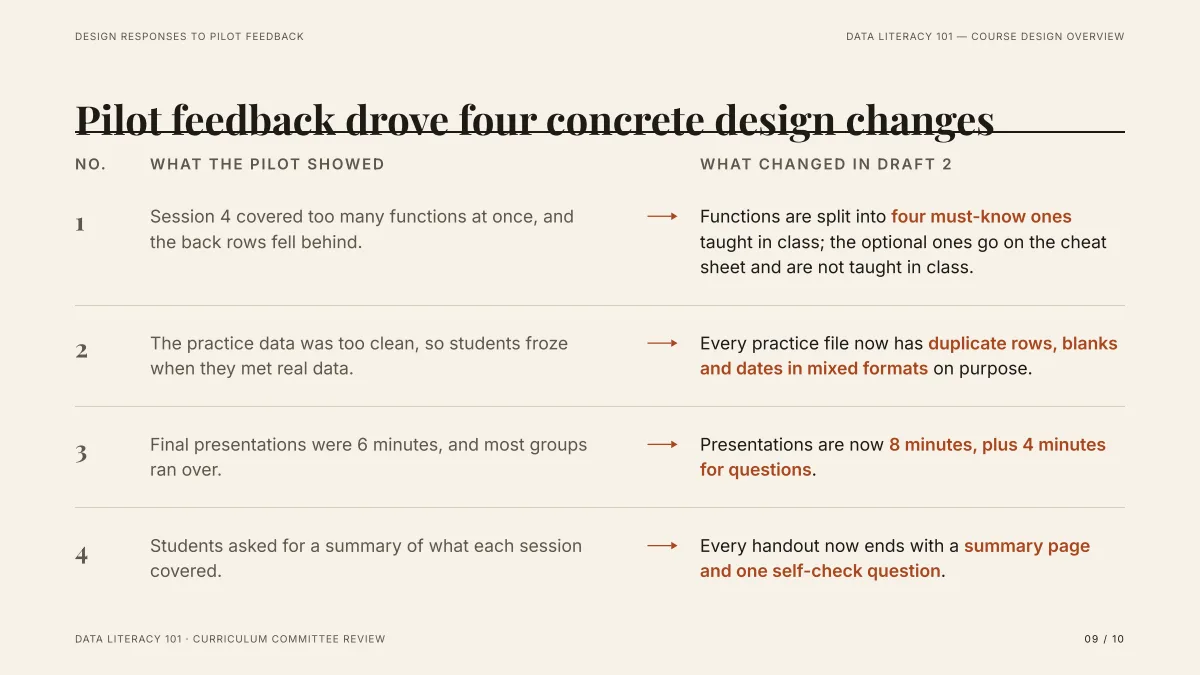
- The left column states what happened, and the right column states what changes. A retrospective slide works the same way: problem, then action.
- Each line is about the work (“session 4 covered too many functions”), not about a person. That is the wording a blameless retrospective uses.
- It came from a Word draft in deep mode (3 credits per slide). The topic is a course, so none of its words carry over.
How many slides should a retrospective deck have?
Five to seven is common for a sprint retrospective; a project retrospective for a sponsor can run eight to twelve. This is a rule of thumb, not a standard; the product accepts 1 to 30 slides and the cover counts.
| Retrospective | Slides | What to include |
|---|---|---|
| Sprint, team only | 5 to 7 | Facts, three columns, actions |
| Project, with a sponsor | 8 to 12 | Goal and result, timeline, what worked, what did not, lessons, recommendations |
| Programme or year | 10 to 15 | The above plus a section per phase; keep detail in an appendix |
Spend most of the meeting on the actions, not on the slides. If you cannot say who does what by when, the deck is not finished.
How is a sprint review different from a retrospective?
They are two meetings with different audiences. Do not put them in one deck.
| Sprint review | Retrospective | |
|---|---|---|
| Question | What did we build? | How did we work, what do we change? |
| Who is there | Team and stakeholders | Usually the team only |
| Slides | Goal, committed vs delivered, demo, next sprint | Facts, went well, did not, learned, actions |
| Output | Feedback on the product | Actions for the team |
The review deck is covered in our sprint review guide (linked on this page). Both decks can start from the same sprint export; the review uses the status column and the retrospective uses your notes.
How do I build it from my retro notes?
Attach the notes and tell the AI how they are grouped. A few habits that help:
- Use the same headings in the notes as the columns in the deck. “Went well” and “Did not go well” in the file become two cards.
- Add counts: “7 of 9 stories done”, “review took 2 days”. A figure in the file is traced; a figure typed only in the request is not.
- Keep the notes short. The outline reads about 24,000 characters across all files, and the request box 8,000; a one-page summary beats a transcript of the whole meeting.
- Say how many actions you want. “Three actions, each with an owner and a date” keeps the deck from listing fifteen.
How do I keep the deck blameless?
This is common practice from blameless post-mortems, and it matters more when the deck goes beyond the team. The AI follows the wording of your notes, so fix the notes first and then read the slides.
- Describe the process, not the person: “the review waited two days” instead of “Priya was slow”.
- Use “we” for decisions: “we added three stories after planning”.
- State the cause as a condition: “staging was down and nobody owned it”.
- Put names only on actions, as owners, and ask for the owner’s agreement before the meeting.
Put the instruction in the request too (“write problems about the process, not about people”), then check every slide yourself.
Questions
How do I make retrospective slides with AI?
Put your retro notes in a Markdown or Word file, attach it, write the slide order, check the outline cards, generate, fix any wording that blames a person, and export an editable PowerPoint.
What goes in a retrospective presentation?
The goal and the facts, what went well, what did not and why, what you learned, and the actions with an owner and a date. Five to seven slides is common for a sprint.
Which format should I choose: Start-Stop-Continue, 4Ls or Went well / Didn’t?
Went well / Didn’t / Actions is the most familiar; Start-Stop-Continue gives concrete changes; 4Ls suits a project or a long period. Choose one and use it for the whole deck.
Can the AI write the lessons learned for me?
It can word them from your notes. It cannot know what happened beyond the files, and it may smooth over the hard parts, so read each lesson and put the specific cause back.
Does it connect to Jira, Miro or a retro tool?
No. There is no live connection. Export or copy the notes into a Markdown, Word or text file and attach it.
Does the PowerPoint include speaker notes?
No. The exported PPTX has text, shapes and tables you can edit, but no speaker notes; write your own in PowerPoint.
How much does it cost?
Writing the outline is free. Quick mode costs 1 credit per slide, deep mode 3, each AI edit 1. Exporting costs no credits, but it needs Level 2 (any credit pack, bought once) or one new person invited per deck. New accounts get 20 free credits; credit packs are one-time purchases with no subscription, and credits never expire. See the Pricing page for the packs.
Are my files used to train AI models?
No. We do not use your files to train AI models. The text of your files is sent to AI providers to write the outline and slides; the Privacy Policy has the details.
Start from your retro notes
Attach the notes, write the slide order, and see the outline cards, and which owners and dates are marked TBD, before any slide is made.
Make my retrospective deck