How do I make a project kickoff presentation with AI?
Updated 2026-11-09
A kickoff deck usually answers six questions in order: what we are doing and what is out of scope, who does what, when the milestones are, what could go wrong, how we will talk to each other, and what happens next week. Eight to ten slides cover that. Attach your project charter (Word) and your schedule (Excel), write the slide order, check the outline, and generate; you get an editable PowerPoint (.pptx). A 10-slide deck is 10 credits in quick mode, and writing the outline is free.
What the AI does not know: your budget, who is on the team and who owns what, unless your files say so. A figure or name your files lack is written as TBD, which is what you want in a kickoff: a visible gap to close in the meeting.
What we have and have not done: we have no recorded kickoff. The picture below is a real timeline slide from a different recording (a six-week launch plan for a made-up coffee brand); example inputs on this page are invented. Structure and timings are common practice, not a standard. Product steps and limits come from the interface and the code, read 2026-11-09.
Five steps from charter and schedule to kickoff deck
Gather the charter and the schedule
The charter (Word or PDF) holds the goal, scope, stakeholders and risks. The schedule (Excel or CSV) holds milestones and dates. Put owners next to each milestone in the sheet; the AI cannot guess them.
Keep the sheet short: a sheet over 2,000 rows is summed by month or category before reading, and a kickoff needs 5 to 8 milestones, not the whole task list.
Attach the files and write the slide order
On the home page, click “Add files” (each file up to 25 MB), attach the charter and the schedule, and write the request from the template on this page. Click “Next”. Choose “Quick mode” (1 credit per slide) for library layouts you can restyle in one click.
Set scenario, audience and tone
Under “More”, set the scenario to “Proposal” or “Work report”, the audience to “Teammates” for the delivery team or “Clients” for a customer kickoff, and the tone to “Professional” or “Friendly”. “Concise” text per slide suits a meeting room screen.
Check the outline against the slide table
The outline has one card per slide. Pick “Timeline” on the milestone card (3 to 6 nodes), “Table” on the roles and risks cards, and “Summary / next steps” on the last. A card that states a budget or a name not in your files says “Not in your materials: … It will be written as TBD”. Nothing is charged until you click “Generate presentation”.
Generate, fill the TBDs, export and share
Click “Generate presentation”, replace each TBD (click the text and type), then export PowerPoint (.pptx) or PDF. Exporting costs no credits, but it needs Level 2 (any credit pack, bought once) or one new person invited per deck. The export panel shows “x / y figures have a source”. Send the PDF with the invite and keep the PPTX for edits. The exported PowerPoint has no speaker notes.
The slides of a kickoff deck, with the layout for each
This is our suggested structure (common practice, not a standard). The layout is what the outline would normally suggest; you can lock another on any card.
| # | Slide | What goes on it | Layout |
|---|---|---|---|
| 1 | Title | Project name, date, sponsor, project lead | Cover |
| 2 | Goals and scope | The goal in one line; what is in scope and what is not | Comparison or Points + takeaway |
| 3 | Success measures | Two to four measures with targets | Key figures |
| 4 | Team and roles | Who, role, what they own, how much time | Table |
| 5 | Milestones | Three to six dated milestones, the first one this month | Timeline (3 to 6 nodes) |
| 6 | Risks and assumptions | Risk, impact, owner, what we do | Table |
| 7 | How we work | Meetings, channels, decision rules, who approves changes | Cards |
| 8 | Budget | Total and the main lines; TBD where unknown | Key figures or Table |
| 9 | Next steps | Five actions, each with an owner and a date | Summary / next steps (2 to 5 items) |
The picture is slide 8 of 12 in our recorded launch-plan deck (a made-up coffee brand, October 19, 2026, quick mode): four nodes on a line (Week 2, Week 4, Week 6, and a rule that applies at each gate). It is a marketing plan, but a milestones slide in a kickoff has the same shape.
kickoff-schedule.xlsx
Milestones · 4 of 6 rows shown
Request to paste with the charter: “Using the attached charter and schedule, make a 9-slide kickoff presentation for the project team and the sponsor, 45 minutes. Order: title; goals and scope; success measures; team and roles; milestones; risks; how we work; budget; next steps with owners and dates. Use only the facts in the files and write TBD where a figure or name is missing. Each slide title is a statement.”
| Milestone | Date | Owner | Depends on |
|---|---|---|---|
| Requirements signed off | 2026-12-04 | TBD | Stakeholder workshops |
| Design approved | 2026-12-18 | Design lead | Requirements |
| Pilot build | 2027-02-05 | Engineering lead | Design |
| Pilot review | 2027-02-19 | Sponsor | Pilot build |
(Made-up data. Replace the milestones with yours; an empty Owner cell comes out as TBD, which is the point.)
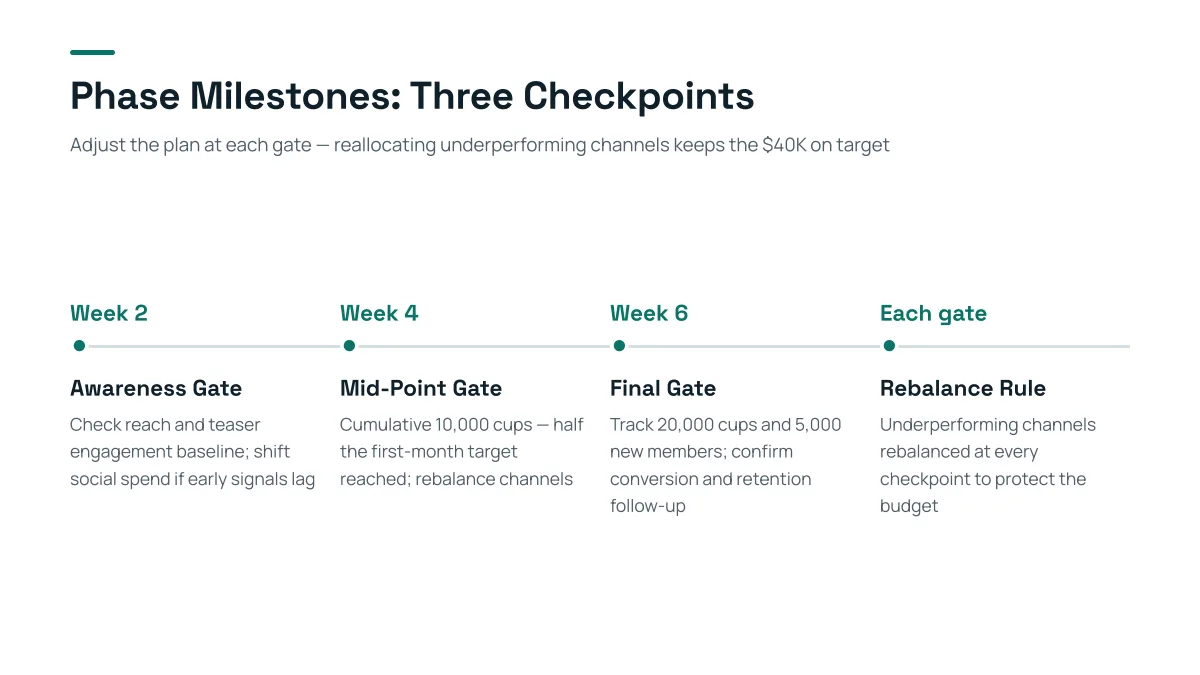
- The Timeline layout takes 3 to 6 nodes, each with a time label, a heading and a line of text. Six milestones is the maximum; pick the ones the team will be held to.
- The title and the subtitle say what the timeline is for. For a kickoff: “First delivery in 10 weeks, three checkpoints before it”.
- The nodes carry no owners here. In your deck, put the owner in the line of text, and read each name before you present.
- Replay this run step by step (no sign-in)
- Download the PPTX
- Project proposal presentations: the deck before the kickoff
- Product roadmap presentations: timeline, Now-Next-Later
- Status reports and project updates
- OKR presentations: objectives and key results
- Retrospective slides: after the project or sprint
How many slides for a 30-minute or 60-minute kickoff?
Count about two to three minutes per content slide, because a kickoff is a conversation: leave a third of the time for questions and for agreeing the next steps. This is a rule of thumb, not a standard; the product accepts 1 to 30 slides and the cover counts.
| Kickoff length | Slides | Notes |
|---|---|---|
| 30 minutes | 6 to 8 | Merge risks into one slide; skip the budget if it is handled elsewhere |
| 60 minutes | 9 to 12 | The structure above plus a stakeholders slide |
| 90 minutes or a half day | 12 to 18 | Add workshop slides; keep detail in an appendix |
The lengths are our suggestion. Your PMO or sponsor may have a template, which comes first.
How do I build it from a charter and a schedule?
Name what each file feeds in the request, so the AI does not mix them up:
| File | Slide it feeds | What to ask for |
|---|---|---|
| Charter: objectives and scope | Goals and scope | In scope and out of scope as two lists |
| Charter: stakeholders | Team and roles | One table row per person or group |
| Schedule: milestones and dates | Milestones | A timeline with 3 to 6 nodes |
| Charter: risks | Risks | A table with owner and mitigation, top five |
A Word charter with heading styles is read with its headings, so the AI can find the section it needs. Do not expect it to know your methodology, so say so in the request if you work in sprints, waterfall or phases.
What will the AI not know?
Anything that is not in your files. Treat these as TBD until you fill them:
- Budget and funding: the figure and who approves it.
- Names and roles, unless the charter lists them. Do not type them in the request only; put them in the file so the figures and names are traceable.
- Dates that depend on a decision: write “TBD (depends on sign-off)” in the sheet so the deck says why.
- Your organisation’s rules for change approval and escalation.
The “Not in your materials” note on an outline card is your checklist for the meeting: each one is a question you ask the room.
How do I export and share a kickoff deck?
Export a PDF to send with the invitation: it keeps the layout exactly. Keep the PowerPoint (.pptx) for edits: text is editable, tables are native tables, charts and icons are pictures. There are no speaker notes in the export.
After the meeting, update the TBDs and send the revised deck as the project’s reference copy. If your team shares files in a drive, share the PDF; the editable file is for the project lead.
Questions
How do I make a project kickoff presentation with AI?
Attach the project charter and the schedule, write the slide order, check the outline cards, generate, fill the TBDs and export an editable PowerPoint. The AI only uses what your files say.
What slides should a kickoff deck have?
Goals and scope, success measures, team and roles, milestones, risks, how the team will work and communicate, budget, and next steps with owners and dates. Eight to ten slides is common.
How many slides for a 60-minute kickoff?
Nine to twelve is a common range, leaving a third of the time for discussion. Your PMO’s template comes first.
Can it make a Gantt chart?
No. There is no Gantt layout. Use the Timeline layout for 3 to 6 milestones, or a Table for more detail; for a real Gantt, build it in your planning tool and paste the picture into the slide.
What does it do when the budget or the owners are not in my files?
It writes TBD instead of inventing a figure or a name, and the outline card says what is missing. Fill the gap in your file or in the editor.
Does the PowerPoint include speaker notes?
No. The exported PPTX has text, shapes and tables you can edit, but no speaker notes; write your own in PowerPoint.
How much does it cost?
Writing the outline is free. Quick mode costs 1 credit per slide, deep mode 3, each AI edit 1. Exporting costs no credits, but it needs Level 2 (any credit pack, bought once) or one new person invited per deck. New accounts get 20 free credits; credit packs are one-time purchases with no subscription, and credits never expire. See the Pricing page for the packs.
Are my files used to train AI models?
No. We do not use your files to train AI models. The text of your files is sent to AI providers to write the outline and slides; the Privacy Policy has the details.
Start from your charter
Attach the charter and the schedule, write the slide order, and see the outline cards, and which names and figures are marked TBD, before any slide is made.
Make my kickoff deck