How do I make a product roadmap presentation with AI?
Updated 2026-11-07
Pick the drawing by how sure you are about the dates. Use a timeline when dates are committed, Now-Next-Later when only the near term is firm, and theme swimlanes when the audience cares about where the effort goes. Give executives one roadmap slide on outcomes, and give the team the detail on separate slides.
To build it with Gamma AI Slide, write your roadmap as notes (items, themes, timing, owners), attach the file, say who the audience is, check the outline cards, and generate an editable PowerPoint. Writing the outline is free; a quick-mode slide is 1 credit.
One limit up front: the product has no Gantt-style layout. It builds a timeline of 3 to 6 milestones, cards (2 to 4), and tables of up to 5 columns and 6 rows. We have no recorded roadmap; the picture is a real timeline slide from a launch plan, and the sample notes below are ours.
Five steps from roadmap notes to slides
Write the roadmap as notes, one line per item
For each item: name, theme, timing (a quarter, or Now, Next, Later), one outcome it should move, an owner, and any dependency. Mark what is committed and what is only planned. Save as Word, .txt or .md, or attach an export from your planning tool (.xlsx or .csv).
Put the dates in the file. Dates typed only in the request can be reworded or dropped; a figure in an attached file is checked, and a missing one becomes "TBD".
Choose the drawing and the audience
Use the table in this page to choose between timeline, Now-Next-Later and themes. On the home page, click "Add files", attach your notes, write the request, and click "Next". Under "More", set the audience to "Executives" for leadership or "Teammates" for the team, and the scenario to "Work report" for a progress review or "Proposal" if you are asking for approval.
Set the slide count and the level of detail
Executive version: 5 to 7 slides and "Text per slide" at "Concise". Team version: 8 to 12 slides and "Detailed". The count goes in the request, and the cover counts.
Pick a layout on the roadmap cards
On the card for the roadmap itself: "Timeline" for dated milestones, "Cards" with three cards for Now, Next and Later, or "Table" for themes by quarter. In quick mode a layout you pick is locked in. Delete or reorder cards, and click "Generate presentation".
Check the dates, then export
Compare every date and owner with your notes: the AI shortens text to fit, and a shortened milestone can lose its date. Click "Export" and choose PowerPoint (.pptx) or PDF. Exporting costs no credits, but it needs Level 2 (any credit pack, bought once) or one new person invited per deck. Tables are native PowerPoint tables; the exported file has no speaker notes.
Three ways to draw a roadmap, and what each is for
The comparison is common practice, and our summary of it. The last column says how the product draws it.
| Timeline | Now-Next-Later | Theme swimlanes | |
|---|---|---|---|
| What it shows | Items on dates or quarters | Three buckets by certainty | Rows of themes, columns of quarters |
| Promises dates? | Yes | No | Only at the quarter |
| Best for | Launch dates, dependencies, a commitment | Uncertain plans, agile teams | Showing where the effort goes |
| Weak spot | Slips become visible failures | Nobody can tell when "Next" is | Dense: up to 6 themes fit |
| Product layout | Timeline (3 to 6 milestones, each with a time label) | Cards (three cards: Now, Next, Later) or Table (3 columns) | Table (theme + up to 4 quarters = 5 columns, up to 6 rows) |
The picture is a real timeline slide from our recorded launch plan: four checkpoints (Week 2, Week 4, Week 6, Each gate) with a one-line note under each. It is a marketing launch, not a product roadmap, and it is the layout a roadmap of three to six milestones comes out in. The sample notes below are our template, not a recording.
orbit-roadmap-notes.md (example)
Orbit roadmap, 2027
Now (committed, Q1): Offline mode (theme: reliability, owner: Mia); Faster sync (reliability, owner: Jo).
Next (planned, Q2): Shared workspaces (theme: teams, owner: Lee); SSO sign-in (teams, owner: Priya).
Later (not scheduled): Public API; Template gallery; Usage analytics.
Outcomes: reduce sync complaints; win 10 team accounts.
Dependency: Shared workspaces needs Faster sync.
(Everything here is invented for the example.)
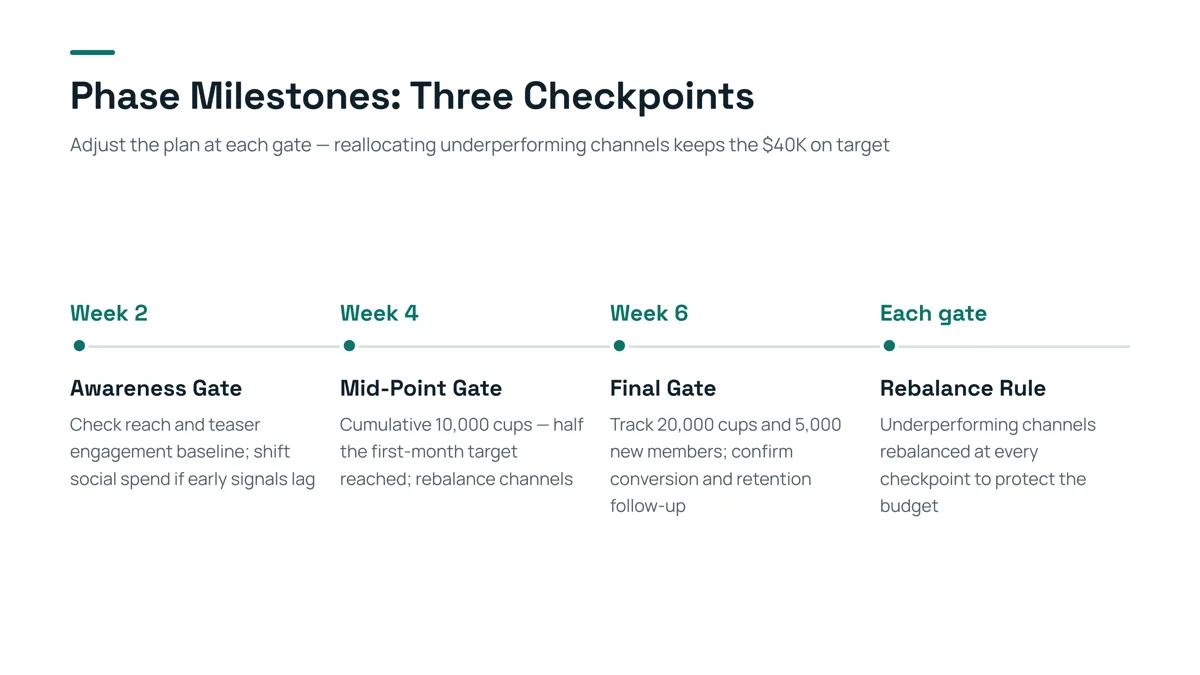
- Each milestone has a time label, a short heading and a one or two line note: that is the whole Timeline layout, so a milestone needs a name, a date and one sentence.
- Three to six milestones fit; a roadmap with twelve items needs two slides, or a table.
- This is a marketing launch, so the content is not reusable; look at the structure.
How is a roadmap for executives different from one for the team?
| Executive version | Team version | |
|---|---|---|
| Question it answers | Where are we going, why, and what do you need from us? | What do I build next, and what is it waiting for? |
| Roadmap slides | One, at quarter level | One per quarter or per theme |
| Items | Themes and outcomes, not tickets | Features with owner and dependency |
| Dates | Quarters; later is "Later" | Sprint or month for Now; quarter for Next |
| Also on the deck | Risks, dependencies on other teams, the ask | Status, open questions, trade-offs |
| Slides | 5 to 7 | 8 to 12 |
Generate each version from the same notes file, with a different audience and slide count. The audience setting is a prompt to the AI, not a template: check the result for the level of detail you wanted.
Which roadmap drawing should I use?
- Use the timeline if a date has been promised to customers or other teams.
- Use Now-Next-Later if the plan changes every quarter: it is honest about what you do not know.
- Use theme swimlanes if the audience questions priorities ("why so little on reliability?").
If you must show all three views, put the timeline for Now, the three columns for the whole, and the themes in an appendix.
What does a good roadmap slide contain?
- A title that states the point ("Reliability first, teams next"), not "Roadmap".
- Outcomes before features: the problem each item solves.
- A clear line between committed and planned items.
- One slide for risks and dependencies, so the questions come at the right moment.
- The ask, if there is one: headcount, a decision, a date.
How do I update the roadmap deck next quarter?
Two ways. Attach the new notes and generate a new deck (1 credit per slide in quick mode), or add last quarter’s exported PPTX, choose "Change this PPT", and ask for the changes in plain words (1 credit per request). The second keeps your own layout, but the AI cannot change colours or chart data in that mode and the figures are not checked against sources.
Questions
Can AI make a product roadmap presentation?
Yes, for the slides. Write the roadmap as notes with timing, themes and owners, attach the file, set the audience, check the outline cards, and generate an editable PowerPoint. The priorities and dates are yours.
What are the three ways to draw a roadmap?
A timeline (items on dates), Now-Next-Later (three buckets by certainty) and theme swimlanes (themes as rows, quarters as columns). Use a timeline when dates are committed, Now-Next-Later when only the near term is firm.
Can the product draw a Gantt chart?
No. It builds a Timeline layout with 3 to 6 milestones and tables of up to 5 columns and 6 rows. A Gantt chart needs a tool built for it, or shapes drawn in PowerPoint.
How is a roadmap for executives different from one for the team?
The executive version has one roadmap slide at quarter level with outcomes, risks and an ask; the team version has detail per item with owners and dependencies. Generate both from one notes file with a different audience and slide count.
Will the AI invent dates or features?
If your attached notes contain figures and dates, a missing figure is written as TBD. It can still shorten or reword an item, so check every date and owner against your notes.
How much does it cost?
Writing the outline is free. Quick mode costs 1 credit per slide, deep mode 3, each AI edit 1. Exporting costs no credits, but it needs Level 2 (any credit pack, bought once) or one new person invited per deck. New accounts get 20 free credits; credit packs are one-time purchases with no subscription, and credits never expire. See the Pricing page for the packs.
Start from your roadmap notes
Attach your notes, pick executives or the team, and see the outline cards before any slide is made.
Make my roadmap deck