How do I make an interview presentation with AI?
Updated 2026-11-12
How do you make an interview presentation, and how many slides? Work out what the panel asked for (a case, a 30-60-90 day plan, a portfolio review or a technical talk), count about a minute to a minute and a half per slide, and keep a quarter to a third of the slot for questions: 5 to 7 slides for 10 minutes, 7 to 9 for 15, 12 to 15 for 30. Those numbers are common practice, not a rule; the recruiter’s brief comes first.
To build it here, put the job description, your resume and the task you were given into files, attach them, say how long you have, and generate: you get an outline of 6 to 8 slides to check, then an editable PowerPoint (.pptx). For a 10-minute slot, 6 to 8 slides is common, about a minute to a minute and a half each, leaving time for questions. That is common practice, not a rule; the recruiter’s brief comes first.
Writing the outline is free, and a quick-mode slide is 1 credit, so a 7-slide deck is 7 credits. The AI only knows what you attach: it will not know the company’s numbers or your achievements unless they are in your files, and a figure your files lack is written as TBD instead of being invented.
What we have and have not done: we have no recorded interview. The picture below is a real slide from a different recording (a six-week product launch plan for a made-up coffee brand); the example inputs on this page are invented. The product steps and limits come from the interface and the code, read 2026-11-09.
Five steps from job description to interview deck
Collect the three inputs
Save the job description, your resume and the brief you were given (the case, the topic or the time limit) as Word, PDF or text files. If the company published an annual report or product page that matters, add the part you need as a file too; do not count on the AI looking up the company.
Add a short notes file with your two or three real achievements and their numbers. Without it the AI can only restate your resume.
Attach the files and write the request
On the home page, click “Add files” (each file up to 25 MB), then write the request: the structure you want, the time, and “use only the attached facts; write TBD where a figure is missing”. Click “Next”.
Choose scenario, audience and tone
Under “More”, set the scenario to “Proposal” for a plan you are proposing (a 30-60-90 day plan) or “Talk” for a case or portfolio walk-through. The audience options are Auto, Executives, Teammates, Clients, Investors, Students and General public: pick “Executives” for a senior panel or “Teammates” for a team interview. Tone “Professional” suits most interviews. Set “Text per slide” to “Minimal” or “Concise”: you will be speaking, not handing out a document.
Check the outline against the structure table
The outline has one card per slide. Compare it with the table below: does the first slide state your answer, and does the last slide say what you would do next? A card that states a company or market figure not in your files says “Not in your materials: … It will be written as TBD”. Fill the gap in a file or leave it out of the talk. Nothing is charged until you click “Generate presentation”.
Generate, fix the facts, rehearse
Click “Generate presentation”. In the export panel you see “x / y figures have a source”; check each figure yourself. Then export PowerPoint (.pptx) or PDF (exporting needs Level 2 or one new person invited per deck) and rehearse with a timer. The exported PowerPoint has no speaker notes; write your own cues in PowerPoint.
Three common structures for a 10-minute interview presentation
Which one you use depends on the brief. These are our suggested structures (common practice, not a standard); the layout column is what the outline would normally suggest, and you can lock another on any card.
| Type | Slides (slot) | Structure | Layouts |
|---|---|---|---|
| Case presentation (take-home or live case) | 6 to 8 (10 to 15 min) | Your answer in one line; the situation; two or three findings; options compared; recommendation; risks and next steps | Statement or Points + takeaway, Cards, Comparison, Summary / next steps |
| 30-60-90 day plan | 6 to 8 (10 to 15 min) | Why I fit this role; what I will learn in 30 days; what I will deliver by 60; what I will own by 90; how you will know it worked; first-week questions | Cards, Steps, Timeline, Summary / next steps |
| Portfolio review | 7 to 10 (15 to 20 min) | Who I am in one line; two or three projects (problem, what I did, result); what I learned; what I would do here | Key figures, Image + text, Points + takeaway |
| Technical presentation (a project or system you built) | 8 to 12 (15 to 30 min) | The problem and the constraint; the approach and why; the design in one picture; the result with numbers; trade-offs and what you would change; questions to expect | Points + takeaway, Comparison, Key figures, Summary / next steps |
Slide counts per type are our suggestion, not a standard. A technical talk often needs one or two spare slides after the end for questions; the product has no code or diagram editor, so bring a diagram you have already drawn as an image file.
The picture is slide 7 of 12 in our recorded launch-plan deck (a made-up coffee brand, October 19, 2026, quick mode): three phases and a checkpoint, each with a one-line description. It is a marketing plan, not a career plan, but the shape is what a 30-60-90 day slide needs: three time blocks and one line on how progress is checked.
Prompt (English)
Interview deck, 7 slides, 10 minutes
Attached: job description (Customer Success Manager), my resume, my notes with three achievements. Make a 7-slide, 10-minute 30-60-90 day plan for the hiring manager. Slides: why I fit; what I will learn in the first 30 days; what I will deliver by day 60; what I will own by day 90; how you will measure it; two questions I will ask in week one; summary. Use only the attached facts; write TBD where a company figure is missing. Each slide title is a statement.
(Made-up inputs. Replace the role, the slide list and the time with the ones in your brief.)
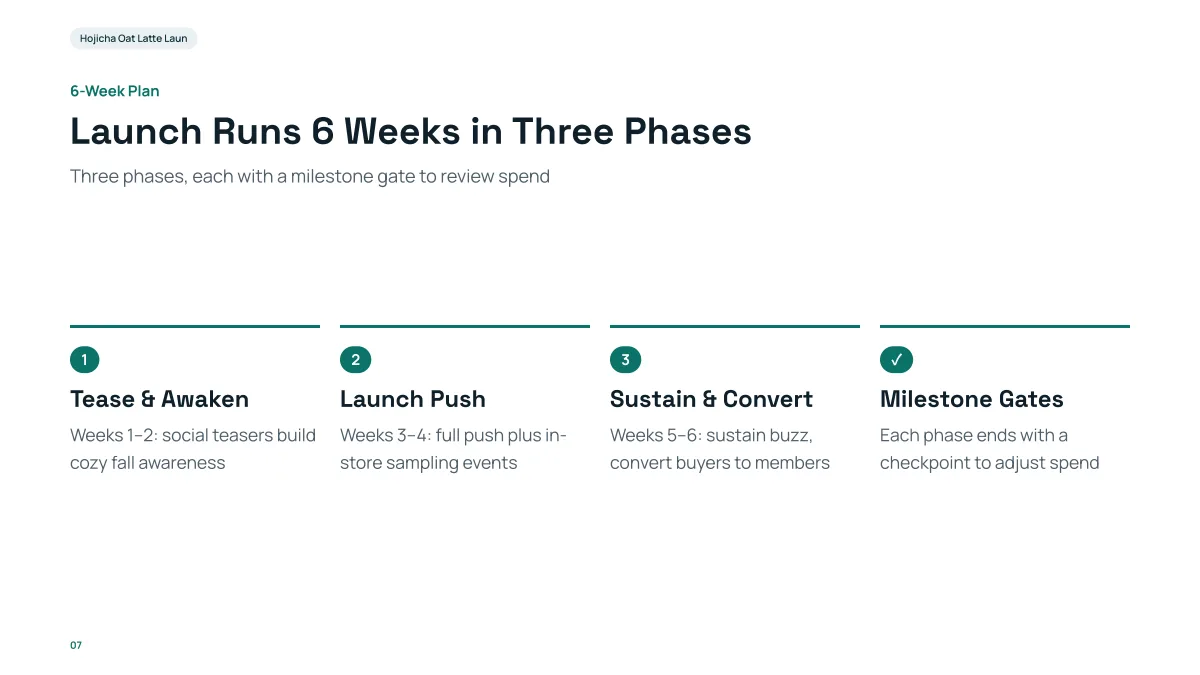
- The title states the plan, and the numbered columns are the phases. The “Steps” layout takes 3 to 5 of them, which fits 30 / 60 / 90 days plus a “how we check” column.
- Each phase has one line. In an interview, keep it that way: the slide is a prompt for what you say, not a script.
- It is a launch plan for a made-up brand. None of its words or figures carry over to an interview.
How many slides for a 10, 15 or 30-minute interview presentation?
Count about a minute to a minute and a half per content slide and leave a quarter to a third of the slot for questions. This is a rule of thumb; if the recruiter gives a slide limit, use theirs. The product accepts 1 to 30 slides and the cover counts.
| Slot | Presenting time | Slides |
|---|---|---|
| 10 minutes | 7 to 8 | 5 to 7 |
| 15 minutes | 10 to 12 | 7 to 9 |
| 30 minutes | 20 to 22 | 12 to 15 |
The slot lengths are our suggestion. Put the answer on slide 1 or 2, because panels remember the start and the end.
How do I give the AI the right facts?
Attach files, and put your own facts in them. The outline reads about 24,000 characters in total across all files, and the request box is read up to 8,000 characters, so attach the job description and a one-page notes file rather than a long portfolio PDF.
- Job description: Word, PDF or text. The AI uses its wording for the responsibilities slide.
- Resume: a PDF must have selectable text; a scanned PDF is not read.
- Case brief and data: Word, or Excel for numbers. A sheet over 2,000 rows is read summed by month or category.
- Company facts you are unsure of: leave them out of the files and write “TBD” in the request. The deck then shows TBD, and you fill it after you have checked the company’s own site.
Which scenario and audience should I pick?
The scenario and audience steer the wording of the outline, so choose what the room is, not what you are.
| Interview | Scenario | Audience |
|---|---|---|
| Case or take-home task | Talk | Executives or Teammates |
| 30-60-90 day plan for a manager | Proposal | Executives |
| Team interview with peers | Talk | Teammates |
| Client-facing role, pitch to a mock client | Proposal | Clients |
All of them are suggestions; “Auto” lets the AI infer from your request. The options are in the “More” panel; change them before you generate, and regenerate the outline if you change them afterwards.
What do interviewers look for in a presentation?
These are common things panels say they weigh, written as common practice, not a checklist from any company or a statistic. Use them to review your outline cards.
| What they look at | What it means on the slides |
|---|---|
| A clear answer early | The recommendation or the plan is on slide 1 or 2, not at the end |
| Structured thinking | One point per slide; titles that state the point; a visible order |
| Evidence | Numbers come with their source: your own result, the case data or the job description |
| Fit for the role | The language of the job description, and one example that matches a responsibility in it |
| Judgement | What you would not do, the risks and the trade-offs, stated plainly |
| Time control | The slide count matches the slot and you finish with questions left |
The AI can draft the structure, but the first and the last of these, and the stories behind your numbers, only you can supply.
What should I check before the interview?
- Every number: your own results from your notes, and any company figure. The export panel shows which figures have a source in your files; it does not tell you whether a number is right.
- The company name, the role title and the interviewers’ names, if you use them. The AI copies what is in your files, so a typo in the job description comes through.
- The slide count against the slot, and a timed run-through.
- Anything confidential from a past employer: take it out of the files before you attach them, and use rounded or anonymised figures if your old contract requires it.
- The exported file on the interview machine: text is editable, but fonts are not embedded, so export a PDF as a backup.
Questions
How do I make an interview presentation with AI?
Attach the job description, your resume, the brief and a short notes file with your real results, write the slide structure and the time, check the outline cards, generate and export an editable PowerPoint. Then check every figure and rehearse with a timer.
How many slides should a 10-minute interview presentation have?
Six to eight is common, about a minute to a minute and a half each, with time left for questions. If the recruiter sets a limit, follow it.
What goes in a 30-60-90 day plan presentation?
Why you fit the role, what you will learn in the first 30 days, what you will deliver by 60, what you will own by 90, and how progress will be measured. A common structure, not a standard; keep it specific to the job description.
Will the AI know about the company?
Only what is in your files. The outline step does some web research, but do not rely on it for company facts: attach what you want used, and write TBD for the rest.
Does the PowerPoint include speaker notes?
No. The exported PPTX has text, shapes and tables you can edit, but no speaker notes; write your own cues in PowerPoint.
Is it fine to upload my resume and a job description?
That is your choice. The text of your files is sent to AI providers to write the outline and slides. Remove anything you do not want to share, such as a phone number or a past employer’s confidential data.
What is the difference between a case presentation and a portfolio review?
A case presentation answers one set problem with a recommendation, so slide 1 is your answer. A portfolio review walks through two or three past projects, so each project gets a problem, what you did and a result. Pick the structure from the table above that matches the brief.
Can I use the AI for a technical interview presentation?
Yes for the structure and wording: attach your project notes or design document (Word, PDF or Markdown) and ask for the problem, approach, result and trade-offs. The product does not draw architecture diagrams, so add your own diagram as an image in PowerPoint, and check every figure yourself.
How much does it cost?
Writing the outline is free. Quick mode costs 1 credit per slide, deep mode 3, each AI edit 1. Exporting costs no credits, but it needs Level 2 (any credit pack, bought once) or one new person invited per deck. New accounts get 20 free credits; credit packs are one-time purchases with no subscription, and credits never expire. See the Pricing page for the packs.
Are my files used to train AI models?
No. We do not use your files to train AI models. The text of your files is sent to AI providers to write the outline and slides; the Privacy Policy has the details.
Start from the job description
Attach the job description, your resume and your notes, write the time you have, and see the outline cards, and which figures are marked TBD, before any slide is made.
Make my interview deck