What are good topics for a presentation about AI?
Updated 2026-11-13
A good AI presentation topic is a question your audience already has, not the field itself: “How does a chatbot decide what to say?” works for a classroom, “Which three support tasks can we hand to AI this quarter?” works for a team, and “AI” alone works for nobody. Below are 79 topics in eight groups (class presentations, middle and high school, university, company teams, workplace training, engineering teams, conferences and non-technical audiences), each with a line on what its slides cover, plus five requests you can paste.
Pick one, then write it as a request: the topic, the audience, the number of slides. Gamma AI Slide drafts an outline of one editable card per slide for you to check (free), and only then builds the slides. The product has no built-in topic list or AI-fact database: facts you want on the slides should be in your request or in files you attach, otherwise you check them yourself.
What we have and have not done: we have no recorded run on an AI topic. The picture on this page is a real agenda slide from a different recording (a launch plan for a made-up coffee brand), and the outline example is invented. The topic lists are our suggestions, not search data. Product limits come from the code, read 2026-11-10.
Five steps from a topic to an outline you can present
Narrow the topic to one question
Take a topic from the tables below and rewrite it as one question or one claim: “How is AI changing customer support?” becomes “Which three support tasks can AI take over this quarter, and which three cannot?”. A claim gives the AI a conclusion to build every slide title around.
Add the audience and the number of slides in the request
On the home page, type the request, for example: “An 8-slide talk for the customer support team on which support tasks AI can take over, what it gets wrong, and what we do next quarter.” Next to the box, the “Slides” menu offers Auto, 3, 5, 8, 10, 12, 15, 20, 25 or 30 (the maximum is 30). A number picked in the menu wins; on “Auto”, a count written in the request is read, and if you write several counts the largest is used.
Add the facts you want on the slides
Click “Add files” and attach a report, a Word note or a spreadsheet (.docx, .pdf, .xlsx, .csv, .pptx, .md or .txt, up to 25 MB each). Figures on the slides then come from your files; a figure your files do not have is written as “TBD”. Without files, the AI may bring in facts from a short web search at the outline step, so check every statistic before you present.
Read the outline against the 8-slide structure
Click “Next” and read the cards. Each has a title (a short sentence stating the point), two to five lines and a suggested slide type. Compare them with the 8-slide example below: is there one slide for the problem, one for the evidence and one for what the audience should do? Edit any card, drag to reorder, or delete one. Nothing is charged until you click “Generate presentation”.
Generate, check the claims, export
Quick mode is 1 credit per slide (8 slides = 8 credits), deep mode 3. Then export PowerPoint (.pptx) or PDF. Exporting costs no credits, but it needs Level 2 (any credit pack, bought once) or one new person invited per deck. The exported PowerPoint has no speaker notes.
An 8-slide outline for an AI topic, and a real agenda slide
The outline below is our made-up example for a 10-minute internal talk: one claim, one slide type per card. It follows the rules the outline step is given (cover first, a title that states the point, two to five lines per card, a closing slide with next steps). It is not a recording; a real run will word the cards differently.
| # | Card title (a statement) | Slide type |
|---|---|---|
| 1 | Three support tasks AI can take over this quarter | Cover |
| 2 | Tickets are up and the team has not grown | Statement |
| 3 | Most of the volume is five repeat questions | Key figures |
| 4 | AI can draft replies for all five | Cards |
| 5 | It gets refunds, edge cases and angry customers wrong | Comparison |
| 6 | A pilot: one queue, four weeks, one metric | Timeline |
| 7 | What it costs against what it saves | Table |
| 8 | Decide on the pilot and name an owner | Summary / next steps |
The picture is slide 2 of our recorded 12-slide launch-plan run (a made-up coffee brand, quick mode, October 19, 2026): when a deck runs past 10 pages, the outline step adds an agenda card, and the slide became a table of sections with their slide numbers. An 8-slide deck skips it, because the agenda is only written past 10 pages.
Prompt (English)
AI in customer support, 8 slides
Make an 8-slide talk for our customer support team (about 20 people, a 10-minute slot at the monthly meeting). The claim: three support tasks AI can take over this quarter. Cover, the problem, the evidence, what AI can draft, what it gets wrong, a four-week pilot, cost against savings, and the decision. Use only the attached ticket report for figures; write TBD where it has none. Tone: professional.
(Made-up team and request. Replace the audience, the claim and the attached facts with yours.)
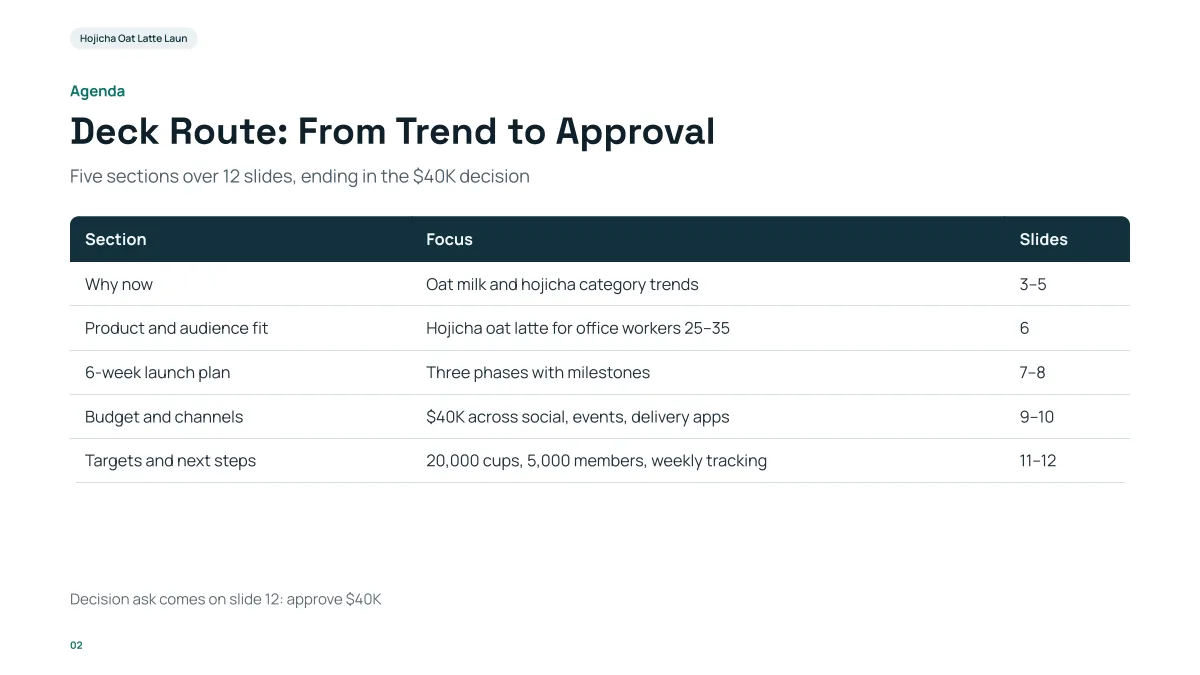
- The agenda has one row per section with a focus and the slide numbers: the same grouping you can use to cut a long topic list into parts.
- It exists because the deck has 12 slides; the outline step writes an agenda card only when the deck runs past 10 pages.
- The content is a coffee launch. Nothing on it carries over to an AI talk.
Which AI topics suit a class presentation?
Pick a topic you can explain in your own words and illustrate with one real example. The topics below suit a 5 to 15 minute class talk (5 to 10 slides; see the slide-count guide for a rule of thumb). They are our suggestions.
| Topic | What the slides cover |
|---|---|
| How does a chatbot decide what to say? | Training on text, predicting the next word, why answers can sound sure and be wrong |
| AI and homework: where is the line? | What counts as help and what counts as copying; one school policy compared with another |
| How image generators learn to draw | Text to image in plain steps; who owns the training pictures; one example prompt and its result |
| Can AI tell a real photo from a fake? | Deepfake examples, the tells that fail, and three checks anyone can do |
| AI in medicine: promise and limits | One diagnostic task AI does well, one it cannot, and who stays responsible |
| Will AI take my future job? | Tasks versus jobs; two jobs that changed rather than vanished; what to learn |
| Bias in AI: where it comes from | Biased data, a facial-recognition or hiring example, what auditors check |
| AI translation: how good is it really? | One sentence through three translators, where meaning is lost, when to use a human |
| Self-driving cars: how they see | Cameras, radar and lidar in one diagram; the levels of automation; one hard case |
| A short history of AI | From the 1950s Dartmouth workshop to today; two booms and two winters; why now |
| AI and the environment | Energy for training and use, what is measured and what is guessed, ways to cut it |
| How recommendation algorithms shape what I watch | A feed in four steps; what it optimizes; how to take back control |
Which AI topics suit a company or team presentation?
Internal talks work best when the topic ends in a decision. Each row below is a claim you can answer yes or no to by the last slide. For a 10 to 20 minute slot, 8 to 12 slides is a common range; these are our suggestions.
| Topic | What the slides cover |
|---|---|
| Which three tasks can AI take over in our team this quarter? | Task inventory, time spent, a pilot for each, risks |
| An AI usage policy for our company | What is allowed, what data never goes in, who approves tools, how we review output |
| Where AI saves time in customer support | Repeat questions, draft replies, handoff to humans, one metric to watch |
| AI in sales: from lead notes to follow-up emails | What gets drafted, what a person must check, a four-week trial |
| Build, buy or wait: our AI options | Three options compared on cost, risk and speed; a recommendation |
| Training the team to use AI well | Skills gap, a two-hour workshop plan, how we measure use afterwards |
| AI and our data: what is safe to share? | Data classes, examples of each, tools approved for each class |
| A one-quarter AI pilot plan | Scope, owner, success measure, budget, a go or no-go date |
| What went wrong: three AI failures and what they teach | Hallucinated facts, a leaked file, a biased screening; one rule from each |
| AI for HR: job posts, onboarding and what not to automate | Safe uses, uses to avoid, legal review points |
| Measuring the return on AI tools | Time saved, quality checks, cost per seat, why most numbers are estimates |
| AI for finance and reporting | Drafting commentary, checking numbers, why a person signs off |
Which AI topics suit an industry conference or webinar?
A conference slot (20 to 40 minutes) needs a point of view and one thing the audience cannot get from a search: your own data, a case you ran or a framework. These are our suggestions for a talk of 12 to 25 slides.
| Topic | What the slides cover |
|---|---|
| What we learned running AI in production for a year | Three wins, three failures, the numbers behind each, what we would repeat |
| Evaluating AI output: a practical checklist | Accuracy, bias, cost and review loops; one worked example |
| Retrieval-augmented generation in plain terms | The idea in one diagram, where it breaks, how to test it |
| AI agents: what works today and what does not | Tasks agents finish reliably, where they stall, human checkpoints |
| The economics of AI features | Cost per request, caching, pricing a feature, when it pays back |
| Regulation and AI: what changes for our industry | Obligations by risk level, timelines, a compliance checklist |
| Designing interfaces for AI that is sometimes wrong | Showing sources, undo, confidence, escalation to a person |
| Open versus closed models: a decision guide | Cost, control, privacy and quality compared; a decision tree |
| AI in research workflows | Literature search, drafting, citation checks; what peer review must still do |
| Security risks of AI systems | Prompt injection, data leaks, supply chain; defenses in order of effort |
| Case study: automating one process end to end | Before and after, the steps, the metrics, the cost |
| The next three years of AI in our field: three scenarios | A base case, an optimistic and a cautious one, signals to watch |
Which AI topics suit a non-technical audience?
For parents, customers, community groups or senior staff, skip the mechanics and answer “what does this mean for me?”. Keep to 5 to 8 slides with one idea each. These are our suggestions.
| Topic | What the slides cover |
|---|---|
| AI explained in five minutes | What it is, what it is not, three everyday examples, one thing to try |
| Spotting AI-generated scams and fakes | Cloned voices, fake reviews, fake photos; a five-question check |
| AI at home: helpful uses and safe habits | Planning, translating, learning; what never to type in; family rules |
| What AI means for kids and school | Study help, cheating worries, how parents can ask the right questions |
| Using AI to write better emails and documents | Draft, edit, check; three prompts to start with |
| AI and jobs: what is changing in our industry | Tasks that shift, skills that matter more, where to learn |
| Privacy and AI: what happens to what I type | What providers keep, how to opt out, a short checklist |
| Seniors and AI: a gentle start | Voice assistants, translation, scam awareness; one practice session |
| AI in healthcare: what patients should know | Where it assists doctors, what it should not decide, questions to ask |
| Is it true? How to fact-check AI answers | Ask for sources, cross-check, spot invented details |
| AI and creativity: tool or competitor? | Artists’ views, copyright questions, three ways people use it |
| Small business: five ways to start with AI | Marketing text, customer replies, bookkeeping, scheduling, translation; cost of each |
Which AI topics suit a middle or high school class?
Younger audiences follow a talk that starts from something they already use: a chatbot, a photo filter, a game, a feed. Keep to 5 to 8 slides, one idea each, and end with a question for the class. These are our suggestions, not search data.
| Topic | An angle you can take |
|---|---|
| Is the chatbot cheating for me or learning with me? | Compare one homework question answered by AI and by you, and agree where the line is |
| How does a photo filter know where my face is? | Show the idea of finding eyes and edges in an image, then one thing it gets wrong |
| Why does my video app keep showing me the same thing? | Draw the feed in four steps and ask the class what it is trying to maximize |
| Can you tell a real picture from an AI picture? | Show a few pairs, reveal the clues people miss, and teach two checks |
| Who decides what AI is allowed to say? | Rules written by companies, an example refusal, and who should be asked |
| Jobs that did not exist 20 years ago | Take two jobs that appeared with new technology and ask what the next ones could be |
| Teaching a computer to tell cats from dogs | A simple version of training with examples, and why more varied examples help |
| How would you use AI to help your community? | Pick a local problem, sketch an AI idea for it, and list what could go wrong |
Which AI topics suit a university course or seminar?
A seminar talk (15 to 25 minutes, 10 to 15 slides) is stronger when it argues one point from evidence. Name the source you rely on and put it on the slide. These are our suggestions.
| Topic | An angle you can take |
|---|---|
| Can a language model reason, or does it pattern-match? | Two readings of the same example, the evidence for each, and what test would settle it |
| Academic integrity in the age of generative AI | Compare three policies, what each assumes about students, and which you would defend |
| Dataset bias: three documented cases | For each case: where the data came from, who was missed, what changed afterwards |
| AI in my discipline (pick one field) | One task the field already uses AI for, how it is checked, and one open problem |
| Copyright and training data | The arguments on each side, one dispute described neutrally, and the open questions |
| Evaluating a model: what a benchmark does not tell you | One benchmark, what it measures, and a case where a high score misleads |
| Privacy and large datasets | What can be inferred from data people thought was anonymous, with one worked case |
| A literature review of one AI subtopic | Five sources, how they agree and disagree, and the gap your question fills |
Which AI topics suit workplace training?
Training works when people leave able to do one thing on Monday. Each topic below ends in a practice task or a checklist, and fits 8 to 15 slides for a 30 to 60 minute session. These are our suggestions, and the rules in them need your own company's policy.
| Topic | An angle you can take |
|---|---|
| Writing good requests to an AI assistant | Weak versus strong request side by side, a template, and a 10-minute exercise |
| Checking AI output before you send it | A five-step review: facts, numbers, names, tone, anything confidential |
| What never goes into an AI tool | Data classes with an example for each, and who to ask when unsure |
| AI for meeting notes and follow-ups | A before and after of one meeting, what to correct, where the notes are stored |
| Spotting AI-generated phishing and fake invoices | Three real-looking examples, the tells, and the reporting steps |
| Using AI to learn a new skill faster | A study plan prompt, how to test yourself, and why to cross-check |
| Responsible AI use for managers | Setting expectations, reviewing work made with AI, and what to say to the team |
Which AI topics suit a technical or engineering team?
Engineers will ask for the evidence. Put your measurements on the slide (latency, cost, error rate, a before and after) and say how you measured. These are our suggestions for a 20 to 30 minute internal talk of 10 to 15 slides.
| Topic | An angle you can take |
|---|---|
| Code review with an AI assistant: what we measured | Review time, defects caught late, false alarms, and what we changed in the process |
| Testing an AI feature: beyond "it looks right" | A small evaluation set, how it was built, and what it caught before release |
| Prompt changes as code changes | Versioning prompts, reviewing them like code, and one regression that slipped through |
| Latency and cost of an AI feature | Where time and money go, three cuts we tried, and what each saved |
| Logging and debugging AI behavior | What to log, how to replay a bad answer, and the one bug it found |
| Guardrails: what we block and what we allow | The rules, one near miss, and how we test the rules themselves |
| A post-mortem of an AI incident | Timeline, root cause, detection gap, and the three fixes |
| Which tasks we should not give an AI | Criteria, two examples that failed, and the checks that stay with a person |
How do I turn one of these topics into a request I can paste?
Write the topic as a claim, then add the audience, the slide count and what the slides may use as facts. Here are five, one per audience above. They are templates we wrote, not recordings; put your own facts in the attached files and replace the brackets.
| Topic | Request to paste into the box |
|---|---|
| Middle school: Is the chatbot cheating for me or learning with me? | Make a 6-slide talk for a class of 14-year-olds on whether using a chatbot for homework is cheating. Start with a question for the class, show one homework question answered two ways, and end with three class rules. Plain words, short lines. |
| University: Dataset bias | Make a 12-slide seminar talk on dataset bias, using only the three cases in the attached notes. For each case: where the data came from, who was missed, what changed. End with what we would check in our own project. Write TBD where the notes have no figure. |
| Workplace training: Checking AI output before you send it | Make a 10-slide training session of 45 minutes for new staff: a five-step check for AI output (facts, numbers, names, tone, anything confidential), one example per step, and a 10-minute exercise on the last slide. Tone: friendly. |
| Engineering team: Latency and cost of an AI feature | Make an 11-slide internal talk for the engineering team on where the time and money go in our AI feature, using only the attached measurements. Show three cuts we tried and what each saved. Write TBD for any number the file does not have. |
| Non-technical: Spotting AI-generated scams | Make a 7-slide talk for a community group on spotting AI scams: cloned voices, fake reviews, fake photos. End with a five-question check people can use at home. Plain words, no jargon. |
Click "Next", choose a mode, read the outline cards, and only then click "Generate presentation". Quick mode is 1 credit per slide, so the 6-slide example is 6 credits.
How do I turn a topic into an outline?
Write the topic as a claim, name the audience and the slide count, and give the AI your facts; the outline step then drafts the cards. The cards are rule-bound, from the outline prompt in the code:
| Part of a deck | What the outline step does |
|---|---|
| Slide 1 | The cover: the deck title (at most about 12 words) and one subtitle line, plus a second line only for facts you gave, such as team or date |
| Every other slide | One point, with a title that states it as a sentence of at most about 13 words, and two to five short lines of at most about 20 words each |
| The story | The prompt asks for why it matters, what is true, what to do and what happens next |
| Agenda | Only when the deck runs past 10 pages |
| Last slide | A summary or next steps |
| Figures | Only from your request, your files or its research; a point that needs a figure it does not have is written as “TBD” when your files hold figures |
| Slide count | 3, 5, 8, 10, 12, 15, 20, 25 or 30 from the menu, or the count you write; at most 30 |
An outline card holds a title of up to 80 characters and up to 6 lines of up to 120 characters; longer text is cut when the card is saved.
How many slides should a talk on AI have?
Count about one to two minutes per content slide, as in our slide-count guide, and leave time for questions. This is a rule of thumb, not a standard.
| Talk length | Slides to ask for (the cover counts) |
|---|---|
| 5 minutes | 3 to 5 |
| 10 minutes | 5 to 8 |
| 20 minutes | 10 to 12 |
| 30 minutes | 15 to 20 |
The menu has no 6, 7 or 9: type “7 slides” in the request and leave the menu on Auto if you want one of those.
Does the AI know current facts about AI?
Not reliably. AI changes quickly, and a model’s knowledge stops at a date. At the outline step the product may run a short web search; that is a convenience, not a source you can cite without checking. For a statistic on a slide, attach the report it comes from (a figure in an attached file is traced to its place in the file) or write it in the request yourself, and verify any other number against its original source.
Questions
What is a good topic for a presentation about AI?
One question or claim for a named audience, for example “Which three support tasks can AI take over this quarter?” or “How does a chatbot decide what to say?”. The tables on this page give 79 by audience, each with what the slides cover.
What are some AI presentation topics for students?
How chatbots work, AI and homework, how image generators learn, spotting deepfakes, bias in AI, AI in medicine, and the history of AI. Choose one you can explain with a real example in 5 to 10 slides.
What are good AI topics for a business presentation?
Ones that end in a decision: a pilot plan, a usage policy, build-buy-or-wait, where AI saves time in one team, or how to measure return. Each one maps to an 8 to 12 slide deck.
Can the tool pick the topic for me?
No. It does not suggest topics; this page is a list to choose from. Once you have one, it drafts the outline and slides from your request.
Can I make an AI presentation about a topic I know little about?
Yes, but check it. Attach a source you trust (a report, an article saved as a file) so the slides rest on it, read the outline before generating, and verify every statistic and claim before you present.
How long does it take to make the slides?
The outline arrives first and is free to edit; the slides are built after you click “Generate presentation”. In our recorded 12-slide quick-mode run the outline took about 77 seconds and the slides about 97 seconds from the request; a different topic and server load will vary.
What is a good AI topic for a middle school presentation?
Start from something the class already uses, such as a chatbot, a photo filter or a video feed, and end with a question for the class. "Is the chatbot cheating for me or learning with me?" works in 5 to 8 slides. The middle and high school table above has eight more.
What AI topics can I use for a university seminar?
Pick a topic you can argue from named sources: dataset bias with three documented cases, academic integrity policies compared, or what a benchmark does not tell you. The university table above lists eight with an angle for each. Put the source of every claim on the slide.
How do I turn an AI topic into a request I can paste into the tool?
Write the topic as a claim, add the audience, the slide count and a rule for facts ("use only the attached notes; write TBD where they have no figure"). The section above gives five ready requests, one per audience. Read the outline cards before you generate.
How much does it cost?
Writing the outline is free. Quick mode costs 1 credit per slide, deep mode 3, each AI edit 1. Exporting costs no credits, but it needs Level 2 (any credit pack, bought once) or one new person invited per deck. New accounts get 20 free credits; credit packs are one-time purchases with no subscription, and credits never expire. See the Pricing page for the packs.
Are my files used to train AI models?
No. We do not use your files to train AI models. The text of your files is sent to AI providers to write the outline and slides; the Privacy Policy has the details.
Turn one of these topics into an outline
Paste the topic as a claim with your audience and slide count, and read the outline before anything is built. The outline is free.
Write an AI presentation outline