How do I make a grant proposal presentation with AI?
Updated 2026-11-07
A grant presentation answers the funder’s questions in the order of their review criteria: why the need matters, what you will do, whether you can do it, what it costs, and what changes as a result. That is about ten slides for a ten-minute pitch, with the budget on its own slide as an editable table. Follow the call’s own slide and time limits first.
To build it with Gamma AI Slide, attach your proposal (Word or a PDF with selectable text), write the slide order, check the outline cards, and generate an editable PowerPoint. Writing the outline is free; a quick-mode slide is 1 credit, so a ten-slide deck is 10 credits. The file matters most for the budget: figures that are in your file are checked, and a missing one is written as "TBD" rather than invented.
What we have and have not done: we have no recorded grant presentation. The picture is a real budget slide from a different recording (a made-up coffee launch), included to show how a budget slide comes out. The structure and the review questions are common practice, so use your funder’s own criteria first.
Six steps from proposal to pitch deck
Read the call: slides, time and criteria
Find the time limit, the slide limit, any mandatory template or headings, and the review criteria. List the criteria in the order the funder gives them: they become your slide order.
Prepare the proposal and the budget as files
Attach the proposal as Word (.docx) or a PDF with selectable text (each file up to 25 MB). Put the budget in the same Word file as a table, or attach it as a spreadsheet (.xlsx or .csv). Every figure the slides show should be in a file you attach.
Write the request and set the audience
On the home page, click "Add files", attach the files, paste the request below, and click "Next". Choose "Quick mode". Under "More", set the scenario to "Proposal" and the tone to "Rigorous" or "Persuasive". There is no funder or reviewer audience in the list: choose "Executives" for a decision-making panel, or leave it on "Auto".
Check the outline against the structure table
Compare the cards with the table on this page. Pick the layouts that carry numbers: "Table" for the budget, "Timeline" for milestones, "Key figures" for outcome targets. A card that states a figure your files do not contain says "Not in your materials: … It will be written as TBD".
Generate and check the budget against your spreadsheet
Click "Generate presentation". Open the budget slide and compare every line and the total with your file. Open the export panel: it shows "x / y figures have a source" and lists the rest.
Export and rehearse to the time limit
Click "Export" and choose PowerPoint (.pptx) or PDF. Exporting costs no credits, but it needs Level 2 (any credit pack, bought once) or one new person invited per deck. The exported PowerPoint has no speaker notes, so add yours in PowerPoint, and rehearse with a timer.
A ten-slide structure, the question each slide answers, and a real budget slide
This is our suggested structure for a ten-minute pitch (common practice, not a funder’s template). Re-order it to follow your funder’s criteria.
| # | Slide | What goes on it | Review question it answers |
|---|---|---|---|
| 1 | Title and one-line ask | Project name, applicant, the sum requested and the one-sentence aim | What is this? |
| 2 | The need | The problem, who has it, one or two figures with their source | Does this matter? |
| 3 | Aims and outcomes | Two or three aims, each with a measurable outcome | What will change? |
| 4 | Approach | The method in 3 to 5 steps | Will it work? |
| 5 | What is new | How this differs from what exists | Is it worth funding? |
| 6 | Timeline and milestones | 3 to 6 milestones with dates | Can it be done on time? |
| 7 | Team | Who does what, and the relevant track record | Can you do it? |
| 8 | Budget | Categories, amounts, total, as a table | Is the cost reasonable? |
| 9 | Evaluation and sustainability | How you will measure success, and what happens after the grant | Will it last? |
| 10 | The ask | What you request and one closing sentence | What do you want? |
The picture is a budget slide from our recorded launch plan: a made-up coffee brand and a "$40K" campaign, not a grant. Its donut chart came from an AI edit asked for after generating (the recording’s edit step), and charts are exported as pictures, so the numbers in it cannot be edited in PowerPoint. For a grant, put the amounts in a table slide and use a chart only as a second picture.
Prompt (English)
Grant pitch, 10 slides, 10 minutes
Using the attached proposal and budget, make a 10-slide presentation for a 10-minute pitch to a funding panel. Order: title with the one-line ask; the need; aims and outcomes; approach; what is new; timeline and milestones; team; budget as a table with columns Category, Amount and Purpose, ending with a total row; evaluation and sustainability; the ask. Use only facts and figures from the attached files: write TBD where a figure is missing, and do not round the budget. Keep slide text short and write each title as a claim.
(Replace the numbers and the order with what your funder asks for.)
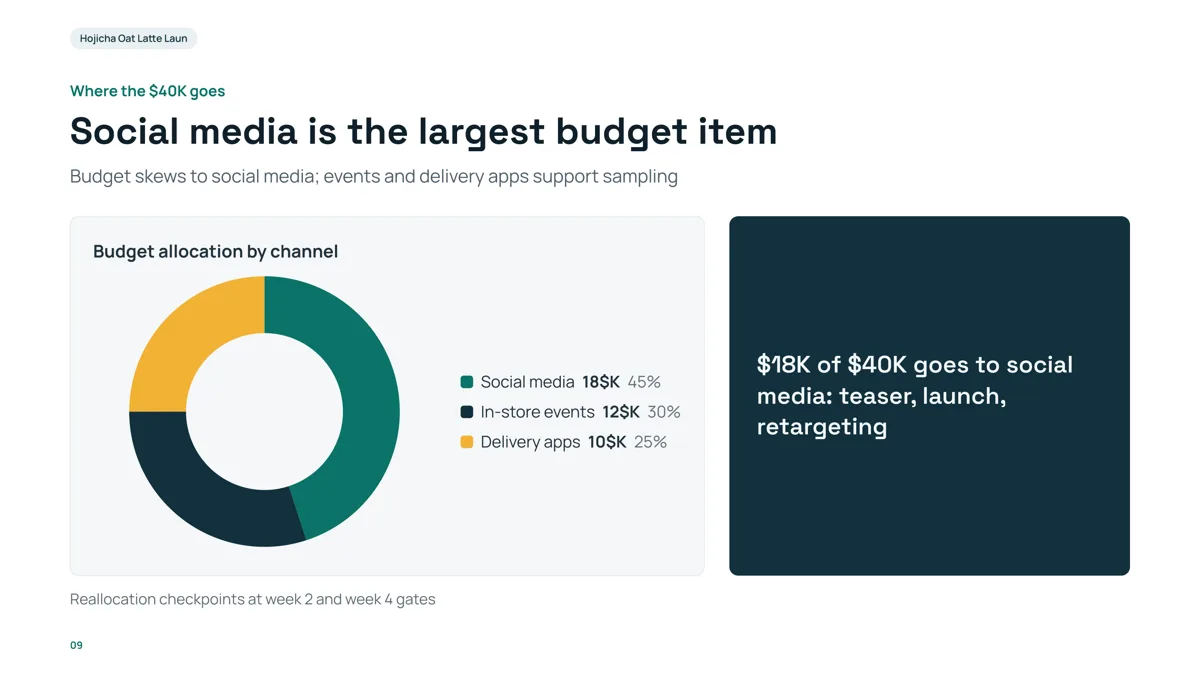
- The title says what the chart shows, and the box repeats the largest item with its amount. A grant budget slide needs the same: the single line the panel should remember.
- The chart is a picture in the exported PPTX, so for a grant keep the exact amounts in a table you can edit and check against the spreadsheet.
- The slide came from a made-up launch brief with a figure list in the file. Yours should come from your own budget file, so every amount has a source.
What do grant reviewers look at most?
Each funder publishes its own criteria, so the call is the authority. Our summary of what they commonly ask, which we have not checked against any one funder’s current guidelines:
| Common question | Where to answer it |
|---|---|
| Does the need or the science matter? (significance, merit) | The need and what is new (slides 2 and 5) |
| Will the approach work? (rigour, feasibility) | Approach and milestones (slides 4 and 6) |
| Can this team deliver? | Team (slide 7) |
| Is the budget reasonable and justified? | Budget (slide 8) |
| What difference will it make, and will it last? (impact, outcomes) | Aims and outcomes, evaluation and sustainability (slides 3 and 9) |
Look for those words in your call, and use its own wording in your slide titles: reviewers score against their form.
How should I show the budget?
- One slide, a table: categories as rows, amounts in a column, a short purpose per line, a total at the bottom. In quick mode a table holds 2 to 5 columns and up to 6 rows, with plain text cells; group small lines under "Other" or split a long budget over two slides.
- The amounts come from your file. Tell the request not to round them and to write TBD for a missing one, and compare the slide with the spreadsheet line by line.
- Add a chart only as a second slide or beside the table: charts export as pictures.
- State what the money buys, not only the category ("Two part-time research assistants, 12 months").
- If the funder requires matching funds or indirect costs, show them as rows of the table.
How many minutes per slide?
About one minute per slide in a pitch with a Q&A: ten slides for ten minutes. This is a rule of thumb; if the call gives a slide limit or a time, use that. The product accepts 1 to 30 slides, and the cover counts.
What can the product not do for a grant deck?
- It does not know your funder’s criteria or template: put them in the request and the file.
- It does not check that a budget is allowed by the funder, only that the figures match your file.
- It does not write speaker notes into the PPTX.
- It does not decide what is new about your project; if the file does not say, the "what is new" card will be generic. Write that part yourself in the file.
Questions
Can AI make a grant proposal presentation?
Yes, for the slides. Attach your proposal and budget, write the slide order, check the outline cards, and generate an editable PowerPoint. The aims, the budget and the claims are yours: check every figure against your files.
What slides should a grant pitch have?
Title and ask, the need, aims and outcomes, approach, what is new, timeline, team, budget, evaluation and sustainability, and the ask. Reorder to follow your funder’s review criteria.
How do I put the budget in the slides?
On one slide as a table of categories, amounts and purposes with a total row, from a budget file you attach. Charts export as pictures, so keep the exact amounts in the table.
Will the AI make up numbers in my budget?
If your attached files contain figures, a figure they lack is written as TBD, and the export panel lists figures without a source. Figures typed only in the request do not switch that rule on, so put the budget in a file.
How long should a grant presentation be?
Follow the call. When it gives no limit, about one minute per slide in a pitch with questions: ten slides for ten minutes.
How much does it cost?
Writing the outline is free. Quick mode costs 1 credit per slide, deep mode 3, each AI edit 1. Exporting costs no credits, but it needs Level 2 (any credit pack, bought once) or one new person invited per deck. New accounts get 20 free credits; credit packs are one-time purchases with no subscription, and credits never expire. See the Pricing page for the packs.
Are my files used to train AI models?
No. We do not use your files to train AI models. The text of your files is sent to AI providers to write the outline and slides; the Privacy Policy has the details.
Start from your proposal
Attach the proposal and budget, write the slide order, and see the outline cards, and which figures are marked TBD, before any slide is made.
Make my grant deck