How do you make a nursing presentation with AI?
Updated 2026-11-11
Pick the type your class asks for (care plan, case study, evidence-based practice or patient education), paste the matching 8 to 10 slide outline below into your request, attach your own notes, and check the outline cards before any slide is made. Writing the outline is free; a 10-slide deck in quick mode costs 10 credits, and you can export an editable PowerPoint (.pptx).
One rule comes first: never put real patient information into the request or into an attached file. The text of attached files goes to AI providers, so de-identify everything before you type it. The checklist is in the privacy section below.
What we have and have not done: we have no recorded run on a nursing topic and no nursing sample. The picture on this page is a real table slide from a different recording (a course proposal), shown to illustrate what a table slide looks like. The four types, their outlines and the PICO example are our suggestions from common practice, not a curriculum standard; your instructor's assignment sheet wins.
Five steps from a topic to a nursing presentation
Choose the type and read the assignment sheet
Ask which type is required: a care plan, a case study, an evidence-based practice (EBP) presentation or patient education. Note the time limit, the slide limit and the citation style (APA 7 is common, but your program decides).
De-identify your notes, then write them down
Write your assessment, interventions and sources in a short Word document using "Patient A", an age range and "day 1, day 3" instead of real identifiers. The slides will only be as good, and as much yours, as what you attach.
Write the request with the outline
On the home page type the request, for example: "Using the attached notes, make a 9-slide nursing care plan presentation for my class. Stick to the notes; don't add outside facts or figures. Slides: title, patient summary, assessment, nursing diagnoses, goals, interventions with rationale, evaluation, patient teaching, references." Click "Add files" to attach the notes (.docx, .pdf, .xlsx, .csv or .pptx).
Under "More", choose the audience "Students". The scenario list has no nursing option; "Lesson" or "Talk" are the closest, or leave it on Auto.
Check the outline against the table
Click "Next" and compare each card with the outline table for your type. Edit titles, delete what is not yours, reorder, then click "Generate presentation". Nothing is charged until then.
Check clinical content, then export
Check every dose, norm and claim against a source you have read: the AI can write plausible clinical statements that are wrong. Then click "Export" and choose PowerPoint (.pptx) or PDF. The exported PowerPoint has no speaker notes, so write your own.
The four common types and their outlines, and what a table slide looks like
Nursing classes usually ask for one of these four. The table says what each is for; it is our description of common practice, not a standard.
| Type | What it shows | Typical slides |
|---|---|---|
| Care plan | How you assess a patient, name the problems and plan the care | 8 to 10 |
| Case study | What happened to one patient and what you learned | 8 to 10 |
| Evidence-based practice (PICO) | A clinical question answered with research | 8 to 10 |
| Patient education | Teaching a patient or family one skill or topic | 8 to 10 |
The outlines, one column per type. Each row is one outline card you can paste into the request.
| Slide | Care plan | Case study | EBP (PICO) | Patient education |
|---|---|---|---|---|
| 1 | Title, class, date | Title, class, date | Title, class, date | Title and who it is for |
| 2 | De-identified patient summary | Presenting situation | The PICO question | Why this topic matters to the patient |
| 3 | Assessment findings | History and assessment | Why the question matters in practice | What the patient already knows |
| 4 | Nursing diagnoses, in priority order | Diagnosis and care given | How the evidence was searched | Key message 1 |
| 5 | Goals, measurable | Interventions and rationale | The best evidence found | Key message 2 |
| 6 | Interventions with rationale | How the patient responded | What the studies agree and disagree on | Key message 3, with a demonstration |
| 7 | Evaluation criteria | What went well and what did not | Recommendation for practice | Warning signs and when to call |
| 8 | Patient and family teaching | Lessons for practice | Limits of the evidence | Check understanding (teach-back) |
| 9 | References | References | References | References and where to get help |
The picture is a real table slide from our recorded course proposal (October 20, 2026). It is not a nursing slide, but a care plan slide with problems, goals and interventions would use the same kind of native table.
Prompt (English)
Care plan presentation, 9 slides
Using the attached notes, make a 9-slide nursing care plan presentation for my class. The patient is "Patient A", a man in his 70s after hip surgery. Stick to the notes; don't add outside facts or figures, and write TBD for anything the notes do not give. Slides: title, patient summary, assessment, nursing diagnoses in priority order, goals, interventions with rationale, evaluation, patient and family teaching, references.
(A template. Replace the topic and the notes; keep the patient de-identified.)
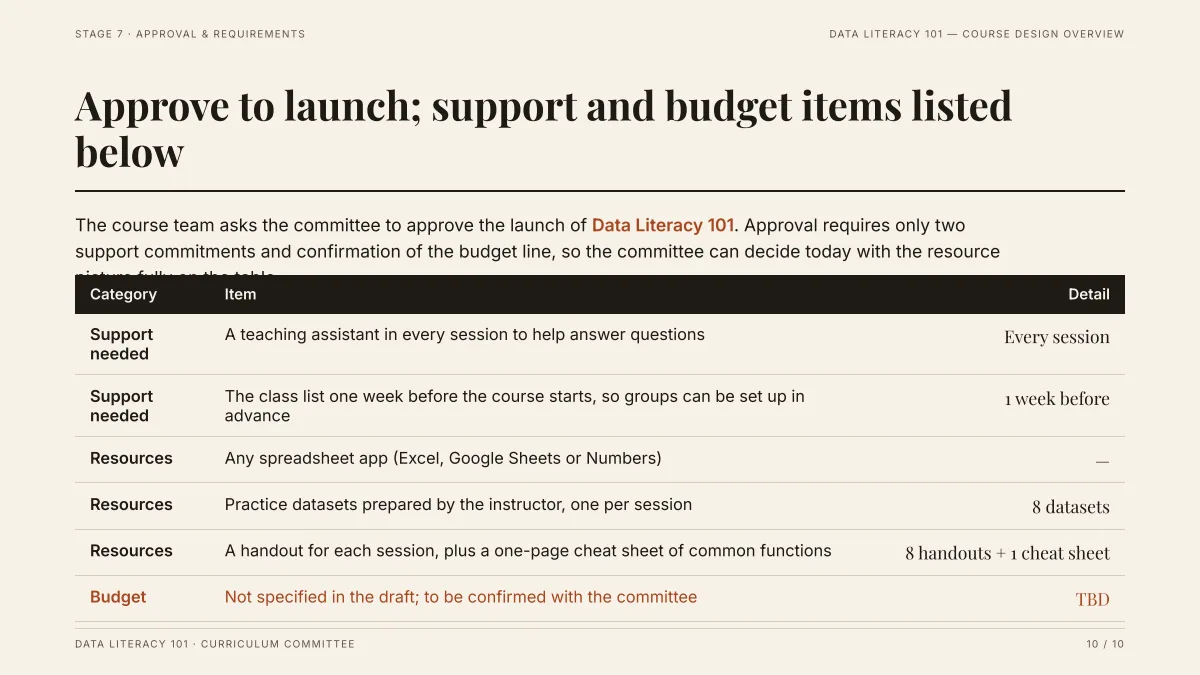
- The table is a native table: in the exported PowerPoint you can click into it and type.
- The draft did not give a budget, so the slide says "TBD" instead of inventing one. In a care plan the same habit applies: a value your notes do not give stays TBD, and you fill it in yourself.
- It is a course proposal, not a nursing slide. We have not recorded a nursing presentation.
- Presentations for students: coursework, nursing and pharmacy outlines
- Case study presentation: the structure and a worked example
- Research paper to academic presentation (for journal clubs)
- Replay this run step by step (no sign-in)
- Download the PPTX
- Turn a Word document into slides
- How many slides for a talk length
- Speaker notes: what the export has and does not have
How do I write the PICO question as slide 2?
PICO breaks a clinical question into four parts: Population, Intervention, Comparison and Outcome. Write the question as one sentence on slide 2, with the four parts labeled beside it, so the audience knows what the rest of the talk answers. The questions below are our examples, not published research questions.
| Part | Question 1 | Question 2 |
|---|---|---|
| Population | Adults over 65 in hospital | Patients having abdominal surgery |
| Intervention | Hourly nurse rounding | Early mobilization on day 1 |
| Comparison | Usual care without scheduled rounding | Mobilization from day 2 or later |
| Outcome | Number of falls | Length of stay and complications |
| Written as one sentence | In hospitalized adults over 65, does hourly rounding, compared with usual care, reduce falls? | In adults after abdominal surgery, does mobilizing on day 1, compared with later mobilization, reduce complications and length of stay? |
Put the sentence in your request ("Slide 2 states this PICO question: ...") so the card for slide 2 uses your wording and not a paraphrase.
What nursing presentation ideas work for each type?
Example topics to start from (our ideas, not a list from any curriculum). Pick one your instructor approves.
- Care plan: fall prevention on a medical ward; pressure injury risk in an older adult; heart failure and fluid balance; post-operative pain; a child with asthma; type 2 diabetes after surgery.
- Case study: pneumonia from admission to discharge teaching; recognizing sepsis on a ward; delirium in an older adult; swallowing safety after a stroke; postpartum bleeding.
- Evidence-based practice: hourly rounding and falls; early mobilization after surgery; handwashing programs; bedside handover; music for pre-operative anxiety; nurse-led discharge education.
- Patient education: using an inhaler; checking blood glucose; wound care at home; a low-salt diet for heart failure; safe use of an anticoagulant; getting up safely after surgery.
How do I build and export the slides with Gamma AI Slide?
| Step | Where | Cost |
|---|---|---|
| Write the request and attach de-identified notes | Home page, "Add files" | Free |
| Check and edit the outline cards | "Next", then the outline page | Free |
| Choose quick mode | The outline page | 1 credit per slide (9 slides = 9) |
| Choose deep mode | The outline page | 3 credits per slide (9 slides = 27) |
| Ask the AI to change a slide | The editor | 1 credit each |
| Export PowerPoint (.pptx) or PDF | "Export" | Free |
New accounts get 20 free credits. In quick mode the layouts come from a template, so you can switch the theme in one click; in deep mode the AI designs each slide. The exported PowerPoint keeps text as editable text and tables as native tables, while charts and pictures are exported as pictures.
How do I keep patient information out of AI?
Do not type a real patient's details into the request, and do not attach a file that contains them. The text of attached files is sent to AI providers (see the Privacy Policy), and we cannot promise it stays inside your hospital's rules. This is general guidance, not legal advice; your school or hospital may be stricter.
| Remove or replace | With |
|---|---|
| Name, initials | "Patient A" |
| Date of birth, exact age | An age range, for example "a man in his 70s" |
| Admission and procedure dates | "Day 1, day 3" |
| Record number, phone, address | Nothing: leave them out |
| Photos, wound pictures, scans | Leave out, or use an illustration |
| Rare details (unusual job, small town) | A general description |
Keep the real record in your own notes on your own device. If you are not sure whether something identifies a person, leave it out.
What should I check before I present?
- Every clinical statement: doses, norms, risk factors and guidelines come from a source you can name, not from the AI.
- Every number: the AI may propose figures you did not give it. In the editor you can see where each figure came from.
- References: write your reference list yourself in the style your program asks for. The "Add a sources page at the end" export option only lists which of your files each figure came from.
- Your own words: you must be able to explain each slide without reading it.
Questions
What are the common types of nursing presentations?
Four are common: a care plan, a case study, an evidence-based practice presentation built on a PICO question, and patient education. The page gives an 8 to 10 slide outline for each. This is our description of common practice; follow your assignment sheet.
How many slides should a nursing care plan presentation have?
Eight to ten is common: title, patient summary, assessment, diagnoses, goals, interventions with rationale, evaluation, teaching and references. With one to two minutes per slide that is a 10 to 15 minute talk. It is a rule of thumb, not a standard.
How do I write a PICO question for a presentation?
Name the Population, Intervention, Comparison and Outcome, then write them as one sentence on slide 2. For example: in hospitalized adults over 65, does hourly rounding, compared with usual care, reduce falls? The page has two examples in a table.
Can I use AI to make a nursing presentation?
Technically yes: you describe the type and the slide count, check an outline, and export PowerPoint. Whether you may use AI depends on your instructor and school, so check the rules first. Check every clinical statement yourself.
Is it safe to put patient information into the AI?
No. Do not enter real patient information or attach files that contain it. Use "Patient A", an age range and relative days. The text of attached files is sent to AI providers, so de-identify before you type.
Can the AI make up facts or figures in my nursing slides?
It can. Attach your own notes and write "Stick to the notes; don't add outside facts or figures". If the files contain figures, a missing one is marked TBD instead of invented. Still check every clinical statement against a source.
Does Gamma AI Slide add references in APA style?
No. The export option "Add a sources page at the end" lists the figures on the slides and which of your files they came from. It is not an APA reference list, so write that yourself.
Can I edit the slides in PowerPoint afterwards?
Yes. Export as PowerPoint (.pptx): text is in text boxes and tables are native tables. Charts and pictures export as pictures, and the file has no speaker notes.
How much does it cost?
Writing the outline is free. Quick mode costs 1 credit per slide, deep mode 3, each AI edit 1. Exporting costs no credits, but it needs Level 2 (any credit pack, bought once) or one new person invited per deck. New accounts get 20 free credits; credit packs are one-time purchases with no subscription, and credits never expire. See the Pricing page for the packs.
Are my files used to train AI models?
No. We do not use your files to train AI models. The text of your files is sent to AI providers to write the outline and slides; the Privacy Policy has the details.
Start from your own de-identified notes
Pick the type, paste its outline into the request, attach your notes and read the outline cards. The outline is free.
Make my nursing presentation